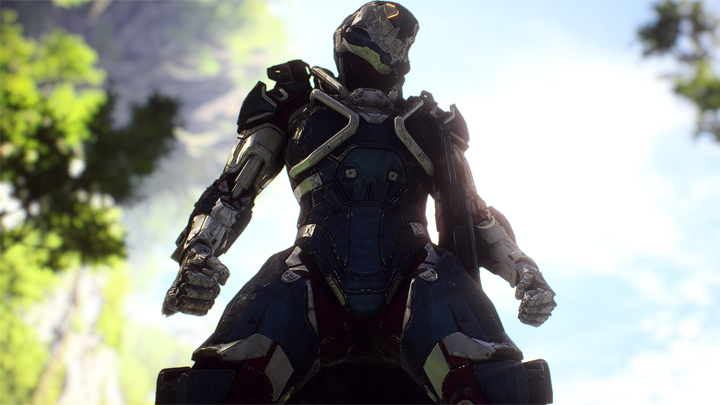
Onyx ReShade -- Total Graphics Overhaul with Cinematic Effects is a mod for Anthem, created by TheMercsAssassin.
Description (in author’s own words):
Separated and then enhanced the game's colors so they don't blend together quite so much, thus making colors pop. I also very much wanted metal to look shinier. I've also added a host of OPTIONAL cinematic effects, including working depth of field, enhanced bloom with lens dirt and lens flares, film grain, cinematic letterbox, and lens aberration.
A nice, lightweight enhancer for the game with lots of OPTIONAL added cinematic effects. Onyx ReShade is a complete visual overhaul for the already extremely gorgeous Anthem, from Bioware and EA. Onyx ReShade enhances colors on an individual basis, using the Lightroom shader, so you won't find any ugly blanket color saturation that looks ugly and distorted on some colors while looking good on others. Additionally, I've made individual adjustments to shadows, highlights, exposure, and contrast, with a bit of sharpness in the end to give you the effect of "wiping off your glasses" and seeing the game in a pseudo HDR.
?
This preset isn't aimed at realism or fantasy, per se, but rather just to further separate and then enhance the game's colors so they don't blend together quite so much, thus making colors pop. I also very much wanted metal to look shinier. I've also added a host of OPTIONAL cinematic effects, including working depth of field, enhanced bloom with lens dirt and lens flares, film grain, cinematic letterbox, and an alternative chromatic aberration with lens distortion to what's in the vanilla game. All the added effects, even the color and lighting enhancements can be toggled off and on with hotkeys from in game, no menu-fiddling required. Oh a did a little color correction too, though the colors were admittedly pretty balanced out of the box (hats off to Bioware).
Instructions:
1. Download ReShade framework here: ht?tps://reshade.me/
2. Run the .exe, choose your Anthem Demo .exe, called "AnthemDemo.exe", which is found in this subfolder path: "... Origin Games\AnthemDemo"
Now choose the DirectX 10+ version when it asks which API to use.
3. Select yes when it ask if you want to download a collection of effects. Click "uncheck all" and just select "Border" (you'll be using the shaders and effects from my dropbox folder instead).
4. Download my zip file on the file page here on Nexus.
5. Open the zip folder and paste the "reshade-shaders" folder, the "d3d11.dll" file, and the "Mercs Onyx ReShade Release 1-1.ini" file and in your Anthem Demo folder, where you found your game's .exe, "... Origin Games\Anthem Demo" folder. Overwrite all if it asks. Don't worry, you are only overwriting ReShade files, not any of your game's actual files.
6. Put the preset file in the same "Anthem Demo" folder we've been working in so far where the game's .exe is and where the reshade-shaders folder, dxgi.dll, and reshade.ini should all now be.
7. Run your game and open the ReShade menu with Shift+F2 and open click the little arrow at the top of the reshade menu to open the drop-down menu. Select the preset.ini file you named whatever you wanted in step 7. (If you don't care about Depth of Field, then you can stop here. If you want to use DoF, then please continue to step 11, it's not as intimidating as it looks, only takes about 10 seconds to do once in game).
8. To get DoF working once you leave Fort Tarsus, open the ReShade menu and click on the DX11 tab at the top. Now check the first box under the "Depth Buffers" one at a time, closing the ReShade menu after each one you check to see if DoF is working properly in game yet. If DoF is flickering on and off every second, or if it's not appearing at all or is appearing in weird splotchy spots, then just keep clicking down the list and closing the menu and checking if it's working right after selecting a new box. It sounds complicated, but it literally takes 10 seconds. You will probably need to do this each time you launch the game and arrive somewhere outside Fort Tarsus. If DoF stops working in Fort Tarsus, then you can do this same process to get it to renable there too, but probably not worth the time for limited amount of time you'll be there as you'll have to redo the process again when you leave the fort again. Also Dof will probably just get in the way of menus in Fort Tarsus anyway.
9. Profit? Ps: Recommended to turn off the game's Chromatic Aberration from the video settings\graphics settings menu.
- Last update: Sunday, September 1, 2019
- Genre: Action
- File size: 15.9 MB