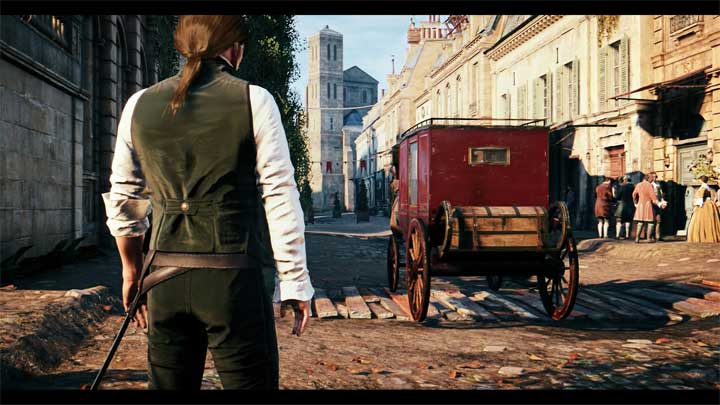
UHG Reshade is a mod for Assassin’s Creed: Unity, creatd by Ultra High Gaming
Description
Enhances the graphics. Sharper image, better effectrs, no fog effect that makes everything washed out. 10 fps drop.
Instrukcje:
Installation:
1. Delete any previous reshade files you have, if you have any. Open your Assassin`s Creed Unity main/installation folder, where the ACU.exe file is located and delete - reshade-shaders(the folder), dxgi.dll, dxgi.txt(you'll have this file only if you use previous versions of the Reshade 4.x.x), ReShade.ini, ReShade.log(it's a text document file which you'll probably have if you use a latest version of the Reshade 5.x.x) and all other preset files. Download and install Reshade 5.2.1, small window will appear, click "Browse", find your Assassin`s Creed Unity main/installation folder, then choose ACU.exe file, click "Next", choose to install for Direct3D 10/11/12, click "Next", on the next window don't choose any preset, you should click "Skip", now choose to install all packs with all effects, Finish the installation. Link to ReShade Setup 5.2.1 - https://reshade.me/downloads/ReShade_Setup_5.2.1.exe or https://www.mediafire.com/folder/8ar1jhh1809cl/ReShade_Repository#7lxhmiy4o4r3a.
2. Download reshade archive and extract the preset file from the archive to your Assassin`s Creed Unity main/installation folder, where the ACU.exe file is located.
3. Start the game, open the Reshade menu by clicking 'Home' button on your keyboard, Finish the Tutorial by clicking Continue or just Skip it, then click on the long bar on the top of the Reshade menu and there Select the file of this preset to activate it.
4. Hope you'll like. Enjoy!
Uninstallation:
Delete reshade-shaders(the folder), dxgi.dll, ReShade.ini, ReShade.log(the text document file) and all UHG*****.ini files. You can find these files in your Assassin`s Creed Unity main/installation folder, where ACU.exe file is located.
Video tutorials about how to install the Reshade, it's for the older versions of the Reshade and it's for different games, but the steps are pretty similar:
- Last update: Tuesday, June 21, 2022
- Genre: Action
- File size: 10.1 KB