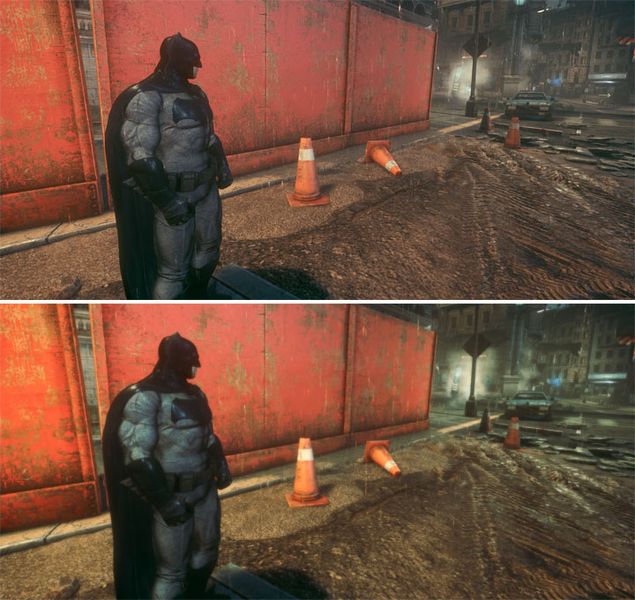
Vanillaa game on top, modded at the bottom.
BvS_ReShade is a mod for Batman: Arkham Knight, created by Jb0238177.
Description (in author’s own words):
Reshade that makes the game look more cinematic, like Batman v Superman movie.
How To Install My Mod:
-Extract my "BvS_ReShade" file with the latest version of 7zip.
-Now you will have my "BvS_ReShade" folder.
-Open my "BvS_ReShade" folder. Copy all the contents inside "BvS_ReShade" folder & paste them into the game's "Binaries \ Win64" folder. "Win64 folder location: (SteamLibrary\steamapps\common\Batman Arkham Knight\Binaries\Win64)".
-Launch the game & you should see the ReShade Overlay in the top left corner of the screen.
-Press "1" at the top of your keyboard to open the "ReShade Overlay" press the "Drop-down arrow" to open the "drop-down menu" & you should see my preset "BvS_ReShade".
-If you do not see my preset in the drop-down list, you will have to manually add it by pressing the "+" button next to the drop-menu arrow, then type in the full name of my file just like this: BvSReShade.ini & press "Enter".
To toggle my preset "On/Off" press "2" at the top of your keyboard.
To toggle off the "ReShade Overlay" press "1" at the top of your keyboard.
IMPORTANT!
-If the game fails to launch, crashes to desktop or your controller isn't working:
a.) Locate the game's "Binaries \ Win64" folder, it's the same location you installed my ReShade mod.
b.) Rename the dxgi file to d3d11 (Controller Issue Fix)
c.) Disable "Steam Overlay" (Launch Issue Fix)
My In-Game Graphics Settings (Recommended):
-Brightness - Max Setting
-V-Sync - On
-Max FPS - 90
-Texture Resolution - High
-Shadow Quality - High
-Level of Detail - High
-Motion Blur - Off
-Anti - Aliassing - On
-Chromatic Aberration - Off
-Film Grain - Off
-Texture Filtering - 16X Anisotropic
Nvidia Gameworks Settings (Recommened):
-Interactive Smoke/Fog - On
-Interactive Paper Debris - On
-Enhanced Rain - On
-Enhanced Light Shafts - On
- Last update: Wednesday, January 1, 2020
- Genre: Action
- File size: 9.8 MB