Widescreen Fix is a mod for Contract J.A.C.K., created by orion_98.
Description:
The mod adds support for high widescreen resolutions (up to 1920x1080), allowing the game to be played on monitors with aspect ratios of 16:9 and 16:10.
The mod also restores support for online multiplayer mode and fixes an issue causing the game to crash on Windows 10 and newer versions of the system.
Instructions:
After setting the new resolution with WideScreenFix_CJ, do not open the Display menu in the game! Otherwise, geometric distortion will occur and the game will need to be restarted.
Installation:
-------------
1. Before installing, upgrade the game Contract J.A.C.K. up to version 1.1.
2. In the properties of the game shortcut, specify compatibility with Windows XP SP3 and specify the launch from the Administrator:
ContractJACK Shortcut -> Right Mouse Button -> Properties -> Compatibility -> Run the program in compatibility mode with Windows XP SP3 -> Run the program as Administrator
3. Run WideScreenFix_CJ.exe, Select FOV, select the aspect ratio and resolution of your display.
The widescreen patch WideScreenFix_CJ will be automatically installed into your game on the way from the Registry.
NOTE:
If the automatic installation of WideScreenFix_CJ.exe does not work, then copy all files from the "Files_for_Manual_installation" folder to the game folder and read “readme_WideScreenCJ.txt”
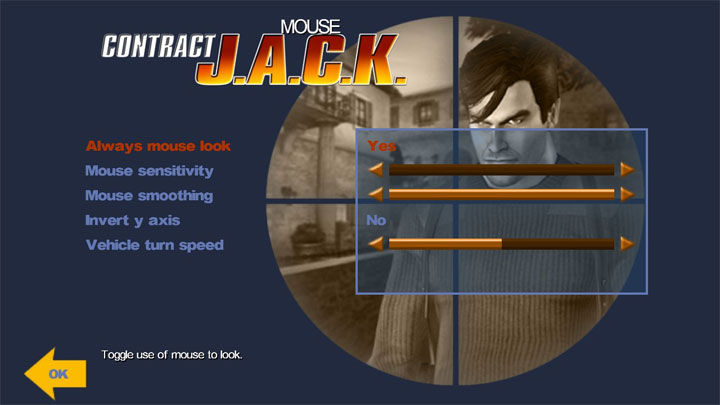
4. Adjusting mouse parameters For smooth play and accurate shooting:
Settings -> Controls -> Mouse -> Mouse sensitivity -> minimum
Settings -> Controls -> Mouse -> Mouse Smoothing -> Maximum
6. Set the polling rate of the mouse to no more than 250 Hz, otherwise there will be a bug with the "wave-like movement" of the mouse vertically.
To change the polling rate of the mouse, use the program from the website of your mouse manufacturer.
Problems and solutions
------------------------
1. After installing the patch, the resolution has not changed or the text in the game menu has shifted down.
Decision:
Specify compatibility with Windows XP SP3 in the properties of the game shortcut and specify the launch as Administrator: ContractJACK Shortcut -> Right Mouse Button -> Properties -> Compatibility -> Run the program in compatibility mode with Windows XP SP3 -> Run the program as Administrator
Verification:
If you selected 1920x1080 for a 16: 9 monitor when installing the patch, then after installing the patch in the Command Line (COMMAND-LINE) of the Launcher the following line should appear:
-rez WideScreenFix_CJ_16_9.rez +fovx 95 +fovy 63.09 +screenwidth 1920 +screenheight 1080 +fovxinterface 100 +fovyinterface 69 +pvmodelaspect 1.7777
2. After installing the WideScreenFix_CJ patch Do not open the Display menu in the Start Menu and do not change the display resolution through the game menu,otherwise, geometric distortion will appear on the screen.
If you opened the display menu and changed the display resolution, then exit the game, using "Esc" or "Alt-F4" and then re-enter the game.
3. Distortion of graphics on the screen, FPS drops, the game freezes.
Usually the bug occurs on NVIDIA video cards after a powerful light effect, for example an explosion.
Decision:
Disable Dynamic lighting in the game menu (see picture):
Options -> Performance -> Display -> Dynamic Lighting -> Off
Or set medium detail in the game menu:
Options -> Performance -> Performance -> Medium
4. Error d3d8.dll: If you press the Win key (flag) during the game, then the picture becomes black and white, the texture colors disappear.
SOLUTIONS:
Restart the game, or in the Display settings (Options - Perfomence - Display) enable / disable Buffering or Texture filtering.
If this error occurs frequently and spontaneously, delete d3d8.dll and enbconvertor.ini from the game folder.
5. Wave-like movement of the mouse, the sight of the weapon is knocked off, it is difficult to hit the enemy. The bug occurs on modern mouse with a polling rate of 1000Hz or 500Hz. The game does not support mice with a polling rate of more than 250Hz
SOLUTIONS:
For accurate shooting, set the mouse polling rate to no more than 125-250Hz.
The program for changing the polling rate of the mouse can be found on the manufacturer's website
Unistall
------------------------
1. Automatic removal: Reinstall WideScreenFix_CJ in Restore to Default mode.
2. Manual removal: Game shortcut -> "OPTIONS" -> delete the line in the "COMMAND-LINE" window, check "Restore to Default" and "Always pass command line" -> Ok
- Last update: Wednesday, April 3, 2024
- Genre: Action
- File size: 1.1 MB