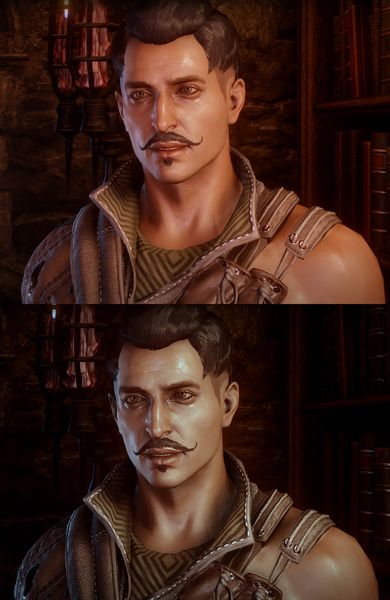
The file Winds of Thedas Reshade Preset v.1 is a modification for Dragon Age: Inquisition, a(n) rpg game. Download for free.
File Type: Game Mod
File Size: 2.4 KB
Last Update: September 23, 2018
Downloads: 1.7K
Last 7 days: 0
Problems with download? [email protected]

Winds of Thedas Reshade Preset is a mod for Dragon Age: Inquisition, created by iLoveStimpaks.
Description (in author’s own words):
A simple reshade preset that I created for personal use.
'Winds of Thedas' tones down the reddish tones of the vanilla game and creates a much more colder feel to the game. Shadows are darker and overall the game looks more to how I envision it. I focus more on gameplay rather than screen archery so it's not the best looking preset but I feel it has a consistent look that works in all different areas of the game and it's playable right off the bat.
Requires: Reshade 3.0.8 (https://reshade.me/)
Instructions:
1. Download Reshade 3.0.8 from the link provided.
2. Run the programme (you might have to run the program as administrator)
3. Select Dragon age Inquistion.exe from where you have installed it.
4. Choose 'Direct3D 10+' when the program asks for rendering API.
5. Select all shaders to download when it prompts you to. (or just select the ones I used listed below)
6. Download my file and place the ini file to where Dragon age Inquistion exe is (where Reshade should have installed.)
7. Run the game.
8. If the preset doesn't show up, press shift and F2 to bring up the menu. If it's your first time, the tutorial will run. Just press continue until a drop down menu appears on the top.
9. Select Winds of Thedas v1 from that list.
10. To turn off the effect while in game press the numpad *.
11. If you wish to edit the preset, go to the settings menu in game (press shift and F2) and select configuration mode in usage mode.
Uninstall:
Remove Winds of Theads ini, dxgi.dll, dxgi.ini, dxgi.log and the 'reshades-shaders' folder.
Shaders used:
Adaptive Sharpen
Ambient Light
Clarity
Colour Matrix
Curves
HDR
Levels
Luma Sharpen
MXAO
Game Mod Size: 68.3 MB DL: 65 Upd.: January 8, 2025
Game Mod Size: 424.8 KB DL: 47 Upd.: January 7, 2025
Game Mod Size: 9.2 MB DL: 89 Upd.: January 7, 2025
Game Mod Size: 43.4 MB DL: 50 Upd.: January 6, 2025
Game Mod Size: 24.7 KB DL: 1.9K Upd.: November 8, 2022
Game Mod Size: 181.8 KB DL: 364 Upd.: July 14, 2022
Game Mod Size: 418.7 KB DL: 285 Upd.: November 5, 2021
Game Mod Size: 696.1 KB DL: 484 Upd.: August 16, 2021
Game Mod Size: 640.5 KB DL: 780 Upd.: July 16, 2021
Game Mod Size: 204.5 KB DL: 1.1K Upd.: July 9, 2021
Game Mod Size: 19.6 MB DL: 1.2K Upd.: June 30, 2021
Game Mod Size: 20.8 MB DL: 899 Upd.: June 30, 2021
Game Mod Size: 13.4 MB DL: 5.9K Upd.: May 22, 2021
Game Mod Size: 29.9 KB DL: 711 Upd.: September 21, 2020
Game Mod Size: 19.8 KB DL: 1.9K Upd.: August 16, 2020
Game Mod Size: 21 KB DL: 5.9K Upd.: August 15, 2020
Game Mod Size: 762.3 KB DL: 2K Upd.: June 17, 2020
Game Mod Size: 39.3 MB DL: 1.4K Upd.: November 16, 2019
Game Mod Size: 7.7 MB DL: 1.7K Upd.: September 18, 2019
Game Mod Size: 34.3 KB DL: 2.9K Upd.: December 11, 2018
Game Mod Size: 94.3 KB DL: 1.3K Upd.: December 11, 2018
Game Mod Size: 17.8 KB DL: 826 Upd.: December 11, 2018
Game Mod Size: 315.3 KB DL: 16.5K Upd.: December 14, 2015
Game Mod Size: 96.2 KB DL: 14.6K Upd.: December 14, 2015
Game Mod Size: 4.5 MB DL: 5.1K Upd.: December 13, 2015
Game Mod Size: 16.7 KB DL: 8.7K Upd.: December 30, 2014
Game Mod Size: 5091.3 MB DL: 253.2K Upd.: October 28, 2022
Game Mod Size: 1254.7 MB DL: 1.51M Upd.: July 12, 2023
Game Mod Size: 1.6 MB DL: 851.7K Upd.: December 6, 2023
Game Mod Size: 115.8 MB DL: 112.8K Upd.: February 7, 2024
Game Mod Size: 1.2 MB DL: 549.6K Upd.: July 3, 2024
Game Mod Size: 4.3 MB DL: 401.6K Upd.: July 3, 2024
Game Mod Size: 1 KB DL: 23.7K Upd.: April 6, 2025
Game Mod Size: 889.9 MB DL: 29K Upd.: November 4, 2025
Game Mod Size: 41 MB DL: 36.2K Upd.: April 29, 2023
Game Mod Size: 70 KB DL: 172.2K Upd.: September 20, 2020