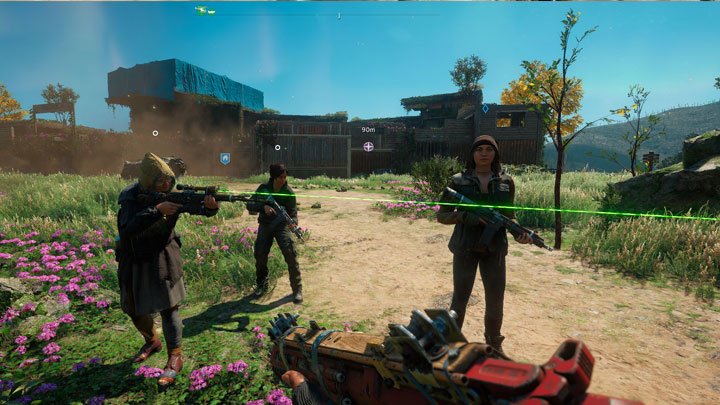
Far Cry New Dawn Scavenger Mod is a mod for Far Cry New Dawn, created by Scavenger Mod team.
Description (in author’s own words):
Mod that allows you to change time, spawn a NPC, GFH in coop workaround, random NPC weapons, and more...
Hope County, Montana, USA 17 years after a nuclear war. An unusual post-apocalyptic shooter in the continuation of the Far Cry 5 series. The plot has changed and the game even included a new combat system similar to the was in The Division, the old problems remained and migrated to the new series of the game.
This mod does not change the plot of the game, but adds new features and functions to it. Adds new missions, gives you the opportunity to manage time and change the atmosphere. Fixes some bugs. And much, much more. The mod is constantly evolving. Here is a list of the main options (packages) of the mod, also, you don't have to run them all, just select what you want:
- Defend Outpost - new mini-mission at outposts
- Remove startup videos and epilepsy warnings
- Time Scale Changer (time is stopped, time transfer by one hour etc.)
- NPC spawner (workaround for hiring a NPC)
- Changes the Highwaymen music
- Disable DOF (depth of field) e.g. on weapons)
- Flashlight toggle. Use the flashlight whenever you want
- Unlocked packs (weapons, outfits, etc...)
- The Highwaymen music at outposts also after an outpost is liberated
- Radio will play also after you leave a car (optionally)
- Unlocked for visiting The Inquisitor's Grave
- Random NPC Weapons
- Removes Prosperity level requirement from Workbench
- Unlocks Eden's Perk, and you won’t have to need to complete the "Joseph's Secret" mission. It's also workaround for Co-Op, because second player don't receive Eden's Perks
- Removing cyan filter, fog from Deadzones, New Eden compound, prison area (optional)
- Restore New Eden, Tree of Life and show up Mickey's Note after beating the campaign
- Change clouds
- and more...
Instructions:
IMPORTANT SUPPORT NOTICE
Please make sure you have the licensed latest version (1.0.5)
The mod doesn't support cracked versions of the game.
If you have cracked version we will NOT provide any support.
Join FC Modding Discord server
The mod uses a convenient installer to select packages of the mod and install them into the game.
The installer is localized for several languages, there is a built-in Help and a brief Wiki of modding terms.
Download the zip file from here, unpack it and run FCNDModInstaller.exe.
The Mod Installer will try to find the game directory (mostly if you have Uplay or Steam version), but if it will be unsuccessful, then manually find the installation directory of the game, go to the path: "bin\" and select the file FarCryNewDawn.exe. So you specify the working folder to the installer.
If there is a problem with game files, the program show message box. If so, try use FAQ, if you still don't know, ask me on mod's page.
Select the required packages in the list (selected packages are marked with a yellow frame and ?). If the selected package is highlighted in red, it means that there is a package conflict, these packages cannot be enabled in the same time. Click on "Toggle conflicts" button and disable the conflicting packages.
Click the INSTALL button to install the mods.
Play the game.
Note: Items 1, 2 and 3 must be completed only at the first start of the installer.
Backup also your saves!
To install third-party or your own author packages, just drag and drop the package file with the extension .a3 onto the installer window. Confirm the installation, do not forget to select it in the list and install.
In the section named "Base packages" there are packages which don't change any visible things in the game, these packages are required by another packages. They should be enabled by default.
Updating the mod
If a new version of the mod is released, You will receive an update message in the Mod Installer.
Mod Installer contains internal self-update system UOTA. Always when new update comes out, you can easily update the mod by clicking to a orange U button at right top part of main window.
Some users have problems with downloading updates throught UOTA, so if you have problems too, try update later or use legacy manual update via Nexus.
Note: Updating is completely up to you - if you don't want new version, you don't need to update the mod.
Uninstalling
If you want to uninstall all mods from the game, you must again use the Mod-Installer to do such thing.
You have two choices:
Click on "UNINSTALL MODS" button in Mod-Installer's main window
Verify files in Uplay or Steam (can be longer, because it will download all files which were changed by mods)
If option A will not work, you must use option B.
Modified Files directories
There are several "ModifiedFilesND" directories.
The reason of separating was when the mod is updated, you always must find and copy over your downloaded a3 files or your own edited a3 files in "ModifiedFilesND" directory.
In the new version, "ModifiedFilesND" is originally empty and you can place a3 files here and then copy whole "ModifiedFilesND" directory to a new version.
If you want to edit any package from Scavenger mod, just copy it from "ModifiedFilesND_Scavenger" directory and place it to "ModifiedFilesND", Mod-Installer automatically loads the one from "ModifiedFilesND" and you will also have backup of original package.
Do not edit or place new files in "ModifiedFilesND_BasePackages" or "ModifiedFilesND_Scavenger" Otherwise they will be ignored.
Also, if you want to have your own "ModifiedFilesND" directory with your mod, please contact me and I send you info how to do it.
ModifiedFilesND - originally empty, here comes all a3 files you downloaded outside Scavenger-mod, or your own packages
ModifiedFilesND_BasePackages - contains base packages which are needed by other packages
ModifiedFilesND_Scavenger - contains files from Scavenger-mod, also place here all a3 files which you download from Scavenger-mod page
Fast fixes
- If you want to use the mod, you must have the latest game version 1.0.5.
- If you have your game installed in "Program Files" directory, run the Mod Installer as Administrator.
- If you have Windows 7 and the Mod Installer doesn't want to start, please download KB2533623 for Windows 7.
- If the Mod Installer keeps crashing, shutdown all apps like RivaTuner.
- If you still have problems with running the Mod Installer, try delete the following folder "C:\Users\<Windows profile name>\AppData\Local\Temp\.net\FCNDModInstaller". This is possible bug in .NET Core which can be fixed only by Microsoft.
- If you installed the mod and it got reset on second run, please check if Uplay or Steam didn't verified game files. If so, disable auto updates (Steam).
- Last update: Wednesday, December 8, 2021
- Genre: Action
- File size: 160.3 MB