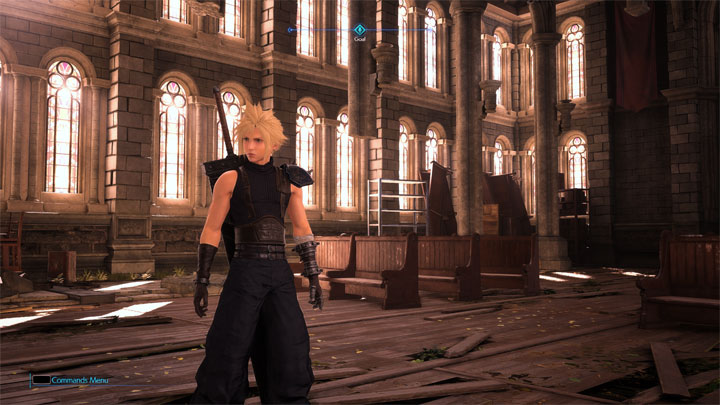
Kingsglaive ReShade is a mod for Final Fantasy VII Remake, created by Jb0238177.
Description:
A subtle, yet effective preset that scales back the game's fog & improves lighting on surfaces, skin & improves the game's color palette. When using this preset it is recommended to set the in-game brightness setting to 0 & make sure the Dynamic Range setting is set to SDR.
Instructions:
You will need to install ReShade to use this! Get it here----> https://reshade.me/
How to install ReShade:
-Launch the ReShade Installer & select the game's .exe "ff7remake_.exe" (Final Fantasy VII Remake Intergrade\End\Binaries\Win64)...
-When selecting the game's API make sure to select the option that says "Direct3D 10/11/12...
-Skip selecting any shader packs & use the ones I provide with my preset...
How to install my preset:
-Extract the "Kingsclaive ReShade.7z" file with 7zip & place the "reshade-shaders folder & the Kingsclaive.ini file into -
the game's Win64 folder where the ff7remake_.exe is located... (Final Fantasy VII Remake Intergrade\End\Binaries\Win64).
How to open the ReShade menu in-game & select my preset:
-Once you are in-game press the Home (pos1) key on your keyboard to open the ReShade Menu Overlay
-Open the drop-down menu & select my preset "Kingsclaive.ini"
-If you do not see my preset in the list, you will have to manually add it by clicking the + symbol next to the drop-down menu and type in the
full name of my preset just like this: Kingsclaive.ini & press Enter.
-To close the Reshade Menu Overlay press the Home (pos1) key on your keyboard...
Recommended!
-When using this preset it is recommended to turn the in-game brightness setting down to 0 & make sure the Dynamic Range setting is set to SDR!
- Last update: Sunday, January 9, 2022
- Genre: RPG
- File size: 230.2 KB