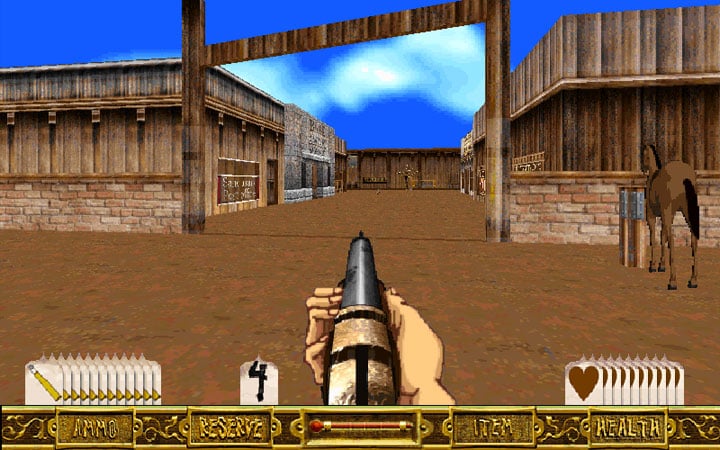
Outlaws Mouse Helper is a mod for Outlaws, created by Osprey.
Description:
This utility for Outlaws allows for cycling weapons with the mouse wheel and using the mouse for a few other functions. It runs in the background while you're playing and maps the game's built-in keyboard commands to the mouse wheel and right and middle mouse buttons, helping you to make greater use of the mouse and less use of keyboard commands.
Features:
* Scroll the mouse wheel up/down to change weapons.
* Middle click to toggle the rifle scope (once acquired).
* Hold Q while scrolling up/down or scroll right/left by itself to change inventory items.
* Press Q to use the selected inventory item.
* Right click to light dynamite and stab with the knife (while also keeping it as reload for guns).
* Hold Tab while scrolling up/down to change automap levels.
* Hold Tab while middle clicking to toggle all automap levels.
* Press ~ to cycle up to the next weapon and Shift + ~ to cycle down to the previous weapon (for mice without wheels).
* Press Shift + F10 to show and hide this list.
* Press Shift + F11 to toggle automatic skipping of unavailable weapons while scrolling.
* Press Pause/Break to pause and un-pause the helper (disabling and re-enabling all above features).
Instructions:
Simply run OutlawsMouseHelper.exe and then run the game.
(Optional) Create a shortcut that will run the helper and game together:
1. Click on the "Create shortcut" button on the helper's main window.
2. Drag and drop your existing shortcut or Olwin.exe onto the next window.
(This will create a new shortcut that runs the helper, then the game, then exits the helper when the game exits)
Configuration:
There are a few options that you can configure on first run, via the tray icon or via in-game hotkeys:
* Whether to show the GUI window. Default: On. Applies only to running the helper by itself, not via shortcut.
Toggle off to launch the helper silently to the tray.
* Whether to exit when Outlaws exits. Default: On. Applies only to running the helper by itself, not via shortcut.
Toggle off to leave the helper running.
* Whether scrolling with the mouse wheel should be inverted from what most games assign by default. Default: Off.
Toggle on to assign scrolling up to Next Weapon and scrolling down to Previous Weapon (off is the reverse).
* Whether scrolling with the mouse wheel should skip unavailable weapons. Default: On. Hotkey: Shift+F11.
Toggle off if it doesn't work as expected or your weapons cycle uncontrollably.
Notes:
* If the game is run as administrator, the helper must also be run as administrator in order to work.
* This utility works best if you have Reload (default) or Fire 2 set for the right mouse button and you don't already use the middle mouse button much, since those buttons get taken over when you equip the dynamite/knife and rifle, respectively.
* Each time that you load a savegame, change weapons once (with the number keys or the mouse wheel) to "calibrate" the utility. That's necessary because the utility can't know which weapon is selected when a savegame is loaded and needs you to change weapons once to know. If you use the mouse wheel, you may end up with a weapon that you weren't expecting, but it'll work as expected from then on.
* The option to automatically skip unavailable weapons (on by default) works only if you're standing still, unfortunately. That's because it reads the screen and too many things are changing when you're moving. If you're moving while trying to scroll to a weapon that you don't have, it'll simply behave as though the feature is disabled and not change your weapon. In those cases, keep scrolling to get to the weapon that you want.
* Because the auto-skip option works by reading the screen, it could, theoretically, fail with some users' graphics configurations. If cycling weapons makes weapon switching go haywire or skip even weapons that you have, you can disable the feature by pressing Shift+F11 in the game or toggling it in the tray icon's GUI.
* Because the helper uses the Q key for inventory use and scrolling, do not assign it to anything in the game's key bindings or else it might interfere. If you really want to change or disable the key so that you can re-assign it, you can modify the script via the section below.
Modification:
This utility is simply a compiled AutoHotkey script. If you're not satisfied with the given mappings or functionality and would like to tweak them, the source script (OutlawsMouseHelper.ahk) is in the "src" folder. You will need to download AutoHotkey from www.autohotkey.com to compile it. In the folder where you installed/extracted AutoHotkey will be a "Compiler" folder. In there is Ahk2Exe.exe, which you can use to compile your modified OutlawsMouseHelper.ahk into a new OutlawsMouseHelper.exe. An icon for you to use is in the folder with OutlawsMouseHelper.ahk. You don't need to compile or worry about OutlawsMouseHelperFunctions.ahk (which mostly has code related to the GUI, not the game). It'll be included automatically when OutlawsMouseHelper.ahk is compiled. For help with using AutoHotkey, see the help file (AutoHotkey.chm) that comes with it.
- Last update: Wednesday, October 30, 2019
- Genre: Action
- File size: 615.4 KB