The file Next Vision v.1.0 is a modification for Red Dead Redemption 2, a(n) action game. Download for free.
File Type: Game Mod
File Size: 0.8 KB
Last Update: November 29, 2019
Downloads: 1.4K
Last 7 days: 2
Problems with download? [email protected]

Next Vision is a mod for Red Dead Redemption 2, created by Vli
Description:
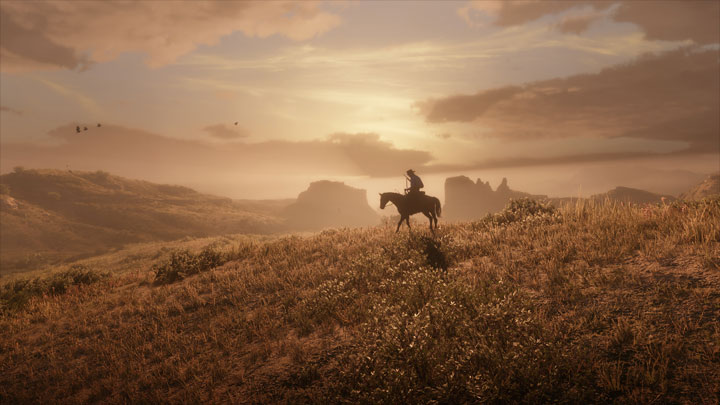
"NextVision" is a Reshade 4.X configuration created for any game with the mission to enhance the lighting and shadows respecting the original idea of the developers keeping the original color palette that they made.
NextVision contains:
• Curves
• DPX
• Filmic Anamorph Sharpen
• Filmic Pass
• SMAA
Screenshot comparison: http://sfx.thelazy.net/games/preset/10151/
Note:
I've optimized the preset as well as possible, with my PC configuration suffer drops between 2 and 7 FPS in the majority of the games in Full HD, 2K and 4K, but depends on the power of each GPU/CPU that could have some more or less FPS drops.
This preset has been created with a Benq VA/HDR monitor, keep in mind that depending on the monitor you've and the personal settings that you've put the preset may be better or worse.
Instalation
1. Go to https://reshade.me/
2. Download the installer
3. Open Reshade Setup.exe, install by selecting the Red Dead Redemption 2 executable from the folder where the game is installed and select the API "Direct 3D 10/11/12".
4. When Reshade ask you if you wish to download effects, select yes and of the shaders you are given to choose to download, choose only the ones I've put on "NextVision contains" and press OK, don't close Reshade Setup window.
5. Unzip my preset in the folder where it is RDR2.exe.
6. Go to Reshade Setup window and press "Edit Reshade Settings", in the next window in the option of preset press "..." button and select my preset (in effects, textures and screenshot path you don't need to do nothing). Activate also "Performance mode" option, press OK button and close Reshade Setup window.
7. Open the game and press Home to open Reshade Overlay.
8. Go to settings in Reshade Overlay and select a new key to open overlay and another key for toggle effect.
9. Close overlay and enjoy the game with NextVision.
Uninstalation
1. Open the folder where it is RDR2.exe
2. Delete "reshade-shaders" folder, "dxgi.dll", "dxgi.ini", "Reshade.ini" and "NextVision.ini"
I hope you will enjoy it!
Game Mod Size: 49.6 KB DL: 2.3K Upd.: February 19, 2025
Game Mod Size: 13647.2 MB DL: 6.7K Upd.: December 3, 2024
Game Mod Size: 1.4 MB DL: 10.3K Upd.: August 6, 2024
Game Mod Size: 9.1 MB DL: 24.8K Upd.: August 6, 2024
Game Mod Size: 897.6 KB DL: 1.2K Upd.: January 8, 2024
Game Mod Size: 556.2 MB DL: 1.4K Upd.: January 7, 2024
Game Mod Size: 1.7 MB DL: 1.4K Upd.: September 4, 2023
Game Mod Size: 82.5 KB DL: 871 Upd.: August 9, 2023
Game Mod Size: 1 MB DL: 1.2K Upd.: August 8, 2023
Game Mod Size: 3.2 MB DL: 831 Upd.: August 8, 2023
Game Mod Size: 2505.1 MB DL: 1.5K Upd.: May 3, 2023
Game Mod Size: 4970.5 MB DL: 1.8K Upd.: March 19, 2023
Game Mod Size: 28.6 MB DL: 1.6K Upd.: March 17, 2023
Game Mod Size: 3408 MB DL: 3.3K Upd.: February 21, 2023
Game Mod Size: 1.7 MB DL: 9.1K Upd.: February 7, 2023
Game Mod Size: 460.9 KB DL: 1.8K Upd.: January 22, 2023
Game Mod Size: 3759 MB DL: 2.1K Upd.: January 2, 2023
Game Mod Size: 760.5 KB DL: 4.2K Upd.: December 21, 2022
Game Mod Size: 560.5 KB DL: 957 Upd.: December 16, 2022
Game Mod Size: 797 KB DL: 2K Upd.: December 8, 2022
Game Mod Size: 331.5 KB DL: 951 Upd.: December 8, 2022
Game Mod Size: 298.8 KB DL: 456 Upd.: December 8, 2022
Game Mod Size: 767 KB DL: 695 Upd.: November 24, 2022
Game Mod Size: 4 MB DL: 2.9K Upd.: November 21, 2022
Game Mod Size: 631.5 KB DL: 1000 Upd.: October 30, 2022
Game Mod Size: 576.8 KB DL: 5K Upd.: October 30, 2022
Game Mod Size: 580.2 KB DL: 796 Upd.: September 16, 2022
Game Mod Size: 324.4 KB DL: 1.3K Upd.: August 11, 2022
Game Mod Size: 907.4 KB DL: 2.9K Upd.: July 14, 2022
Game Mod Size: 1.1 MB DL: 898 Upd.: July 14, 2022
Game Mod Size: 1011.3 KB DL: 1.3K Upd.: July 11, 2022
Game Mod Size: 130.6 MB DL: 25.4K Upd.: July 11, 2022
Game Mod Size: 1006.1 KB DL: 4.4K Upd.: July 6, 2022
Game Mod Size: 725.5 KB DL: 619 Upd.: June 24, 2022
Game Mod Size: 748.8 KB DL: 3.7K Upd.: June 2, 2022
Game Mod Size: 739 KB DL: 31.3K Upd.: May 26, 2022
Game Mod Size: 1.1 MB DL: 18.3K Upd.: May 13, 2022
Game Mod Size: 754 KB DL: 475 Upd.: April 27, 2022
Game Mod Size: 723.1 KB DL: 416 Upd.: April 27, 2022
Game Mod Size: 517.8 KB DL: 1.8K Upd.: April 27, 2022
Game Mod Size: 589.9 KB DL: 489 Upd.: April 13, 2022
Game Mod Size: 1.4 MB DL: 458 Upd.: April 2, 2022
Game Mod Size: 43.9 KB DL: 1.1K Upd.: March 30, 2022
Game Mod Size: 131 KB DL: 579 Upd.: March 1, 2022
Game Mod Size: 10.8 KB DL: 588 Upd.: February 28, 2022
Game Mod Size: 612.2 KB DL: 6.9K Upd.: February 3, 2022
Game Mod Size: 570.3 KB DL: 1.1K Upd.: January 20, 2022
Game Mod Size: 2.7 MB DL: 1.8K Upd.: November 19, 2021
Game Mod Size: 1 MB DL: 2K Upd.: November 12, 2021
Game Mod Size: 47.5 MB DL: 1.9K Upd.: October 21, 2021
Game Mod Size: 5091.3 MB DL: 253.2K Upd.: October 28, 2022
Game Mod Size: 1254.7 MB DL: 1.51M Upd.: July 12, 2023
Game Mod Size: 1.6 MB DL: 851.7K Upd.: December 6, 2023
Game Mod Size: 115.8 MB DL: 112.8K Upd.: February 7, 2024
Game Mod Size: 1.2 MB DL: 549.6K Upd.: July 3, 2024
Game Mod Size: 4.3 MB DL: 401.6K Upd.: July 3, 2024
Game Mod Size: 889.9 MB DL: 29K Upd.: November 4, 2025
Game Mod Size: 1 KB DL: 23.7K Upd.: April 6, 2025
Game Mod Size: 41 MB DL: 36.2K Upd.: April 29, 2023
Game Mod Size: 70 KB DL: 172.2K Upd.: September 20, 2020