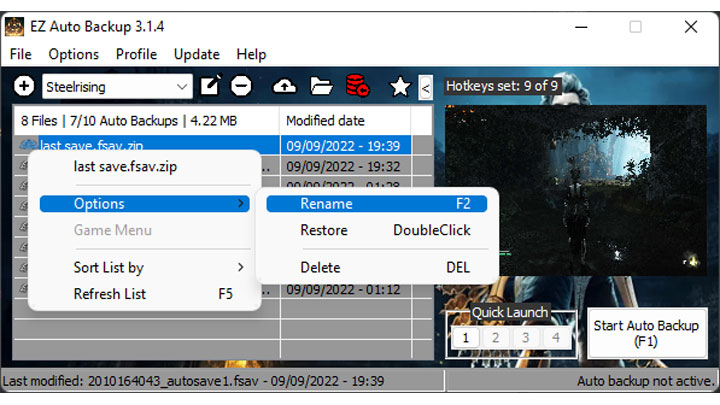
EZ Auto Backup is a tool for Returnal, created by ai8772.
Description:
instant backup after a game auto save.
EZ Auto Backup is a save file backup managing tool. It can create backups of the save file each time the game saves or with an intervall, which is very usefull for games with only 1 auto save file. Like in a souls game after you died, just return to the titlescreen and restore one of the last save backup, or you can manually create backups before a boss fight or your favorite cutscenes to restore them any time. This will also helps to prevent currupted save files which may happens, so you don't lose all your playing hours.
If you have any requests, suggestions, found some bugs or need any help, feel free to join the Discord.
You have to disable cloud save and exit the game first before restoring a backup.
Features
- Choose between 2 auto backup methods:
- Intervall, set the minutes in which auto backups occurs.
- Instant, backups will instantly be created each time the game auto saves.
- Seamless Co-Op mod support
- Manuall backup your save game folder
- Support for any game, the reworked game detection is now dynamic and allows you to add your own games to the game profile.
- Backup your profile with it's backup files.
- Quick and easy setup
- Set a number of max auto backups. Onces max count reached the oldest auto backup will be deleted.
- .zip compression with 7z by default for backup files.
- Quick Selection feature, allows you to select through your backups in game, with either an overlay which includes a screenshot or by Text To Speech. ERAB will automatically choose the method, depending on the selected game screen mode (windowed or fullscreen)
- Customizable keyboard and controller hotkeys which allows you the following functions:
- Start/Stop Auto Backup
- Quick backup
- Restore Quick Backup
- Manual Backup
- Quick Restore last backup
- Quick Restore 2nd last backup
- Select through your backups with either an Overlay or TTS, with Quick Selection
- Restore the selected backup from Quick Selection
- Quick Launch feature for up to 4 applications to quick launch from ERAB.
- Set CPU affinity for each profile, which can be auto set when the game is launched.
- Many customizable options and UI theming.
- User friendly UI with a compact mode.
- See stats from all of your characters in a save file.
- Update NVIDIA DLSS file.
- Updater, always stay up to date.
Notes
Always return to the title screen first before you restore a backup!
Quick backup will always overwrite the "Quickbackup" file in the backup folder, to create seperate backups use a custom hotkey for manual backup instead.
This tool can only backup the last auto save in game and not creating individual save states, but in a souls game it's kinda possible, when you quit the game, then after reloading it creates a new autosave, from which you could manual backup, it's like having a custom "save state".
For optimal use place ERAB on a second monitor to have an overview of the auto backups.
You can use your own notification sounds by replacing the existing ones in the ERAB folder.
Screenshots may be inaccurate, but it should help to manage your the backup files.
When you see a status overlay in the middle of the screen then press ctrl+alt+s for repositioning. To disable it go to "Settings > EZAB Settings > Misc > Use EZAB status overlay"
Installation
Unpack EZAB
Start ERAB.exe, when launched for the first time, EZAB will ask you to create a new profile.
Select a game from the list.
Click "Create Profile" and choose the required save file and backup folders
Enter a name for your profile to finish the profile creation process.
Go to settings if you want to change the auto backup method or change some options. Auto backup every x min is the default method, you can also choose "Instant" where an backup is created directly after the game auto saves if the intervall is set to 0, otherwise it will only instantly save after the timer has expired.
Start the game of your profile in order to use any auto or just use manual backup functions through hotkeys.
- Last update: Tuesday, February 21, 2023
- Genre: Action
- File size: 7.3 MB