The Planet Crafter - Game Mod - Storage Customization v.0.3.2 - Download

The file Storage Customization v.0.3.2 is a modification for The Planet Crafter, a(n) simulation game. Download for free.

DOWNLOAD

File Type: Game Mod

File Size: 8.2 KB

Last Update: May 18, 2022

Downloads: 1.3K

Last 7 days: 8

Problems with download? [email protected]

The Planet Crafter

More Info About Game

The Planet Crafter

The Planet Crafter
12

All Downloads for

The Planet Crafter

The Planet Crafter Downloads

Storage Customization is a mod for Planet Crafter, created by aedenthorn.

Description:

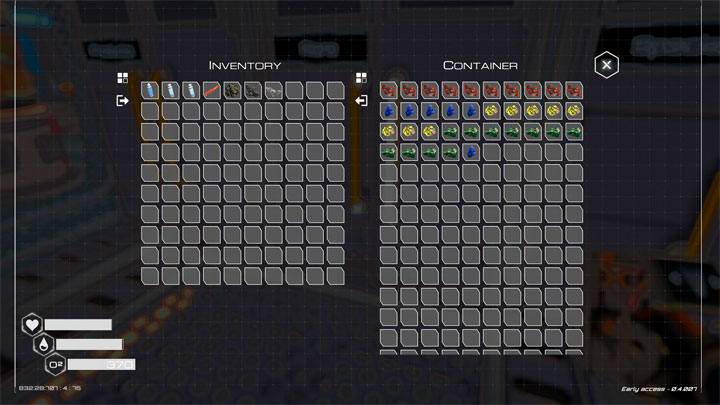
Lets you set custom storage sizes and icon scales for in-game containers, collectors and backpacks.

This mod adds the following config variables:

## Inventory icon scale

# Setting type: Single

# Default value: 1

IconScale = 1

## Chest storage size

# Setting type: Int32

# Default value: 15

ChestStorageSize = 15

## Locker storage size

# Setting type: Int32

# Default value: 35

LockerStorageSize = 35

## Golden chest storage size

# Setting type: Int32

# Default value: 4

WaterCollectorStorageSize = 4

## Golden chest storage size

# Setting type: Int32

# Default value: 30

GoldenChestStorageSize = 30

## Storage added by Backpack 1

# Setting type: Int32

# Default value: 4

Backpack1Adds = 4

## Storage added by Backpack 2

# Setting type: Int32

# Default value: 8

Backpack2Adds = 8

## Storage added by Backpack 3

# Setting type: Int32

# Default value: 12

Backpack3Adds = 12

## Storage added by Backpack 4

# Setting type: Int32

# Default value: 16

Backpack4Adds = 16

## Storage added by Backpack 5

# Setting type: Int32

# Default value: 23

Backpack5Adds = 23

To change these, run the game once with the mod installed, then edit BepInEx\config\aedenthorn.StorageCustomization.cfg.

For backpacks, the value specified is added to the base inventory size of 12 when equipped. Do not change these values for backpacks already equipped in a save. Remove the backpack first, save, then change, or your inventory size will be bugged.

Storages larger than 35 will add a scroll box; you can use either the mouse scroll wheel or drag with the mouse to scroll. I don't know if scrolling is possible with a gamepad.

Instructions:

To install this mod, first install BepInEx for Planet Crafter, then place the dll file in BepInEx\plugins.

You can use this tool: BepInEx Unity Installer

Source code is at https://github.com/aedenthorn/PlanetCrafterMods.

  • Last update: Wednesday, May 18, 2022
  • Genre: Simulation
  • File size: 8.2 KB

Game Mods The Planet Crafter

The Planet Crafter Remote Storage Access v.0.2.1

Game Mod Size: 6.7 KB DL: 384 Upd.: June 22, 2022

The Planet Crafter Game Mod Remote Storage Access v.0.2.1

The Planet Crafter Better Meteorites v.0.1.1

Game Mod Size: 5 KB DL: 361 Upd.: June 20, 2022

The Planet Crafter Game Mod Better Meteorites v.0.1.1

The Planet Crafter Custom Flashlight v.0.2.0

Game Mod Size: 3.8 KB DL: 313 Upd.: June 20, 2022

The Planet Crafter Game Mod Custom Flashlight v.0.2.0

The Planet Crafter Auto Mine v.0.2.2

Game Mod Size: 4.8 KB DL: 747 Upd.: June 7, 2022

The Planet Crafter Game Mod Auto Mine v.0.2.2

The Planet Crafter Quick Store v.0.3.6

Game Mod Size: 4.8 KB DL: 736 Upd.: June 7, 2022

The Planet Crafter Game Mod Quick Store v.0.3.6

The Planet Crafter Quick Rotate v.0.1.0

Game Mod Size: 3.6 KB DL: 269 Upd.: June 4, 2022

The Planet Crafter Game Mod Quick Rotate v.0.1.0

The Planet Crafter Craft From Containers v.0.2.2

Game Mod Size: 5.7 KB DL: 1.8K Upd.: June 4, 2022

The Planet Crafter Game Mod Craft From Containers v.0.2.2

The Planet Crafter Spawn Objects v.0.3.0

Game Mod Size: 7.3 KB DL: 2K Upd.: May 18, 2022

The Planet Crafter Game Mod Spawn Objects v.0.3.0

The Planet Crafter Better Jetpack v.0.1.1

Game Mod Size: 3.9 KB DL: 460 Upd.: May 17, 2022

The Planet Crafter Game Mod Better Jetpack v.0.1.1

The Planet Crafter Vehicle

Game Mod Size: 7.6 MB DL: 2.4K Upd.: March 1, 2022

The Planet Crafter Game Mod Vehicle

Other popular Game Mods

Need for Speed: Most Wanted (2005)

Need for Speed: Most Wanted (2005) NFS Most Wanted REDUX (Ultimate Overhaul, Cars & Graphics Mod) v.2.3

Game Mod Size: 5091.3 MB DL: 253.2K Upd.: October 28, 2022

Need for Speed: Most Wanted (2005) Game Mod NFS Most Wanted REDUX (Ultimate Overhaul, Cars & Graphics Mod) v.2.3
Grand Theft Auto: Vice City

Grand Theft Auto: Vice City GTA Vice City Modern v.2.0

Game Mod Size: 1254.7 MB DL: 1.51M Upd.: July 12, 2023

Grand Theft Auto: Vice City Game Mod GTA Vice City Modern v.2.0
Need for Speed: Most Wanted (2005)

Need for Speed: Most Wanted (2005) Widescreen Fix v.29072023

Game Mod Size: 1.6 MB DL: 851.7K Upd.: December 6, 2023

Need for Speed: Most Wanted (2005) Game Mod Widescreen Fix v.29072023
Need for Speed: Underground 2

Need for Speed: Underground 2 Remastered Underground 2 v.1.0

Game Mod Size: 115.8 MB DL: 112.8K Upd.: February 7, 2024

Need for Speed: Underground 2 Game Mod Remastered Underground 2 v.1.0
Need for Speed: Underground 2

Need for Speed: Underground 2 Widescreen patch v.8072023

Game Mod Size: 1.2 MB DL: 549.6K Upd.: July 3, 2024

Need for Speed: Underground 2 Game Mod Widescreen patch v.8072023
Need for Speed Carbon

Need for Speed Carbon Widescreen Fix v.8072023

Game Mod Size: 4.3 MB DL: 401.6K Upd.: July 3, 2024

Need for Speed Carbon Game Mod Widescreen Fix v.8072023
Grand Theft Auto: Vice City

Grand Theft Auto: Vice City GTA Vice City Extended Features v.0.9.9.1

Game Mod Size: 889.9 MB DL: 29K Upd.: November 4, 2025

Grand Theft Auto: Vice City Game Mod GTA Vice City Extended Features v.0.9.9.1
Grand Theft Auto V

Grand Theft Auto V Realistic Enhanced v.1.0

Game Mod Size: 1 KB DL: 23.7K Upd.: April 6, 2025

Grand Theft Auto V Game Mod Realistic Enhanced v.1.0
Hollow Knight

Hollow Knight Scarb v.1.3.1.0.0

Game Mod Size: 41 MB DL: 36.2K Upd.: April 29, 2023

Hollow Knight Game Mod Scarb v.1.3.1.0.0
Need for Speed: Most Wanted (2005)

Need for Speed: Most Wanted (2005) Save Editor

Game Mod Size: 70 KB DL: 172.2K Upd.: September 20, 2020

Need for Speed: Most Wanted (2005) Game Mod Save Editor