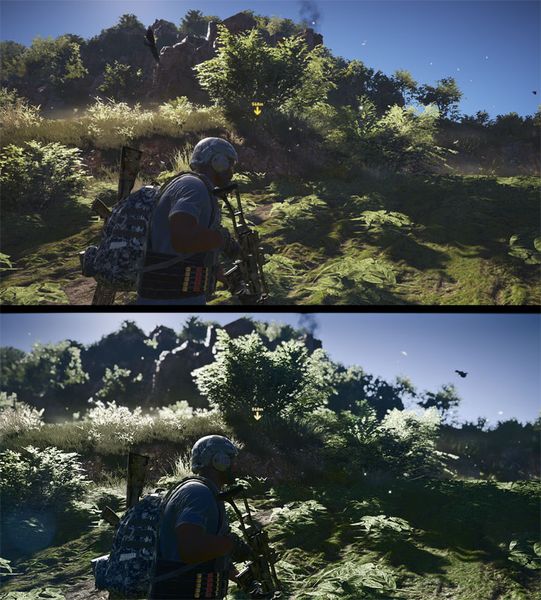
Vanilla on top, Moden at the bottom.
E3 2015 Inspired Lighting Overhaul is a mod for Tom Clancy's Ghost Recon: Wildlands, created by TheMercsAssassin.
Description (in author’s own words:
This preset tries to stylistically achieve a look similar to the E3 2015 Ghost Recon Wildlands trailer: https://www.youtube.com/watch?v=Tqz0q2BKl-U
This mod greatly enhances all light sources, reduces washed-out vanilla look, enhances all existing texture detail, increases reflectiveness of wet materials and objects including lakes, puddles, streams, makes metal and plastic more shinier.
If you've tried my previous GRW ReShades, they were too dark overall and especially at night. I've fixed that in this one while also fixing the overly-bright spots in the sky from the sun. I've also fixed previous issues where the distance looked washed out in certain weather/lighting conditions.
Dedicated to user yohozheng12 on theSweetFX database site, who asked me if I could create a E3 2015 ReShade about a month ago. Took me a while to understand what I was doing, but here's my first crack at getting close. I have more to do to make it more similar to the trailer. I need stronger colors, but the hardest thing was finding a way to desaturate the terrain while not completely desaturating every other color, especially reds and blues.
Controls:
All of these are remappable once in game.
-Toggle ReShade menu on-off - F1.
-Toggle all ReShade effects - End key
-Toggle depth-of-field - /
-Toggle sharpness - 5 on numberpad (make sure numberpad is enabled or the controls won't work)
-Toggle film grain - 3
-Black bars - 0
I recommend opening the ReShade GUI and changing these settings to the following:
Toggle ReShade on and off with the END key
Install Instructions:
1. For me, the game has to be in borderless-windowed mode or windowed mode. Fullscreen crashes ReShade on most games for me. Change this in the in-game options menu before installing ReShade.
2. Download and extract the folder from FILE section above and then open the folder and copy/paste the three files and one folder inside it (d3d9.ini, d3d9.dll, MercsE32015TrailerPreset.ini, reshade-shaders) into to your "Tom Clancy's Ghost Recon Wildlands" main folder where GRW.exe is located.
For steam it's usually: "...Steam\SteamApps\common\Tom Clancy's Ghost Recon Wildlands"
For Uplay it's usually: "...Ubisoft Game Launcher\games\Tom Clancy's Ghost Recon Wildlands"
3. Open the d3d9.ini file in your main Tom Clancy's Ghost Recon Wildlands game folder and locate these two lines under "[GENERAL]":
EffectSearchPaths=C:\Program Files (x86)\Ubisoft Game Launcher\games\Tom Clancy's Ghost Recon Wildlands,C:\Program Files (x86)\Ubisoft Game Launcher\games\Tom Clancy's Ghost Recon Wildlands\reshade-shaders\Shaders
TextureSearchPaths=C:\Program Files (x86)\Ubisoft Game Launcher\games\Tom Clancy's Ghost Recon Wildlands,C:\Program Files (x86)\Ubisoft Game Launcher\games\Tom Clancy's Ghost Recon Wildlands\reshade-shaders\Textures
Replace the 4 highlighted parts with the proper directory path to your game. This is the same file path we used to find your GRW.exe file in Step 2.
4. Run the game.
5. If the effects load but you don't see a change in your game, press F1 to bring up the ReShade menu and click the drop down arrow in the top-right of the ReShade menu box. Choose my Pathfinder.ini file and select it. The effects should load from there. Further details on the controls below.
6. PROFIT!
ALTERNATIVE INSTRUCTIONS BELOW. TRY THEM IF THIS METHOD OF INSTALLING DIDN'T WORK FOR YOU, PLEASE. After that, I'm happy to try to help.
Alternative Install Instructions:
1. Download the Reshade 3.0.6 from here https://reshade.me/
2. Scroll to bottom of page and download whatever the latest version advertised is.
Run the .exe that you just downloaded. Probably best to copy it to your desktop or somewhere else first outside your downloads folder.
Follow the steps it tells you selecting yes everything it asks.
3. Select your "GRW.exe" which is in the main folder of the game. For steam it's usually: "...Steam\SteamApps\common\Tom Clancy's Ghost Recon Wildlands"
For Uplay it's usually: "...Ubisoft Game Launcher\games\Tom Clancy's Ghost Recon Wildlands"
4. Select the DirectX 8/9 version after you select the "GRW.exe."
5. Run your game
As your game loads up, you should see a grey box popup in the top of the screen saying it's loading all the reshade effects.
Once it's done, hit "shift+F2" and follow the promps. The most important thing is to hit the plus symbol next near the top of the Reshade GUI and type any name you want.
Follow the other prompts until the boxes turn from red to black or grey or whatever indicates you're done with the very short tutorial.
You can leave your game open or close it for this next step.
6. Go back to your game's main folder, where the "GRW.exe" is and look for that file you just created with whatever name you gave. It should be a .ini file.
7. Open the .ini file and replace all the text with the text from my preset on this page.
Save the file. Run your game or alt tab back to it. And then do step 7 if you your game is still running.
8. Reopen the Reshade GUI with Shift+f2 and click the click "reload". The new effects should start loading with my custom settings.
9. PROFIT!
Uninstalling:
1. Delete the Reshade folder, d3d9.ini, d3d9.dll, and d3d9.log and MercsE32015TrailerPreset.ini files from your game folder. That's it.
Enjoy, leave comments below if you're having trouble installing or better yet youtube a Resahde 3.0+ install guide. It's extremely easy.
You may notice a slight decrease in performance, but it should still be pretty similar FPS to what you usually get. The visual difference is night and day to me and I can't ever go back to vanilla.
- Last update: Sunday, September 2, 2018
- Genre: Action
- File size: 7.6 MB