Tom Clancy's The Division 2 - Game Mod - Straight to VHS - 80's ReShade v.1.0 - Download

The file Straight to VHS - 80's ReShade v.1.0 is a modification for Tom Clancy's The Division 2, a(n) action game. Download for free.

DOWNLOAD

File Type: Game Mod

File Size: 9.9 MB

Last Update: April 13, 2019

Downloads: 950

Last 7 days: 1

Problems with download? [email protected]

Tom Clancy's The Division 2

More Info About Game

Tom Clancy's The Division 2

Tom Clancy's The Division 2
2

All Downloads for

Tom Clancy's The Division 2

Tom Clancy's The Division 2 Downloads
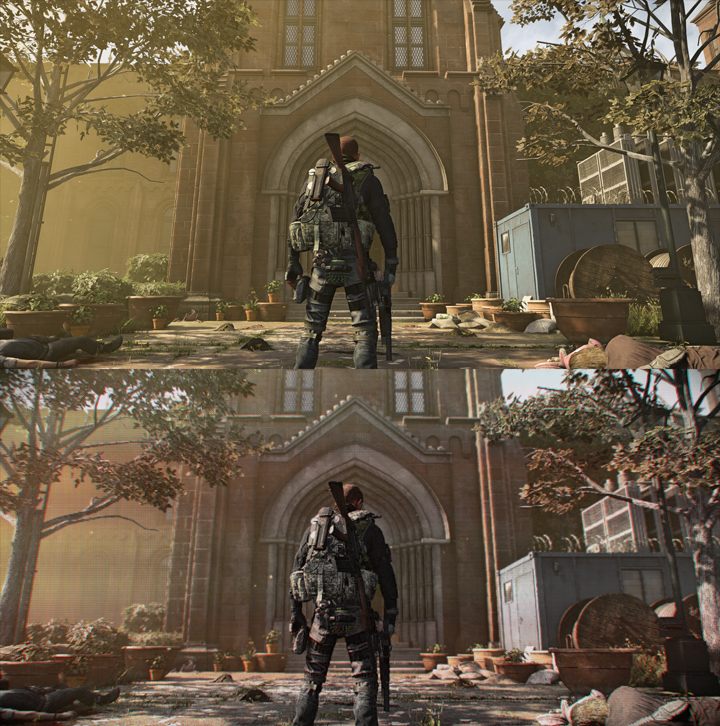
Vanilla game on top, modded version on the bottom. - 2019-04-13
Vanilla game on top, modded version on the bottom.

Straight to VHS - 80's ReShade is a mod for Tom Clancy's The Division 2, created by TheMercsAssassin.

Description (in author’s own words):

Straight to VHS ReShade will blast you back to the 80's and 90's when VHS tapes were the way of the future and were the premiere way to gather the family 'round and enjoy your favorite movie (which often took many months or even years to release on VHS after leaving theaters). This reshade is a result of constant refinements and tweaks, as I've been working on essentially every day since the game launched into early access on March 12, 2019. Though highly stylistic, StV ReShade is is built for gameplay, and like all of my ReShades offers many modular features, like multiple choices of depth-of-field, film grain, letterboxing (black bars), multiple iterations of bloom, and more!

INSTALL INSTRUCTIONS

1. Download ReShade framework 4.0.2

2. Run the .exe, choose your Division 2 .exe, called "TheDivision2.exe", which is found in this subfolder path: "... Ubisoft Game Launcher\games\Tom Clancy's The Division 2"

Now choose the DirectX 10+ version when it asks which API to use.

3. Select yes when it ask if you want to download a collection of effects. Click "uncheck all" and just select "Border" (you'll be using the shaders and effects from my dropbox folder).

4. Download my zip file on the file page here on Nexus.

5. Open the zip folder and copy-paste the "reshade-shaders" folder, and the "Mercs Straight to VHS - 1-0.ini" file in your Division 2 folder, where you found your game's .exe, "... Ubisoft Game Launcher\games\Tom Clancy's The Division 2" folder. Overwrite all if it asks. Don't worry, you are only overwriting ReShade files, not any of your game's actual files.

6. Run your game and open the ReShade menu with Shift+Home and click the little arrow at the top of the reshade menu to open the drop-down menu. Select the preset "Mercs Straight to VHS" .ini file. (If you don't care about Depth of Field (DoF), then you can stop here and just delete all the DoF shaders from your reshade-shaders/shaders folder. If you want to use DoF, then please continue to step 7, it's not as intimidating as it looks, only takes about 10 seconds to do once in game).

7. To get DoF working once you load into the game and can see your character model in D.C.,follow this guide. Basically, activate the Display Depth shader (press "+" on the numberpad) to see the depth buffer, then click the "dxll" tab and click the boxes until you see the image with your character displayed in one half and the other gray-scaled, as shown in the video. Then click the "reload" button on the bottom of the reshade "home" tab, as shown in the video: https://youtu.be/AbsLCo96ONY?

8. Profit?

  • Last update: Saturday, April 13, 2019
  • Genre: Action
  • File size: 9.9 MB

Game Mods Tom Clancy's The Division 2

The Division 2 Project Liberty -- Photorealistic Lights and Cinematic Effects v.1.0

Game Mod Size: 9.9 MB DL: 802 Upd.: May 2, 2019

The Division 2 Game Mod Project Liberty -- Photorealistic Lights and Cinematic Effects v.1.0

Other popular Game Mods

Need for Speed: Most Wanted (2005)

Need for Speed: Most Wanted (2005) NFS Most Wanted REDUX (Ultimate Overhaul, Cars & Graphics Mod) v.2.3

Game Mod Size: 5091.3 MB DL: 253.2K Upd.: October 28, 2022

Need for Speed: Most Wanted (2005) Game Mod NFS Most Wanted REDUX (Ultimate Overhaul, Cars & Graphics Mod) v.2.3
Grand Theft Auto: Vice City

Grand Theft Auto: Vice City GTA Vice City Modern v.2.0

Game Mod Size: 1254.7 MB DL: 1.51M Upd.: July 12, 2023

Grand Theft Auto: Vice City Game Mod GTA Vice City Modern v.2.0
Need for Speed: Most Wanted (2005)

Need for Speed: Most Wanted (2005) Widescreen Fix v.29072023

Game Mod Size: 1.6 MB DL: 851.7K Upd.: December 6, 2023

Need for Speed: Most Wanted (2005) Game Mod Widescreen Fix v.29072023
Need for Speed: Underground 2

Need for Speed: Underground 2 Remastered Underground 2 v.1.0

Game Mod Size: 115.8 MB DL: 112.8K Upd.: February 7, 2024

Need for Speed: Underground 2 Game Mod Remastered Underground 2 v.1.0
Need for Speed: Underground 2

Need for Speed: Underground 2 Widescreen patch v.8072023

Game Mod Size: 1.2 MB DL: 549.6K Upd.: July 3, 2024

Need for Speed: Underground 2 Game Mod Widescreen patch v.8072023
Need for Speed Carbon

Need for Speed Carbon Widescreen Fix v.8072023

Game Mod Size: 4.3 MB DL: 401.6K Upd.: July 3, 2024

Need for Speed Carbon Game Mod Widescreen Fix v.8072023
Grand Theft Auto: Vice City

Grand Theft Auto: Vice City GTA Vice City Extended Features v.0.9.9.1

Game Mod Size: 889.9 MB DL: 29K Upd.: November 4, 2025

Grand Theft Auto: Vice City Game Mod GTA Vice City Extended Features v.0.9.9.1
Grand Theft Auto V

Grand Theft Auto V Realistic Enhanced v.1.0

Game Mod Size: 1 KB DL: 23.7K Upd.: April 6, 2025

Grand Theft Auto V Game Mod Realistic Enhanced v.1.0
Hollow Knight

Hollow Knight Scarb v.1.3.1.0.0

Game Mod Size: 41 MB DL: 36.2K Upd.: April 29, 2023

Hollow Knight Game Mod Scarb v.1.3.1.0.0
Need for Speed: Most Wanted (2005)

Need for Speed: Most Wanted (2005) Save Editor

Game Mod Size: 70 KB DL: 172.2K Upd.: September 20, 2020

Need for Speed: Most Wanted (2005) Game Mod Save Editor