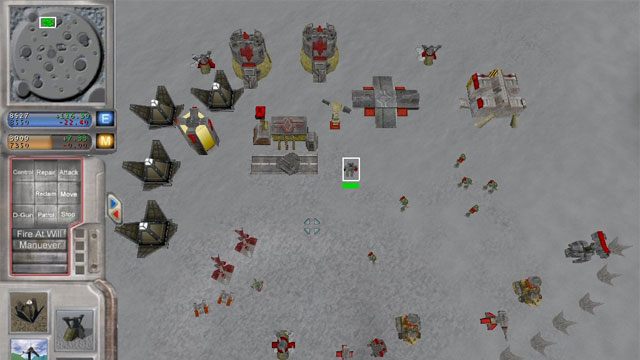
Unreal Annihilation 2004 is a mod for Unreal Tournament 2004, created by Blade_Sword.
Description:
Unreal Annihilation will make UT2004 into Total Annihilation! It uses the standard overhead view by default, but allows you to control any unit and fully control it in a first person shooter style of view. There is nothing quite like joining in on the carnage of that friendly peewee brawl.
Instructions:
If you have the Zip, Rar or any other archived version, extract the contents to the UT2004 directory. Make sure to extract with paths.
If you have the UMOD version, run the exe and the installation wizard should guide you through.
1.2 Setup
---------
Enter your UT2004 directory
Enter the folder 'System'
Right-click on the UT2004.exe and choose 'Create shortcut'
Right-click on the shortcut and click on 'Properties'
In the field 'Target:' change the path to:
..\UT2004\System\UT2004.exe -Mod=Annihilation2k4
----
i.e.
If your installation was at the default installation location of:
C:\UT2004\System\UT2004.exe
The shortcut would be changed to:
C:\UT2004\System\UT2004.exe -Mod=Annihilation2k4
----
Run this shortcut to play Unreal Annihilation
========================================================================
2 How to play
========================================================================
2.1 Finding Unreal Annihilation
-------------------------------
Currently the UA2004 menu is not implemented. When you run Unreal Annihilation you will reach the default UT2004 menu. You can access Unreal Annihilation in the 'Gametype' menu under the section 'Custom Game Type'
2.2 Starting solo a game
------------------------
Go to Instant Action from the main menu
Choose Unreal Annihilation as gametype
Choose map you wish to play on
Press 'Play'
Once map is running click the mouse and wait until the team colour option displays
NOTE: There is no single player game in the form of missions or A.I skirmishes. This is just to see the game run and move about.
2.3 Starting a dedicated server
-------------------------------
Go to the directory ..\UT2004\annihilation2k4\System
Run 'UA Server.bat'
2.4 Joining a multiplayer game
------------------------------
From the main menu open the console by pressing the ' key
type:
open <IP ADDRESS OF THE SERVER HERE>
Replacing <IP ADDRESS OF THE SERVER HERE> with the servers IP
----
i.e.
If the servers address is 123.456.789.000 you would type:
open 123.456.789.000
----
Unfortunetly this is the method that must be used until we resolve some bugs.
- Last update: Monday, December 14, 2015
- Genre: Action
- File size: 115.3 MB