Age of Wonders 3: Interface
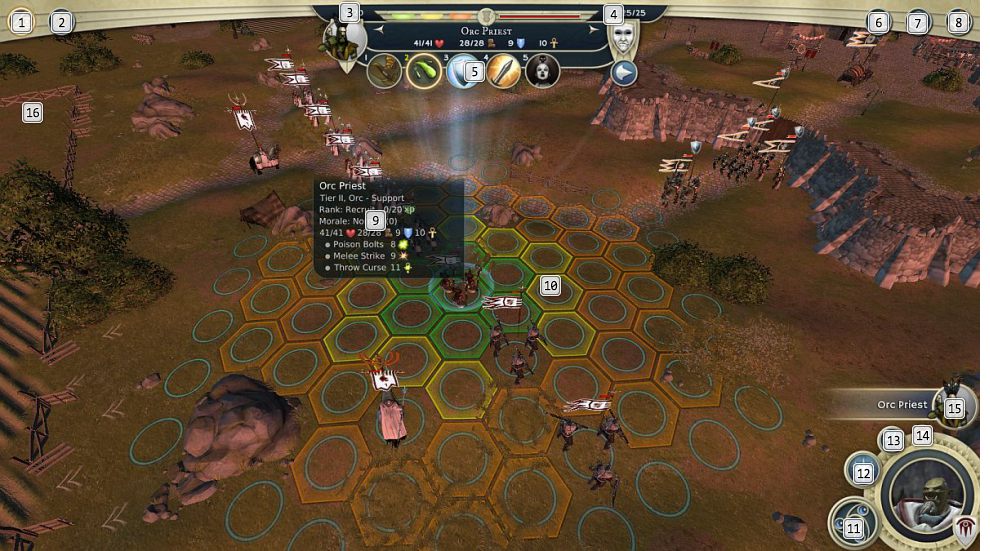
The most important information during the battle appears and in the upper corner, in the middle of the screen. It concerns the amount of mana that is let [3], the number of available Casting Points [4], the statistics available after you have selected a unit [5]. All of the remaining information can be found in the bottom-right corner, where you can end the turn, pick the spell that you want to cast [12], switch into automatic mode (your units will be controlled by the computer) [13]. Also, you can find here the escape button (not recommended; makes you lose all of the units and you lose the battle automatically) [14] and information on the units that can still make a move in this turn [15]. The final important piece of information is the circle that appears in the upper-left corner of the screen [16] at the moment at which a spell took an effect on the entire battlefield.


You are not permitted to copy any image, text or info from this page. This site is not associated with and/or endorsed by the developers and the publishers. All logos and images are copyrighted by their respective owners.
Copyright © 2000 - 2026 Webedia Polska SA for gamepressure.com, unofficial game guides, walkthroughs, secrets, game tips, maps & strategies for top games.