Assassin's Creed Rebellion: How to start a mission?
Last update:
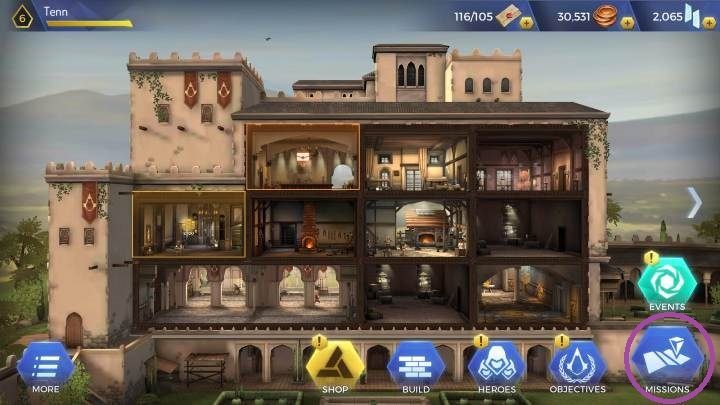
To start a mission in Assassin's Creed Rebellion, you must open the map of regions, by clicking on the icon marked on the screenshot above.

Missions in Assassin's Creed Rebellion provide you with experience points, resources and components useful for training heroes.
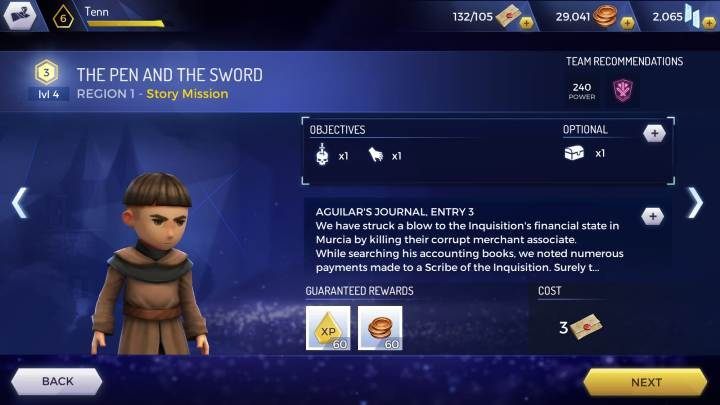
There are 3 regions in the game, in each of them you'll find 4 categories of mission. You can unlock regions by completing quests from the "story" category.

To start a mission you must first select a category. To select a category, just click on the icon you are interested in.

After selecting a category, all available missions will pop out. Choose the mission that interests you and press "next" or "play".

There is one more choice before you start a mission. You must choose your team. To do this, click "Edit team" and select your heroes. Then just click on the start button and you can start your mission.


- Assassin's Creed Rebellion Guide
- Assassin's Creed Rebellion: Game guide
- Assassin's Creed Rebellion: Missions
- Assassin's Creed Rebellion: Auto Mode
- Assassin's Creed Rebellion: Rush Mode
- Assassin's Creed Rebellion: Mission types
- Assassin's Creed Rebellion: How to speed up a mission?
- Assassin's Creed Rebellion: How to start a mission?
- Assassin's Creed Rebellion: What do the percentages mean?
- Assassin's Creed Rebellion: Can I get lost during a mission?
- Assassin's Creed Rebellion: Missions
- Assassin's Creed Rebellion: Game guide
You are not permitted to copy any image, text or info from this page. This site is not associated with and/or endorsed by the developers and the publishers. All logos and images are copyrighted by their respective owners.
Copyright © 2000 - 2026 Webedia Polska SA for gamepressure.com, unofficial game guides, walkthroughs, secrets, game tips, maps & strategies for top games.