Battlefield 2142: Safety and symbols inside vehicles
A number of graphic and sound signals accompanying sitting in a vehicle makes the game a bit easier and raises the efficiency of the crew's actions. A driver should know what these signals refer to.
Undoubtedly, the most important is the warning of acquiring target. If an engineer keeps his rocket launcher's crosshair on our vehicle or somebody tries to shoot at as with and EMP missile launched from a ground stationary anti-aircraft gun, an alarm sounds and a proper icon appear on the screen.

If we get close to some explosive charges (mines or RDX DemoPaks), a proper icon will be shown too.

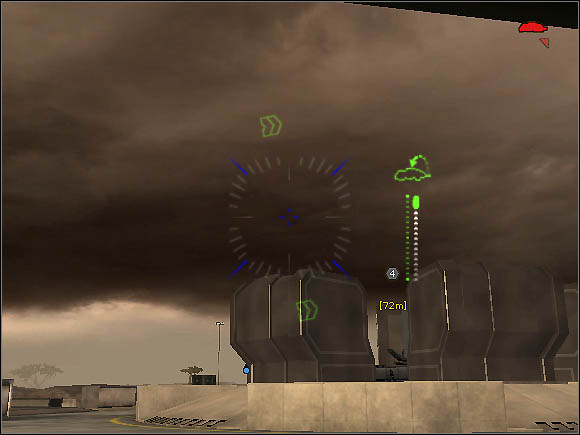
There is one additional graphic signal, which is assigned to APC vehicles. If there is a green Titan symbol above the crosshair, on the right-hand side, we are able to boards a nearby airship using the vehicle's assault pod. If the symbol is yellow, there may be a problem with landing on the Titan.


- Battlefield 2142 Game Guide
- Battlefield 2142: Game Guide
- Battlefield 2142: Additional notes
- Battlefield 2142: EMP Weapons
- Battlefield 2142: Aiming
- Battlefield 2142: Explosives
- Battlefield 2142: Fighting inside the Titan
- Battlefield 2142: Which kit?
- Battlefield 2142: Orientation and communication
- Battlefield 2142: Safety and symbols inside vehicles
- Battlefield 2142: Parachute and assault pod
- Battlefield 2142: Additional notes
- Battlefield 2142: Game Guide
You are not permitted to copy any image, text or info from this page. This site is not associated with and/or endorsed by the developers and the publishers. All logos and images are copyrighted by their respective owners.
Copyright © 2000 - 2026 Webedia Polska SA for gamepressure.com, unofficial game guides, walkthroughs, secrets, game tips, maps & strategies for top games.