Disgaea RPG: Stronghold Background - how to change?
The following page of the Disgaea RPG guide answers how to change the background in the Stronghold. We also tell you where to find the Stronghold Customization option.
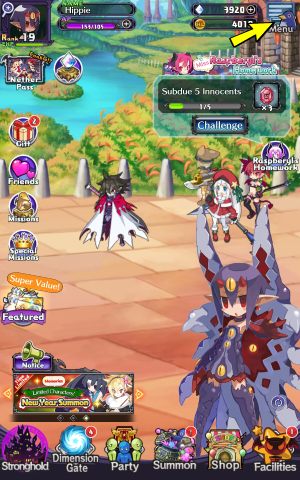
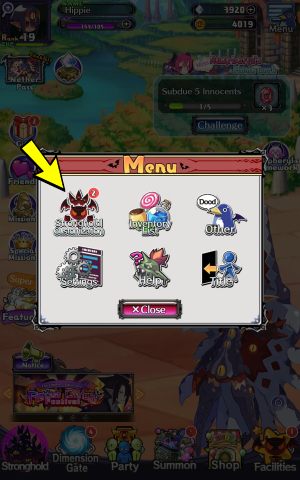
Go to the Stronghold tab, click on the Menu icon in the upper right corner, and then select Stronghold Customization.
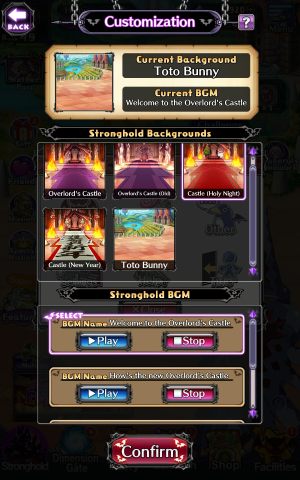
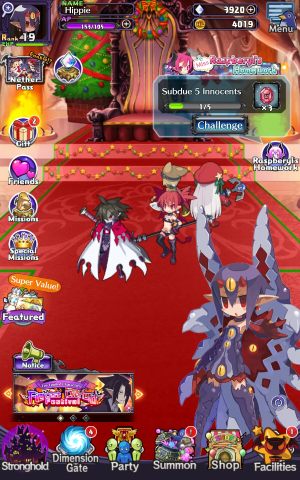
Select the available background theme and music and then click on Confirm. You can make these changes at any time.
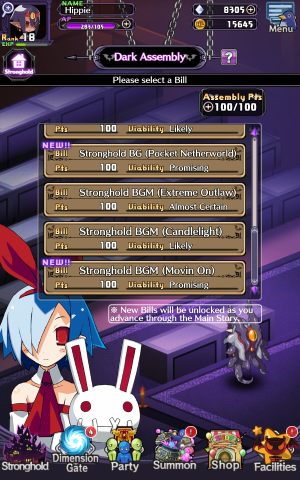
You can get new Stronghold backgrounds as prizes during special in-game events. Making progress in the story also unlocks new backgrounds in the Dark Assembly.



- Disgaea RPG Guide
- Disgaea RPG: Game Guide
- Disgaea RPG: FAQ
- Disgaea RPG: Leveling up - how to do it quickly?
- Disgaea RPG: My character is level 100 - what next?
- Disgaea RPG: Daily routines - what to do?
- Disgaea RPG: Action Points - what are they used for?
- Disgaea RPG: Equipment - how to equip?
- Disgaea RPG: Innocent - what is it?
- Disgaea RPG: Character copies - what to do with them?
- Disgaea RPG: Death of the party - what will happen?
- Disgaea RPG: Combat - how to surrender?
- Disgaea RPG: Stronghold Background - how to change?
- Disgaea RPG: Inventory list - how to find?
- Disgaea RPG: FAQ
- Disgaea RPG: Game Guide
You are not permitted to copy any image, text or info from this page. This site is not associated with and/or endorsed by the developers and the publishers. All logos and images are copyrighted by their respective owners.
Copyright © 2000 - 2026 Webedia Polska SA for gamepressure.com, unofficial game guides, walkthroughs, secrets, game tips, maps & strategies for top games.