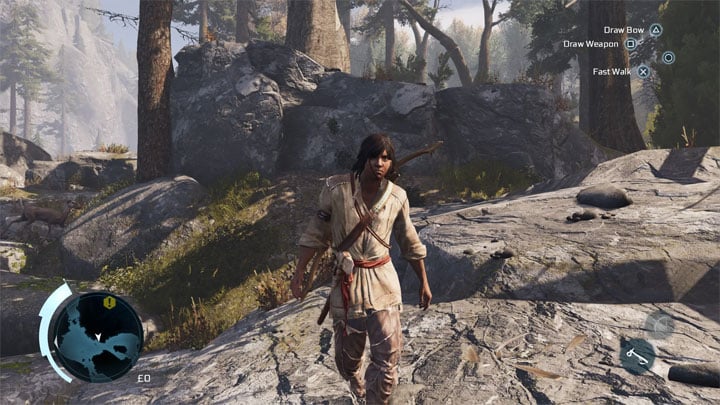
Playstation Buttons is a mod for Assassin’s Creed III Remastered, created by sergio1030
Description:
Assassin's Creed III Remasterd works great on pads, but the problem is that when using pads from PlayStation consoles the game does not display icons for those controllerers.
This mod fixes that, making the game display icons from PlayStation/DualShock.
Instructions:
Install this mod using Resorep?.
Important:
Since both AC 3 and Liberation Remastered share the same folder, you will only be able to have one .exe file selected in Resorep at a time (either ACIII.exe or ACLiberation.exe), otherwise if you have both selected, the game won't open.
For Windows 10:
Just follow this guide in order to replace textures on any game that Resorep supports.
For Windows 11:
If the app won't launch on windows 11 then do the following:
Step 01: Download and extract Resorep anywhere but the same folder as the game you want to mod.
Step 02: Download and install "JDK 8u321" (an older version of java).
Step 03: Enter the JDK "bin" folder (usually located in "C:\Program Files\Java\jdk1.8.0_321\") and rename "java.exe" to "java8.exe".
Step 04: Copy all 3 files you find in the "Win 10" folder of Resorep ("resorep.jar", "dx11proxy32.dll" and "dx11proxy64.dll") and paste them to the previously mentioned "bin" folder.
Step 05: Create a new Text Document called Resorep ("Resorep.txt") wherever you want to start the app from and type the following:
?cd "C:\Program Files\Java\jdk1.8.0_321\bin"
.\java8 -jar resorep.jar
In my case the directory "C:\Program Files\Java\jdk1.8.0_321\bin" is where the renamed "java8.exe" was, if in your case is different then update the code before saving it. After that save it and rename the file from "Resorep.txt" to "Resorep.bat"
Step 06: Run "Resorep.bat" with admin privileges, a command prompt will open and just wait until it finishes (if it takes too long just spam enter on the window to hurry the process up).
Step 07: Resorep will open and you can follow the video guide above.
- Last update: Friday, August 30, 2024
- Genre: Action
- File size: 253.8 KB