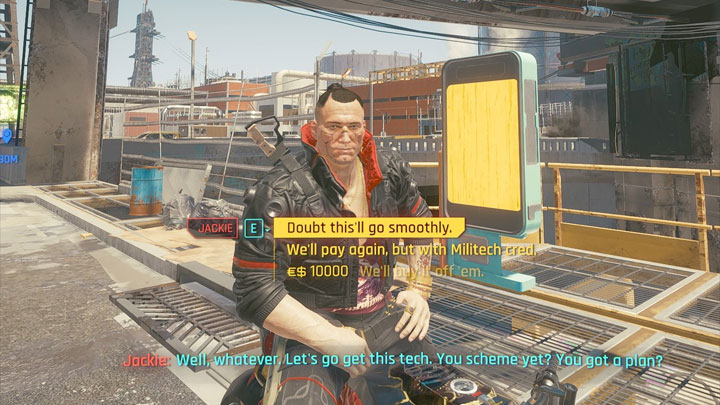
E to Interact - V to Walk and Drive - Dedicated Dodge - Dialogue Scroll is a mod for Cyberpunk 2077, created by Ausanan.
Description (In author’s own words):
- Changes main key binding from F to E.
- Adds the ability to Walk and Drive slowly by holding V.
- Adds a dedicated Dodge by pressing Left Control and disables double tap dodging.
- Adds the ability to use the mouse scroll up and down for dialogue selection.
- You can now use YGHJ as a workaround for toggleable Walk/Driving sp
REPORT ABUSE
SHARE
Permissions and credits
IMPORTANT!
- All modifications in the .xml files in the mod have been made with ONLY 3 in game rebindings made. All 3 should be rebound in-game prior to installing and NOTHING else. The 3 required rebinds are listed below in the mod description. If you have other rebinds made in game. RESET TO DEFAULT and only make the 3 listed changes. This should prevent issues with certain rebinds in the mod not working.
- In addition to having your in-game rebinds set to default. It appears the mod does not work IF you have already modified your .xml files to other keybind configurations. Meaning you CANNOT modify your .xml files to another configuration, then revert the changes. You REQUIRE a fresh, unmodified .xml file.
- Either, back up your fresh, unmodified .xml files before installing. Or if you don't have a backup of your vanilla .xml files. I will provide the FRESH, UNMODIFIED .xml files as a separate download. Install that file, then install the mod.
For some reason, CDPR set the key bind for interacting to F, instead of E which is the standard key bind across the industry. And for some reason you cannot rebind this in the in game key binds.
So I decided to make my own mod which alters this and makes the game more in line with other games. Now you can use E to interact with NPC's, pickup loot and enter your car.
Instructioons:
BEFORE INSTALLING!!!
Remap the following keys in-game:
1. Call Car - Remap to "B"
2. Hold To Crouch - Remap to "CAPS LOCK"
3. Exit Vehicle - Remap to "E"
Installation:
Simply paste the inputUserMappings.xml file and inputContexts.xml into - Cyberpunk 2077/r6/config
Overwrite existing files.
All keybinds after latest version installed (6.1)
Interact / Select - "E"
Walk / Drive Slowly - "V"
Dodge - "Left Ctrl"
Dialogue Scroll - "Mouse Wheel Up/Down"
Journal - "9"
Toggle Walk / Driving Workaround - "YGHJ"
Additional Dialogue Selection Option (Version 6.0 only) - "LMB"
Toggleable Walking
Toggle walking is as far as I can tell, impossible at this stage. However I have made a workaround. While some people may not like this, at this time this is the only way of having "Toggleable" walking currently.
- I have mapped "YGHJ" for walking, due to this, your journal has had to be remapped to "9" as that is an unused key from what I can see.
- "WASD" is regular movement still, and you can still hold "V" to walk if you would like, this has just been made for those that are used to toggleable walking. So use "YGHJ" to walk, then switch to "WASD" when you need to move at regular pace. One benefit of this workaround, is because "V" makes you walk by walking forward really slow. With "YGHJ" you can now walk left and right without walking slightly diagonally.
- Again, this is not perfect, but it is the only workaround possible at this point in time.
Note:
1. I would highly recommend making a backup of your vanilla inputUserMappings.xml file and inputContexts.xml file. Just in case you ever want to revert back to default.
DISCLAIMER
I have been informed that using the mouse wheel for dialogue selection has always been a feature. However it never worked for me, so I assumed that it was a design choice by CDPR. So it was likely a bug I was experiencing, but this has fixed it for me. I'll leave it there as it may be useful if anyone else is experiencing this. And it won't affect you negatively if you're not experiencing this bug.
Known Issues
1. F Not E To Exit Vehicle: [FIX] You have exiting vehicles binded to "F" in the in-game keybind menu. Rebind it to "E".
2. Run When Walking and Holding Forward and Sideways: This appears to be unfixable at this stage, as CDPR probably never intended for you to be able to walk with M&KB.
- Last update: Thursday, December 17, 2020
- Genre: RPG
- File size: 14.4 KB