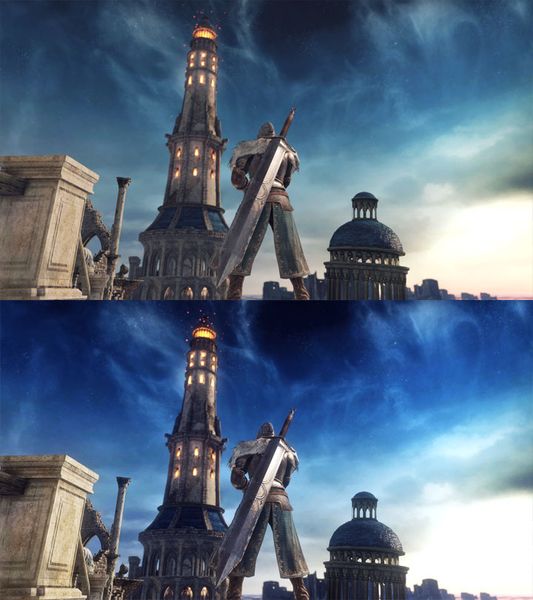
Vanilla game on top, modded version on the bottom .
Majula_ReShade is a mod for Dark Souls II: Scholar of the First Sin, created by Jb0238177.
Description (in author’s own words):
My version of a (E3) ReShade Preset that doesn't over-darken the game or over-saturate the game's color pallet. Instead it adds color correction, better lighting, hdr & sharpness. While using this preset it is HIGHLY RECOMMENDED to turn your in-game brightness level all the way up
Instructions:
This is just the .ini file, you will need the latest version of ReShade to use it. You can get it here: https:reshade.me .... To install my file, simply place it in your Dark Souls II Scholar of the First Sin Game Folder where the game's .exe is located ( D:\SteamLibrary\steamapps\common\Dark Souls II Scholar of the First Sin\Game ). HOW TO INSTALL ReShade: 1.) Launch the ReShade Installer & select the game's .exe ( D:\SteamLibrary\steamapps\common\Dark Souls II Scholar of the First Sin\Game ) 2.) Select the game's API - it is DX10+ 3.) ReShade will ask if you want to download all the .fx files, click okay to download them & click okay to install them 4.) ReShade should now say Succeeded! 5.) Now, you can close the ReShade Installer. IMPORTANT! when launching the game - if it fails to launch, Crashes To Desktop or your controller isn't working: you will need to rename the dxgi file to d3d11, it is located in the same folder you installed my file & ReShade ( D:\SteamLibrary\steamapps\common\Dark Souls II Scholar of the First Sin\Game ). If renaming the dxgi file doesn't work you will need to disable your Steam Overlay, as it can cause a conflict with the ReShade Overlay. To open the ReShade menu in-game press the HOME (pos1) key on your keyboard & once the menu is open click the drop-down menu arrow. Once the drop-down menu is open select my file "Majula_ReShade" from the list. If you do not see my file in the list then you will have to manually add it by clicking the + symbol next to the drop-down arrow & type in the full name of my file just like this: Majula_ReShade.ini, then press enter. To close the ReShade menu press the HOME (pos1) key on your keyboard.
- Last update: Sunday, September 1, 2019
- Genre: RPG
- File size: 2.4 KB