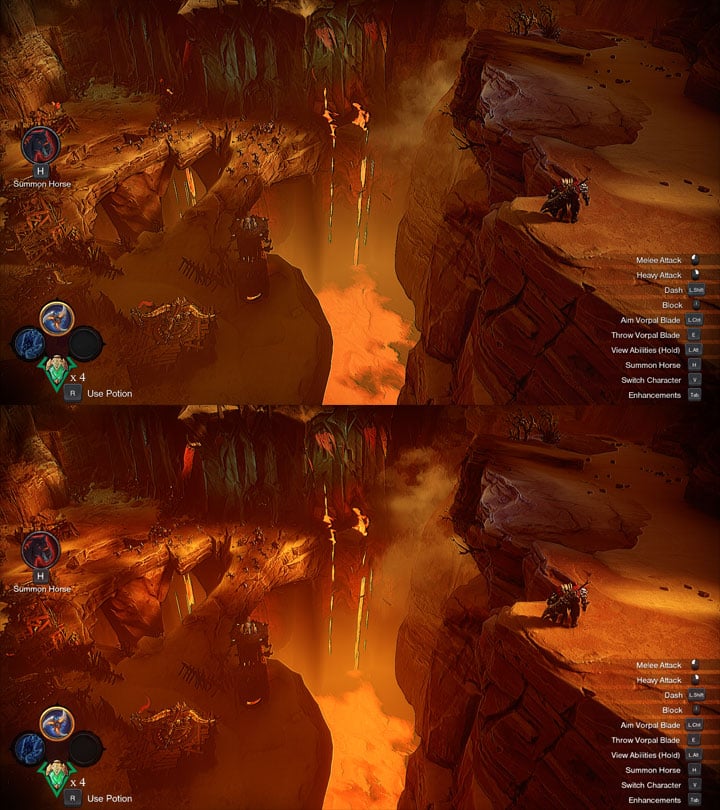
Vanilla game on top, modded on on the bottom.
Darksiders Genesis Better Graphics Pack is a mod for Darksiders Genesis, created by Jb0238177.
Description (in author’s own words):
My Engine.ini config file adds aniscoptric filtering 16x, adjust the sharpness, bloom & tonemapper settings. It also disables the game's motion blur, volumetric fog & dof/bokeh dof. My "Genesis_ReShade.ini" ReShade file is also included in the pack to enhance the game's color, hdr & fxaa.
Instructions:
"Make sure to back up your "Engine.ini" file before replacing it with mine"
"Make sure to also have the latest version of ReShade" you can get it here: https://reshade.me
How To Extract & Install My Files:
-Extract my "Darksiders Genesis Better Graphics.7z" folder with 7Zip. You will have my "Engine.ini" config file & my "Genesis_ReShade.ini" file.
-Place my "Engine.ini" config file in the game's "Saved\Config\WindowsNoEditor folder" & click okay to overwrite when asked.
-Make sure to right-click my "Engine.ini" file, select properties, tick the read-only box, apply & then okay.
Folder Location: C:\Users\Your Username\AppData\Local\THQ Nordic\Darksiders Genesis\Saved\Config\WindowsNoEditor.
-Place my "Genesis_ReShade.ini" file in the game's "Project Mayhem\Binaries\Win64 folder".
Folder Location: SteamLibrary\steamapps\common\Darksiders - Genesis\ProjectMayhem\Binaries\Win64.
How To Install ReShade:
-Launch the ReShade Installer & select the game's "DarksidersGenesis-Win64-Shipping.exe"
Folder Location: SteamLibrary\steamapps\common\Darksiders - Genesis\ProjectMayhem\Binaries\Win64.
-Select the game's API, it is Direct3D10+.
-ReShade will now ask if you would like to download & install any .fx files? Click okay to download & install them.
-ReShade should now say Succeeded!
How To Open The ReShade Menu Overlay In-Game & Select My Preset:
-Press the Home (pos1) key on your key board to open the ReShade Overlay.
-Click the drop-down arrow to open the drop-down menu & select my preset "Genesis_ReShade".
-If you do not see my preset listed you will have to manually add it by pressing the + symbol next to the drop-down menu, then type in the full name of my preset just like this: Genesis_ReShade.ini & press Enter.
What To Do If Your Game Crashes To Desktop, Fails To Launch Or Your Controller Doesn't Work:
-Locate the game's "Project Mayhem\Binaries\Win64 folder" where you installed ReShade & rename the "dxgi file" to "d3d11".
- Last update: Sunday, December 15, 2019
- Genre: Action
- File size: 2.3 KB