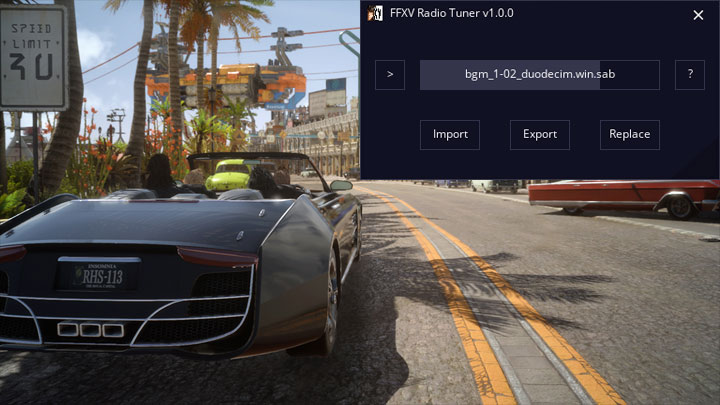
FFXV Radio Tuner is a mod for Final Fantasy XV, created by Lulech23.
Description:
Radio Tuner is a simple application for Final Fantasy XV: Windows Edition to completely customize your roadtrip audio experience. Listen to built-in tunes outside the game, export them to your own MP3s, or add your own music library into the game via file replacement--all in a few clicks with a simple GUI.
Setup
Simply download and extract the contents of the .zip file anywhere on your hard drive. No installation is required.
Known Issues
Not all *.sab/*.mab files are compatible with Radio Tuner. You may receive error messages from the application itself or in-game audio may fail to play as expected. Use at your own risk!
In-game audio length is limited 18 minutes max. If the replacement track is longer, it will be cut off.
How-to
1. Unlock Music
Important! Before you can actually listen to any modified tracks, you must have unlocked them in-game. This can be achieved at many gas stations and other vendors throughout Eos who offer music albums for a small fee.
2. Import
Run FFXV Radio Tuner and wait for the application to load. Once it's ready, import a *.sab file from your Final Fantasy XV's ...\SteamLibrary\SteamApps\common\FINAL FANTASY XV\datas\sound\resources\20000music\jp\ folder. This is where the Regalia's music is stored (as opposed to regular game soundtrack).
Once the file has been imported, you can listen to it directly within Radio Tuner. Click the Play button on the left to begin, and click anywhere in the center status box to adjust volume.
3. Export (Optional)
Radio Tuner features the ability to export FFXV audio to a variety of more common formats, such as MP3, OGG, and WAV. Find a tune you really like? Add it to playlists of your own!
4. Replace
To add your own music to Final Fantasy XV, you'll need to replace a built-in track. Once you've imported a track you have unlocked in the game, click Replace and navigate to the audio file you'd like to replace the in-game track with. Input audio files can be virtually any format, including MP3.
Important! *.mab files are not currently replaceable.
Once a file has been selected, a backup of the original will be made (with the extension *.orig) and your track will be converted to FFXV format in its place. To verify everything worked correctly, import the file again and have a listen!
- Last update: Saturday, January 18, 2020
- Genre: RPG
- File size: 18.6 MB