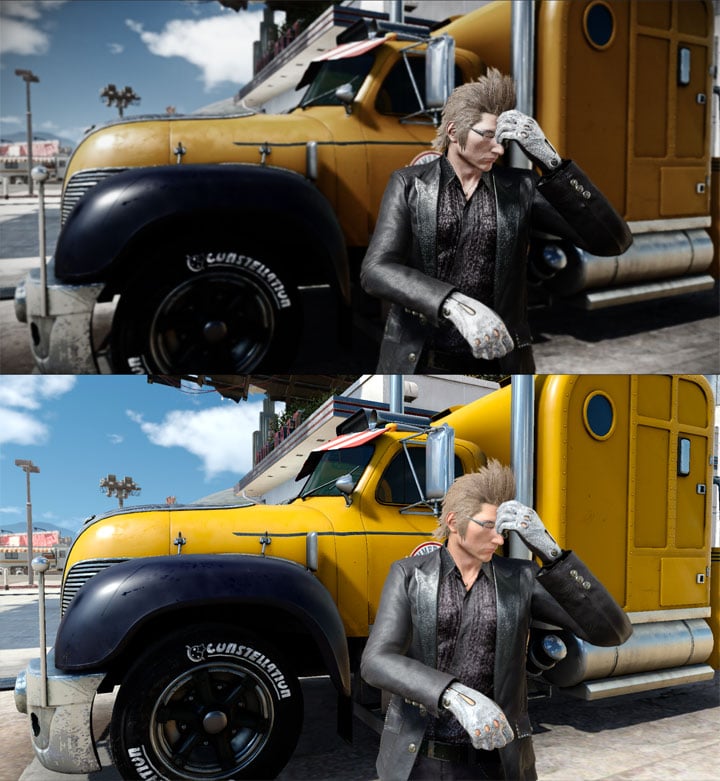
Modded version on top, vanilla on the bottom.
Final Flash - a Cinematic ReShade with DoF is a mod for Final Fantasy XV, created by TheMercsAssassin.
Description (in author’s own words):
This uses the ReShade 3.0 framework to deliver realistic and cinematic, knock-your-socks-off visuals. Almost every cinematic feature is on a toggle key... and there are many, DoF and lens flares to lens dirt, anamorphic camera distortion, and godrays. Please let me know if you need help disabling a feature or tweaking a setting to your liking.
Also, toggle off the reshade DoF with the division key on the numberpad during cutscenes to avoid unintended blur.
I've been working on this preset since the game launched, as in that's all I've done with the game instead of actually playing it, lol. I do hope the work shows.
CRITICAL INSTALL INSTRUCTIONS:
1) Once you've installed ReShade through the reshade.me page, you must then go to the in-game ReShade settings menu and make sure your settings are as follows:
RESHADE_DEPTH_LINEARIZATION_FAR_PLANE=10000.0
RESHADE_DEPTH_INPUT_IS_UPSIDE_DOWN=0
RESHADE_DEPTH_INPUT_IS_REVERSED=0
RESHADE_DEPTH_INPUT_IS_LOGARITHMIC=1
Then, go back to the main "Home" reshade menu tab and click "reload" at the bottom of that reshade menu.
Failure to do this will render your entire screen either 100% blurry or give you odd ghost transparent projections everywhere DOF should be while Depth-of-Field (DoF) is on.
2) After finishing all the install steps below, you need to overwrite the default "reshade-shaders" folder with the one included in this download in your main Final Fantasy XV folder, where the game's .exe file is. Failure to do this will give you massive lens dirt splotches that are discolored and extremely bright bloom.
INSTALLATION INSTRUCTIONS:
1) Download latest version of ReShade from here: https://reshade.me/
2) Run the .exe in admin mode and select "ffxv_s.exe" in your Final Fantasy XV main folder, where the game's .exe is.
3) Choose the DirectX 10+ version
4) Say yes when it ask if you want to download a collection of shaders.
5. Now download my preset here. Put the three preset .ini files in your game's main folder where you found "ffxv_s.exe" and where your reshade-shaders folder should now also be installed. Overwrite the reshade-shaders folder with my own reshade-shaders folder.
Run your game and after you get a message in a grey box saying reshade effects have loaded, press Shift+F2 simultaneously to open the in-game ReShade GUI. Select the .ini file from that drop down menu. Toggle the effect with scroll-lock key. You can change these keys in the ReShade's settings menu.
Click continue until the boxes go from red to gray/clear.
6. Go to the Critical Instructions section above and follow those steps.
7. Done. Your new ReShade should be making your game look fapping sexy by this point (I hope).
CONTROLS & HOTKEYES:
-DoF main blur - / (the division key) on the numberpad
-Alternate, more fancy and cinematic DoF (disable the main Matso DoF first. This one is off by default and is not as smooth as the regular DoF) - page down
-Softer distant DoF (LightDof)- 1 on numberpad
-Boom and lens flares and certain lens dirt - 6 on numberpad
-Anamorphic camera lens (lens distortion) and chromatic aberration- 2 on numberpad
-Letterboxing (black bars) - 0 on numberpad
-Vignette (darkening in corners) - * on numberpad
-Ambient light and lens dirt (disabled by default) - decimal-point (dot) on the numberpad
-Gaussian Blur (softens the image) - 9 on numberpad
-LiftGammaGain (turning this off will drastically brighten and, to me, overexpose the image, but you may like it) - 4 on numberpad
-Tiltshift (constant soft blur towards bottom of the screen, off by default) - 8 on the numberpad --- this effect may not scale well on resolutions beyond 1920x1080p, resolution scaling, or monitors with aspect ratios other than 16:9, so toggle this off if you get insane world-ending blur where you can't see anything, it shouldn't look that way.
CRASHING AND UI/HUD FIX
1. For me, the game crashes if I use any form of ReShade or SweetFx in fullscreen mode. So you must enable borderless window mode to use ReShade if yours also crashes when trying to load the game with Reshade enabled.
2. Recently I've needed to rename my reshade files, "dxgi.ini" and "dxgi.dll" to "d3d11.ini" and "d3d11.dll", respectively, to get the game to stop crashing on launch.
3. I've tested and optimized this ReShade for the game's default in-game brightness. Tested on ultra settings with sahdows on average or high. TAA aliasing. Ambient occlusion off, but use the NVIDIA VXAO instead (looks much better than the standard AO anyway).
IMPORTANT THINGS TO NOTE FOR FINE TUNING THE RESHADE:
Bloom and Lens Flares: Adjust fBloomThreshold or the fBloomAmount up or down in very small increments (of about 10 or 20) until you are happy with how much bloom you want. Increasing fBloomThreshold the value will give less bloom, while increasing fBloomAmount will give you more bloom (and more lens dirt, as the amount of bloom impacts how much dirt you get, which you can then lower the dirt amount sepeately).
To disable the lens flares from bright lightsources at night, like the moon and interior lights, look under the Bloom effect in the ReShade in-game menu and look for the setting "bAnamFlareEnable" and change it from on to off with the drop down menu.
Brightness: If it is too dark lower the gamma setting in the in-game Reshade "Tonemap" setting in increments of 20. OR raise the "brightness" in the RehShade Technicolor 2 setting.
DoF (depth of field blur): To pull the DoF on far away out-of-focus areas closer to the player (and make it stronger), adjust DOF_FarBlurCurve up or down. Increasing the value will give less blur.
- Last update: Sunday, September 2, 2018
- Genre: RPG
- File size: 7.7 MB