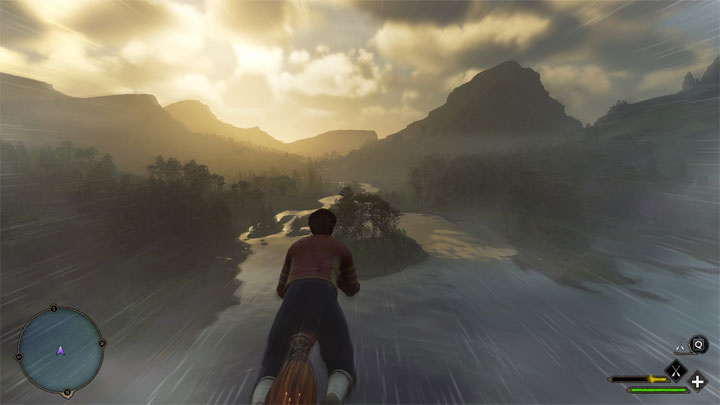
Faster and better brooms - Customizable and can be toggled on and off is a mod for Hogwarts Legacy, created by yakuzadeso.
Description:
Better control over your broom! Faster acceleration! Faster hovering speed, shift boost speed, right-click boost speed! More responsive hovering turns, shift boost turns, right click boost turns! Can edit every value yourself, customize your experience and toggle it on and off.
How to install the mod:
Extract the archive to „…Phoenix\Binaries\Win64” in the place where you installed the game.
In the game, the mod can be turned on/off with ALT+Z.
Changes made (latest version of the mod includes all of these changes in one file but it can be customized by changing its settings):
FasterAndBetterBrooms-Acceleration
Edits the time to reach max speed. Reach your broom's max speeds (Hover/Boost/Passive) instantly!
FasterAndBetterBrooms-BoostForward
Edits right-click boost's speed. Doubled values.
FasterAndBetterBrooms-BoostTurns
Edits right-click boost's turn responsiveness. Doubled values felt perfect.
FasterAndBetterBrooms-HoverForward
Edits hovering speed (when you just move without hitting shift or right-click). Doubled values.
FasterAndBetterBrooms-HoverTurns
Edits hovering turn responsiveness. Doubled values felt perfect.
FasterAndBetterBrooms-PassiveForward
Edits shift boost's speed. Doubled values.
FasterAndBetterBrooms-PassiveTurns
Edits shift boost's turn responsiveness. Doubled values felt perfect.
FasterAndBetterBrooms-AIO
All of the above in one file! Only need one AIO variant.
FasterAndBetterBrooms-HoverVertical
Edits hovering vertical speed (going up/down with CTRL/Spacebar). Doubled values.
FasterAndBetterBrooms-PassiveVertical
Edits shift boost's vertical speed (going up/down with CTRL/Spacebar). Doubled values.
FasterAndBetterBrooms-BoostVertical
Edits right click boost's vertical speed (going up/down with CTRL/Spacebar). Doubled values.
FasterAndBetterBrooms-AIOVertical
Same as AIO file but with vertical speed changes included. Only need one AIO variant.
Settings:
To customize the mod open its main.lua file with Notepad
Every change is enabled by default. You can disable whatever you want by setting it to false. You can also edit whatever value you want. For example, if you want x3 Boost speeds:
?--Boost speed values
BoostForwardImpulseValue = 1500000 --default 500000
BoostForwardStartImpulseValue = 600000 --default 200000
BoostForwardMaxSpeedValue = 6000 --default 2000
Changing keybinds
To change keybinds open the mod's main.lua file with Notepad
So for example, to change the "Main Hotkey" to F we do:
--Main Hotkey
Key = Key.F --Change "Z" to whatever key you want. Valid keys on the mod's page.
And if you want to disable the modifier key ALT set ModifierKeyIsEnabled to false.
Installation:
Download UE4SS-RE/RE-UE4SS xinput version. Direct download link: UE4SS_Xinput_v2.5.1?
Drop its files in Phoenix\Binaries\Win64.
Download whatever file you want from this mod and drop it in Phoenix\Binaries\Win64\Mods.
Using RE-UE4SS to edit values yourself in real time:
Open UE4SS-settings.ini with Notepad or whatever text editor you're using and change "EnableHotReloadSystem = 0" to "EnableHotReloadSystem = 1"
You can open this mod's main.lua file with a text editor to edit it. I've included comments and the default values in them. For example, if you want x3 Boost speeds:
?--Boost speed values
BoostForwardImpulseValue = 1500000 --default 500000
BoostForwardStartImpulseValue = 600000 --default 200000
BoostForwardMaxSpeedValue = 6000 --default 2000
Where you can change the "1500000" in "BoostForwardImpulseValue = 1500000" to whatever value you want.
The comments are the text/values next to the double "-" symbol.
After editing the file save it and you can reload the mods in real time while in-game by clicking the "Restart all mods" button in the RE-UE4SS console
After clicking "Restart All Mods" you need to reload your save file or use the fast travel map for the mods to re initialize.
Editing the speed requires to edit Impulse, StartImpulse and MaxSpeed together or you might not see that much of a difference.
- Last update: Wednesday, April 12, 2023
- Genre: RPG
- File size: 2.3 MB