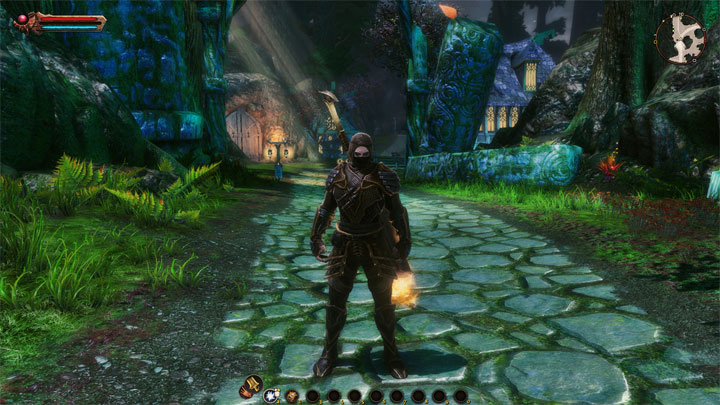
ReReckoning_ReShade is a mod for Kingdoms of Amalur: Reckoning, created by Jeff B.
Description:
ReReckoning_ReShade, removes the game's blurry filter that causes everything to have an ugly green appearance; improves it's color-palette, contrast, lighting & sharpness. If you feel my ReShade/Mod improved your "KOA: ReReckoning" gaming experience please consider "endorsing" my mod, so more people will be able to see it.
Instructions:
How To install my file:
-Extract the "ReReckoning_ReShade.7z" file with "7Zip".
-Open the "ReReckoning_ReShade" folder, then copy all of it's content's & paste them into the "Kingdoms of Amalur ReReckoning" game folder (where the "koa.exe" is located).
"Reckoning.exe" Folder Location: ( C or D:\SteamLibrary\steamapps\common\Kingdoms of Amalur ReReckoning ).
Before Launching The Game Open The "ReShade.ini" File With Notepad Or Notepad++ & Underneath [General] Make Sure The "CurrentPresetPath" is set to the correct location of your "Kingdoms of Amalur ReReckoning Game Folder Where You Installed The Mod Files That Contains The "ReReckoning.ini" File.
Example: CurrentPresetPath=D:\SteamLibrary\steamapps\common\Kingdoms of Amalur Re-Reckoning\ReReckoning.ini
What To Do If The Game Doesn't Launch Or Your Controller Isn't Working:
-Open your "Kingdoms of Amalur ReReckoning" installation folder (C or
D:\SteamLibrary\Steamapps\common\Kingdoms of Amalur ReReckoning)
& rename the "dxgi.dll" to "d3d11.dll".
How To open the ReShade menu in-game & Select My Preset:
-Press the NUMPAD 1 key on your keyboard to open the ReShade menu
-Once the menu is open, press the drop-down arrow & select my file "ReReckoning.ini" from the list.
How To Close ReShade Menu:
-To close the ReShade menu, press the NUMPAD 1 key on your keyboard.
How To Toggle Preset On/Off:
-To toggle the preset on/off, press the NUMPAD 2 key on your keyboard.
- Last update: Saturday, October 3, 2020
- Genre: RPG
- File size: 37.2 MB