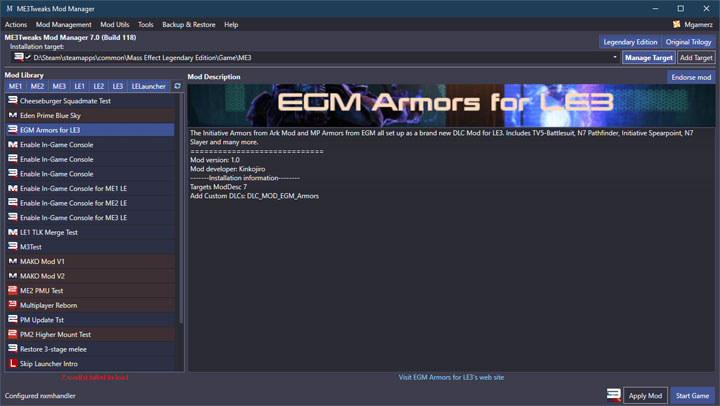
ME3Tweaks Mod Manager is an open source tool for Mass Effect Legendary Edition and original trilogy, created by ME3Tweaks. It’s also worth visiting the project’s Discord.
Description (in author’s own words):
Mod Manager for Mass Effect Trilogy and Mass Effect Legendary Edition
Ensure you use the correct terminology when talking about games:
ME1 = Mass Effect (2008)
ME2 = Mass Effect 2 (2010)
ME3 = Mass Effect 3 (2012)
LE1 = Mass Effect (Legendary Edition)
LE2 = Mass Effect 2 (Legendary Edition)
LE3 = Mass Effect 3 (Legendary Edition)
ME3Tweaks Mod Manager is a mod manager that supports all three Mass Effect trilogy games, as well as all three legendary versions of the games, plus the Legendary Edition launcher. This program is designed to make it easier to install mods for the Mass Effect series for end users.
Importing mods is as simple as dragging their archive files onto the interface, and either importing them into your mod library, or directly installing them. Importing them allows you the ability to update the mods as well as various other features within Mod Manager.
ME3Tweaks makes it it's mission to make tools that are easy to use for everyone, and ME3Tweaks Mod Manager is a tool for end users who want to mod their game without a huge hassle. Modding Mass Effect games can be difficult and time consuming, and I made this tool specifically to help end users have a good user experience.
ME3Tweaks Mod Manager is specifically geared towards the end user who knows little to nothing about modding and doesn't like to read directions (most users will never read this text - something I know for a fact given how much I have to deal with users). A good tool should most be mostly self sufficient in its use. I aim to make Mod Manager a tool that you shouldn't need the directions for to use.
A good user experience is good for everyone. It's good for the user, it's good for the developer, and it's good for the modding scene. It's also good for my resume.
ME3Tweaks Mod Manager is backwards compatible with all Mass Effect 3 Mod Manager mods. Just drag and drop the mod zip/rar/7z file onto the interface and either install or import the mod.
ME3Tweaks Mod Manager supports all three trilogy games and their legendary edition counterparts.
All ME3Tweaks Mod Manager instances on NexusMods are the same - you only need one copy of it, there are no game specific versions. Currently this is a beta build. The builds on other Nexus pages will not work with LE.
Mod installation order
Not sure what order mods should be installed in? Here's a general guide.
1. Content mods (package files)
2. Textures (installed with Mass Effect Modder)
This section will need to be rewritten for LE!
0. Does your mod say to use ME3Explorer at any point of installation? If so, skip those steps. ME3Explorer is a modding toolset for developers - it is not for end users and was never designed to be. ASI Mod Manager is the only exception to this for now.
1. Large content mods such as Expanded Galaxy Mod should be typically installed first, as other mods are built to support these through compatibility patches.
2. All other smaller content mods (content mods contain pcc, upk, u, or sfm files). Many third party mods that don't explicitly state they support Mod Manager will still work - try dropping their zip/rar/7z archives onto Mod Manager! I have built extensive support for most third party content mods and will continue to work on improving compatibility over time.
3. Texture mods such as ALOT. You install these through ALOT Installer or Mass Effect Modder.
4. You do not install anything after installing textures. You will break a lot of things if you do. Seriously, do not try it.
ME3Tweaks Mod Manager enhances the modding experience by following scene guidelines such as not installing package files after ALOT, ensuring binkw32 bypasses are installed, AutoTOC for ME3, and more.
New features for ME3Tweaks Mod Manager include directly installing mods from archive (no import required), package compression on import and install (coming soon), starter kits for all three games to help jump start your next mod, granular file restores and more.
Familiar but streamlined interface
ME3Tweaks Mod Manager is a complete rewrite of Mass Effect 3 Mod Manager, and as such is designed to keep a consistent interface design. While some menu items have moved, the main process for installing a mod is the same: Drag the archive file onto the window, and import the mod. Then just click install. ME3Tweaks Mod Manger is even faster, now supporting directly installing mods from archives - no import step required.
Dialog windows have mostly been left behind in Mass Effect 3 Mod Manager, so don't have to worry about windows getting lost, or being unable to move the window until the current dialog is closed. A new dark theme makes it fit better with your dark theme lifesystem, but you can keep using light theme if you want.
Deployment tools for developers
Beginning work on a mod? Use Starter Kit from the tools menu to generate a blank, working DLC mod for any of the three games. Ready to post it online for others to use? Deploy it from the mod utils menu to check for common issues such as audio or texture issues, then let Mod Manager package it into an optimized 7z archive for maximum compression with fast unpacking for end users.
Want to conditionally install (or not install) items? Mod Manager's moddesc file format allows you to specify adding or removing files at installation time to your mod if, for example, a user doesn't have specific DLC files that your mod might depend on.
Supported operating systems include:
- Windows 8.1
- Windows 10
Windows 7 is NOT supported. The program may run on Windows 7 but I will not support any issues that arise from users on that OS.
Disk space requirements vary based on how much you backup and what mods are installed.
Internet connection is required for dynamic features such as the Third Party Importing Service. While an internet connection is not required after the first boot, some features will not work as well without a connection to ME3Tweaks or GitHub.
- Last update: Wednesday, December 6, 2023
- Genre: RPG
- File size: 69.3 MB