MewgenicsSaveEditorto narzedzie do Mewgenics, której autorem jest Wawax007.
Description:
A standalone save file editor for Mewgenics. Edit cats, game properties, NPC progress, unlocks, and inventories with safe save writes and automatic backups.
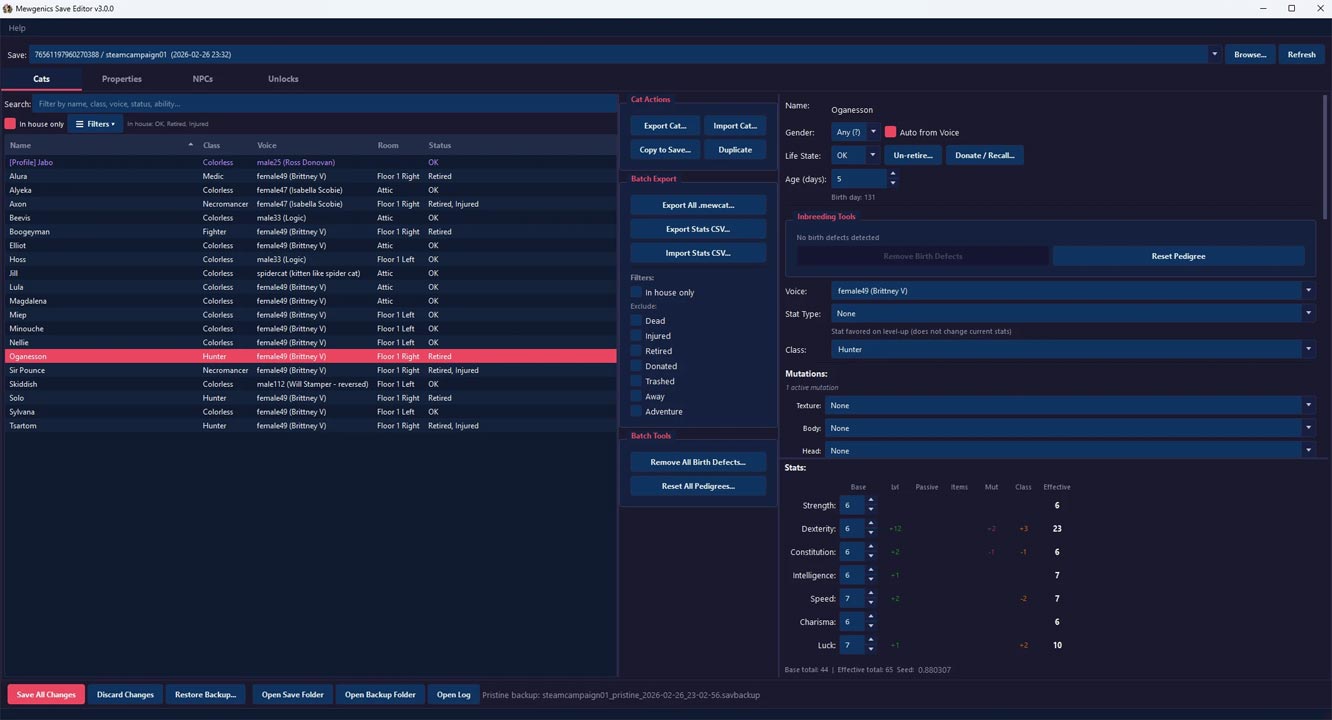
Cat Editor
- Edit cat name, class, voice, skin, gender, stat type, life state, and abilities
- 14 typed ability slots: A1-A10 (active) and P1-P4 (passive) with in-game description tooltips
- Edit base stats with full breakdown: Base, Lvl, Passive, Items, Mutations, Class, Effective
- Edit mutations per body part (15 parts) with in-game description tooltips
- Remove birth defects (mutations + passives) and reset pedigrees (per-cat or batch)
- Toggle donated status: recall cats from NPC buildings
- Unretire cats
- Status handling and filters: In House, Retired, Donated, Injured, Dead
- Search/filter cats and quickly manage large rosters
- Supports team cats, profile cat, and archived/winning-team cats
- Export/import cats as .mewcat, duplicate, and copy between saves
- CSV export/import for cat stats + abilities
Properties Editor
- Edit core values (gold, food, collars, day, storage upgrades, etc.)
- Force next weather selector (59 weather types)
- House boss difficulty selector (8 difficulty levels)
- ~150 injectable properties across 10 themed sections with risk-level badges
- "Unlock All Safe Properties" preset button
- Auto-discovers additional properties in the save
- Search/filter by key or description
- Contextual hints and warnings
- JSON export/import for property sets
- Sensitive properties (Steam ID, random seed, etc.) stay protected
NPC Editor (Experimental)
- Edit building donation counters
- Toggle quest completion
- Toggle special idol unlocks
- Queue side-quest items into storage inventory
- Steven save-scum reset (clears all 3 tracking systems)
- "Neutralize Steven" mode: inject SQLite triggers to permanently block save-scum detection
Unlocks Editor
- 7 unlock categories: Classes, Active Abilities, Passive Abilities, Equipment Items, Bosses, Radio Songs, Level Groups
- Per-category Unlock All / Lock All buttons
- "Unlock Everything" one-click button for all 7 categories
- Searchable tree widgets with human-readable display names
- Unknown items preserved on save
Import / Export
- .mewcat compatibility: read v1/v2, write v2
- Export one cat or all cats
- Import a .mewcat into the selected cat slot
- Cross-save copy between different saves
- CSV export/import for spreadsheet workflows
- SHA256 integrity checks for safe transfers
Backup & Safety
- Steam Cloud warning: detects active sync and recommends disabling it
- Pristine backup: first-ever backup is kept permanently and never rotated out
- Automatic timestamped backup before each save (up to 20 rotating)
- Backup management and restore flow built-in (pristine backups are marked)
- Atomic save transaction: if validation fails, nothing is committed
- Post-write verification on edited data with automatic rollback on failure
- External modification detection: warns before reloading if pending edits exist
Usage Guide
Important: Close Mewgenics before making changes.
To edit cats:
- Launch MewgenicsSaveEditor
- Select a save file from the dropdown
- Open the Cats tab and edit fields
- Click Save All Changes
To edit properties:
- Open the Properties tab
- Adjust values (weather, difficulty, injectable properties, etc.)
- Click Save All Changes
To edit NPC progress:
- Open the NPCs tab
- Adjust quests/idols/counters/items
- Click Save All Changes
To manage unlocks:
- Open the Unlocks tab
- Toggle individual unlocks or use Unlock All / Lock All
- Click Save All Changes
To restore a backup:
- Use File > Restore Backup
- Pick the backup by timestamp
Installation
Download and extract the MewgenicsSaveEditor folder
Run MewgenicsSaveEditor.exe
Troubleshooting
- "No save files found" -> launch the game once, then retry
- "Game is running" -> close Mewgenics before editing
- Changes not visible -> save in editor, then restart the game
- Antivirus warning -> exe is unsigned; whitelist if needed
- Steam Cloud overwriting edits -> disable Steam Cloud for Mewgenics (Properties > General)
- Linux: app won't start -> install missing Qt libs: sudo apt install libxcb-cursor0
- Last update: Sunday, March 1, 2026
- Genre: RPG
- File size: 40.9 MB