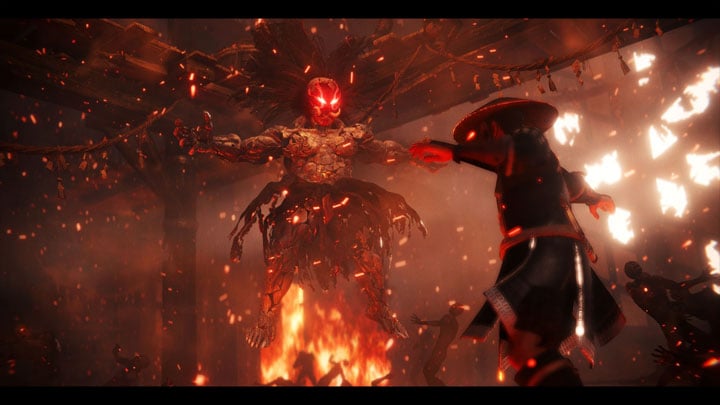
Nioh 2 Redux - Vivid and Cinematic Enhancements with Balanced Optional Effects - 3 ReShades is a mod for NiOh 2: The Complete Edition, created by TheMercsAssassin.
Description:
NIoh 2 Redux ReShade collection brings a pseudo HDR look and adds OPTIONAL, well-crafted cinematic effects to modernize the look of the game to be more in line with other AAA releases. 3 presets available at launch - vivid, natural, and gritty.
WHAT IS THIS?
I was disappointed with the PC version of Nioh 2's visuals after waiting almost a year for it to get ported from PS4. Many textures still look quite muddy and the image space is often quite washed out. Nioh 2 Redux ReShade is my attempt to make this masterful game look as stunning as I imagined it, bringing a pseudo HDR look and adding optional, well-crafted cinematic effects to modernize the look of the game to be more in line with other AAA releases.
In this ReShade you'll find 3 color grading options that carefully analyzes changes to each color and lighting element to find a sweet spot between punchy visuals, believability and playability. While blacks and darks are indeed darker in this ReShade collection, they are largely handled by a shader that I've set up to automatically adapt to the image viewpoint. In effect, this means that the corners and sides of the screen will remain darker and richer to make the image pop while any area you focus the camera on will automatically adjust to more brighter visibility conditions. Basically dark areas won't be overly dark. This ReShade has been thoroughly tested to ensure maximum playability across a variety of levels. I have NEVER died because the visual effects or lighting changes obscured my view, so now it is ready for all of you.
ALL PICTURES WERE CAPTURED USING THE VIVID PRESET.
I worked on this exclusively since launch, so I really hope you like it :)
Cheers,
Merc
HOTKEYS:
All of these are remappable once in game. (make sure numberpad is enabled or the controls won't work).
-Toggle ReShade menu on-off - HOME (can be chagned in ReShade's settings menu)
-Toggle all ReShade effects - must be set in ReShade's settings menu (I like to use END, personally).
-Toggle depth-of-field - / on numberpad
-Toggle slight lens distortion (warping in corners of screen) & chromatic aberration (color bleeding on objects' edges toward the edges of the screen) - 1 (effect 1) and 2 (effect 2) on numberpad
-Toggle sharpness - 5 on numberpad
-Toggle film grain - 3 (effect 1) and 7 (effect 2) on numberpad
-Letterbox ("Teh Black Barz") - 0 on numberpad
-Vignette (darkness around the corners, should definitely cut this off is you cut border off) - * on numberpad
INSTALL INSTRUCTIONS:
1. Download ReShade 4.9.1 from here: https://reshade.me/?.
(quick install instructions for people that know what they're doing and have installed ReShade 4.9.0 framework many times before. What you need to know is highlighted in light blue text below. EVERYEONE ELSE, please read the step-by-step instructions).
2. Run the ReShade .exe, select the box that says "click here to select a game", and choose your nioh2.exe, usually found here: "...\Steam Install\steamapps\common\Nioh2" and click "open"
3. Select the DirectX 10/11/12 for the API
4. Under "select effect packages to install", select the following:
Sweet FX by CeeJay
qUINT by Marty McFly
Color Effects by prod80
Fubax shaders (near bottom of menu)
5. Click "Ok."
6. Under SweetFx uncheck all and recheck only "Border", click ok.
7. Under qUINT uncheck all and recheck "qUINTdoF" and "qUINTlightroom", click ok.
8. Under Color uncheck all and recheck "PD8006_Film_Grain", click ok.
9. Under Fubax uncheck all and recheck "Prism", click ok.
10. Close the ReShade setup box.
11. Now download the main file .zip file from here on Nexus. Open the zip file.
12. Copy and paste the .ini files and reshade-shaders folder into your Nioh 2 folder, the folder where your game's Nioh2.exe is. Overwrite anything it ask, if it asks, (don't worry, you're just overwriting ReShade files, not your game files).
13. Launch the game. Don't press anything until the game loads up pass the splash screen, you should see the ReShade notification in the top-left of the screen in a big grey box telling it's loading its effects.
14. Open the ReShade menu with "Home" and select skip the ReShade tutorial, then use the drop down menu to select the preset you wish to use. The Vivid preset with the Autofocus DoF is the flagship (main) file of the collection, but no reason not to try them all.
I strongly suggest you go the ReShade's "settings" tab and set a toggle key for the ReShade itself so you can turn it on and off easily. I use the "END" key for my toggle key, personally.
15. -- If you use DLSS or resolution scaling, please see skip this step and instead refer to the stickied post in the "posts"/comments tab of the mod page. Otherwise, please proceed with this final step to complete installation --
Open the ReShade menu and at the top of the reshade menu, click "D3D11" tab all the way on the right. Check the box that says "Copy depth buffer before clear operations". Finally, check the new box that appears and says "CLEAR 2".
If you don't do this, depth of field (DOF) won't work correctly AT ALL and will instead blur random parts of your screen in indescribable and terrible ways.
16. Profit?
?
CRASHING FIXES & FAQ:
1. For me, all games used to crash if I use any form of ReShade or SweetFx in fullscreen mode. So you could try to enable borderless window mode to use ReShade if your game crashes when trying to load the game while in fullscreen mode with Reshade enabled.
2. I used to need to rename my reshade file "dxgi.dll" to "d3d11.dll" to get the game to stop crashing on launch.
3. Disable the other overlays and hooks (like frame rate monitoring software) if crashing continues.
4. I've tested and optimized this ReShade for the game's default in-game brightness. Tested on ultra settings.
5. Toggle depth-of-field - / on numberpad
6. Inventory or map slightly blurred and it's driving you nuts? Just look directly at the ground or away from something very close to the camera (like the sky) when going into the menus, like don't look directly at a wall that you're taking cover behind and the menu won't ever get blurred. Or, simply use the toggle key to turn off the Depth of Field shader when popping into menus. I use a mix of both methods, whatever seems quickest at the time.
- Last update: Monday, March 15, 2021
- Genre: RPG
- File size: 35.8 MB