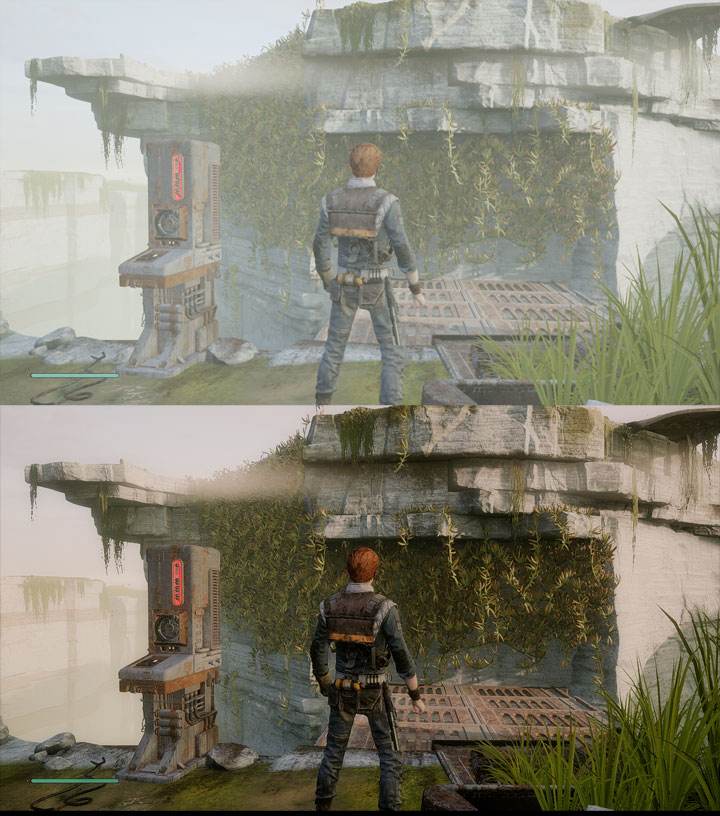
The file ReSpawn_ReShade v.1 is a modification for Star Wars Jedi: Fallen Order, a(n) action game. Download for free.
File Type: Game Mod
File Size: 2.1 KB
Last Update: November 29, 2019
Downloads: 1.1K
Last 7 days: 5
Problems with download? [email protected]

ReSpawn_ReShade is a mod for Star Wars Jedi: Fallen Order, created by Jb0238177.
Description (in author’s own words):
Removes the games washed-out contrast filter & adds better colors, lighting, shadows & sharpness; You will need to set the in-game Brightness Level to 4, set the Graphics Settings to Medium. Also Disable Motion Blur, Film Grain & Chromatic Abarration in the game's Settings for the preset to look correctly.
Instructions:
This is just the .ini file, you will need the latest version of ReShade to use it. You can get it here: (htttps://reshade.me)
How To Extract My file & Install it:
-Extract my "ReSpawn_ReShade" folder & you will now have my "ReSpawn_ReShade.ini" config file.
-Place the "ReSpawn_ReShade.ini" config file in the "Star Wars Jedi Fallon Order Win64 folder" where the game's .exe is located.
-Here is the Win64 folder location: (Star Wars Jedi Fallen Order\SwGame\Binaries\Win64).
How To Install ReShade:
-Launch the ReShade Installer & select the game's "starwarsjedifallenorder.exe" Folder Location: (Star Wars Jedi Fallen Order\SwGame\Binaries\Win64)
-Select the game's API: You can choose DX10+ or OpenGL
-ReShade will ask if you want to download any .fx files? Select all of the .fx files then click okay to download & install them.
-ReShade should now say Succeeded! You can close the ReShade Installer.
How To Launch The ReShade Overlay Menu & Select My Preset:
-Once you are in-game press the Home (pos1) key on your keyboard to open the "ReShade Overlay"
-Click the drop-down arrow to open the drop-down menu & Select my preset "ReSpawn_ReShade"
-If you do not see my preset you will have to manually add it by clicking the + button next to the drop-down arrow, then type in the full name of my preset just like this: ReSpawn_ReShade.ini & press Enter.
-To close the "ReShade Overlay" press the Home (pos1) key on your keyboard.
What To Do If Game Crashes To Desktop Or Your Controller Isn't Working:
-Locate the "Star Wars Jedi Fallen Order Win64 folder" Folder Location: (Star Wars Jedi Fallen Order\SwGame\Binaries\Win64)
-Rename the dxgi or OpenGL file that ReShade Installed into the Win64 folder to d3d11
-If renaming the file doesn't work you will need to disable your "Steam Overlay" as it can conflict with the "ReShade Overlay".
Game Mod Size: 21.7 KB DL: 197 Upd.: May 5, 2024
Game Mod Size: 25.9 KB DL: 871 Upd.: December 9, 2022
Game Mod Size: 2 MB DL: 1.1K Upd.: July 23, 2022
Game Mod Size: 2.2 MB DL: 3.9K Upd.: June 16, 2022
Game Mod Size: 2.7 MB DL: 343 Upd.: January 9, 2022
Game Mod Size: 7.8 KB DL: 1K Upd.: January 8, 2022
Game Mod Size: 70.9 KB DL: 6.1K Upd.: December 15, 2021
Game Mod Size: 7.9 KB DL: 1.1K Upd.: December 12, 2021
Game Mod Size: 46.4 MB DL: 1.2K Upd.: December 12, 2021
Game Mod Size: 216.8 MB DL: 1.5K Upd.: December 11, 2021
Game Mod Size: 71.3 MB DL: 980 Upd.: December 11, 2021
Game Mod Size: 1.5 KB DL: 515 Upd.: August 22, 2021
Game Mod Size: 1.6 KB DL: 1.4K Upd.: August 21, 2021
Game Mod Size: 1.5 KB DL: 195 Upd.: August 21, 2021
Game Mod Size: 1.2 MB DL: 3.6K Upd.: August 16, 2021
Game Mod Size: 68.5 MB DL: 818 Upd.: July 19, 2021
Game Mod Size: 21.6 MB DL: 2.1K Upd.: April 20, 2021
Game Mod Size: 7 MB DL: 1.6K Upd.: April 19, 2021
Game Mod Size: 6.3 KB DL: 1K Upd.: February 18, 2021
Game Mod Size: 239.1 KB DL: 299 Upd.: February 17, 2021
Game Mod Size: 28.2 KB DL: 558 Upd.: January 20, 2021
Game Mod Size: 5 KB DL: 306 Upd.: January 12, 2021
Game Mod Size: 99.8 MB DL: 810 Upd.: January 9, 2021
Game Mod Size: 5.1 MB DL: 706 Upd.: January 4, 2021
Game Mod Size: 32.3 MB DL: 528 Upd.: January 1, 2021
Game Mod Size: 21.3 MB DL: 2.8K Upd.: December 16, 2020
Game Mod Size: 2.5 MB DL: 1K Upd.: December 16, 2020
Game Mod Size: 5.6 MB DL: 1.6K Upd.: December 16, 2020
Game Mod Size: 1.2 KB DL: 481 Upd.: December 8, 2020
Game Mod Size: 4.8 MB DL: 1.3K Upd.: December 7, 2020
Game Mod Size: 30.1 MB DL: 1.7K Upd.: December 5, 2020
Game Mod Size: 19 KB DL: 377 Upd.: December 4, 2020
Game Mod Size: 7.5 KB DL: 894 Upd.: December 3, 2020
Game Mod Size: 51.2 MB DL: 3.9K Upd.: December 2, 2020
Game Mod Size: 9.4 MB DL: 456 Upd.: December 1, 2020
Game Mod Size: 51.9 MB DL: 2.3K Upd.: November 30, 2020
Game Mod Size: 24.4 MB DL: 1.1K Upd.: November 30, 2020
Game Mod Size: 26 KB DL: 439 Upd.: July 6, 2020
Game Mod Size: 7.5 MB DL: 1.1K Upd.: June 7, 2020
Game Mod Size: 1.1 MB DL: 651 Upd.: January 2, 2020
Game Mod Size: 484.8 KB DL: 957 Upd.: December 16, 2019
Game Mod Size: 13.7 MB DL: 1.5K Upd.: December 12, 2019
Game Mod Size: 111.4 MB DL: 994 Upd.: November 29, 2019
Game Mod Size: 44.4 MB DL: 1.1K Upd.: November 28, 2019
Game Mod Size: 5091.3 MB DL: 253.2K Upd.: October 28, 2022
Game Mod Size: 1254.7 MB DL: 1.51M Upd.: July 12, 2023
Game Mod Size: 1.6 MB DL: 851.7K Upd.: December 6, 2023
Game Mod Size: 115.8 MB DL: 112.8K Upd.: February 7, 2024
Game Mod Size: 1.2 MB DL: 549.6K Upd.: July 3, 2024
Game Mod Size: 4.3 MB DL: 401.6K Upd.: July 3, 2024
Game Mod Size: 889.9 MB DL: 29K Upd.: November 4, 2025
Game Mod Size: 1 KB DL: 23.7K Upd.: April 6, 2025
Game Mod Size: 41 MB DL: 36.2K Upd.: April 29, 2023
Game Mod Size: 70 KB DL: 172.2K Upd.: September 20, 2020