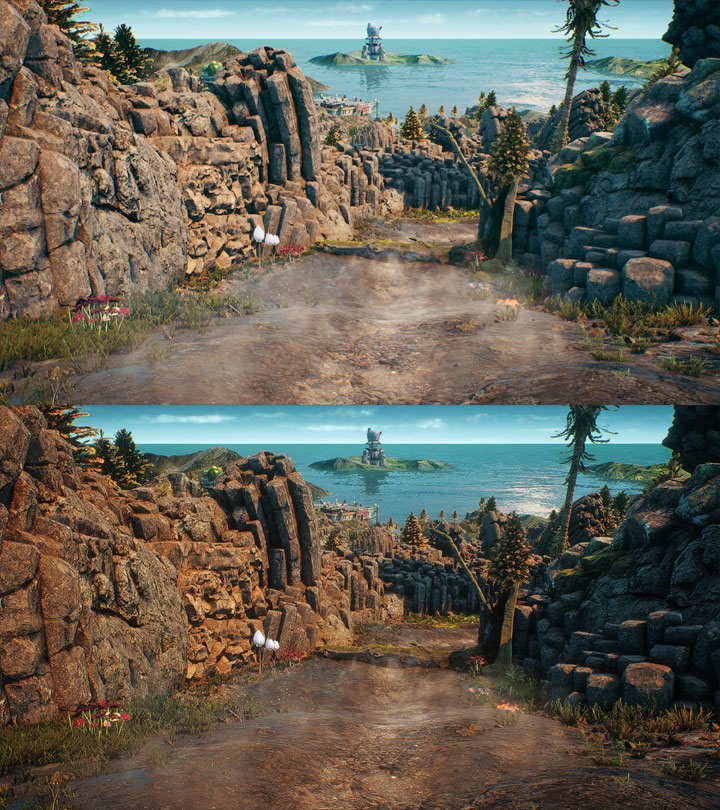
Vanilla game on top, modded one on the bottom.
Obsidian_ReShade is a mod for The Outer Worlds, created by Jb0238177.
Description (in author’s own words):
My preset adds color correction, sharpness & hdr without over-saturating the game's color palette. My in-game graphics settings are on Ultra with the Default Gamma Setting & no Motion Blur. If you like my preset, please endorse it. Thank you!
Instructions:
How To Install My Preset:
-Extract my "Obsidian_ReShade" file with 7Zip & place my .ini file in the game's Win64 folder (The Outer Worlds\Indiana\Binaries\Win64).
How To Install ReShade:
1.) Launch the ReShade Installer & select the game's .exe, which is "IndianaEpicGameStore-Win64-Shipping.exe" located in the game's Win64 folder (The Outer Worlds\Indiana\Binaries\Win64).
2.) Select the game's API - it is Direct3D 10+.
3.) ReShade will ask if you want to download any .fx files? Select all of them, then click okay to download & install them.
4.) ReShade should say Succeeded! You can close the ReShade Installer now.
How To Open The ReShade Menu In-Game & Select My Preset:
1.) Once you are in-game press the Home (pos1) key on your keyboard to open the ReShade Menu Overlay
2.) Click the drop-down arrow to open the drop-down menu & select my preset "Obsidian_ReShade" from the list
3.) If you do not see my preset in the list, you will have to manually add it by clicking the + symbol next to the drop-down menu then type in the full name of my preset just like this: Obsidian_ReShade.ini & press Enter.
4.) To close the Reshade Menu Overlay press the Home (pos1) key on your keyboard
IMPORTANT:
-If your game fails to launch, Crashes To Desktop or your controller isn't working you will need to rename the dxgi file that ReShade has installed into the game's Win64 folder to d3d11. (The Outer Worlds\Indiana\Binaries\Win64).
- Last update: Monday, July 6, 2020
- Genre: RPG
- File size: 1.6 KB