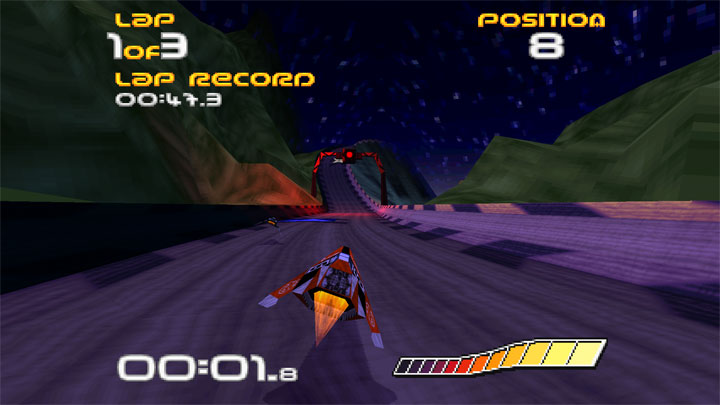
WipeOut Phantom Edition is an enhanced PC source port of the original WipeOut. It uses game data from the PlayStation version and is much more comparable to the PlayStation version than the official PC port.
FEATURES:
Graphics
- Uncapped frame rate: Render frame rate is decoupled from game state simulation using interpolation.
- High resolution rendering: Matches your desktop resolution by default.
- Distant geometry fade: Objects fade into view smoothly, eliminating pop-ins.
- Ship lighting: Ships inherit coloration from track lighting data, similar to WipeOut 2 and 3.
- Increased view distance: See further into the distance.
- Configurable aspect ratio and widescreen support: Adjust screen settings to suit your monitor.
- Optional lo-fi resolution mode: Switch to 320x240 graphics mode.
- Maintained PSX-accurate rasterization and blending: Retains authentic PlayStation look by only using blending features available on original hardware, while also providing high resolution smooth graphics.
Gameplay
- Keyboard and gamepad input support: Choose your preferred control input method.
- Wall collision response options: Modern (Comparable to BallisticNG), Classic (Comparable to WipeOut) and Legacy:
- Wall scrape particle effects and audio: Visual and audio enhancement in Modern and Classic wall collision modes.
Audio
- New music and sound effect system: Similar to PlayStation version.
- 3D audio for sound effects: Spatial audio sources and doppler effect.
UI
- Additional options menus: Configure most of the new features.
- Keyboard and gamepad control configuration: Customize your controls to your preference.
- Technical
- New config file system: Game configuration data and progress is stored in editable text files.
- Automatic game data extraction: The game can automatically extract game data files from provided bin/cue disk image files.
Setup
TL;DR: Download the latest release, put your PlayStation USA-region .bin and .cue files in wipeout/diskimages, and launch the game.
Download the latest release and unzip the wipeout folder to your desired location on your hard drive.
You'll need game data files from the original PlayStation USA-region version of Wipeout. You can either manually provide these files or supply bin/cue disk image files, which can be obtained by ripping a disk you own. The disk image method is preferred as it automatically extracts the music into wav files.
IMPORTANT: Ensure that the game data is from the PlayStation USA-region version of Wipeout. Data from official PC versions won't work.
Disk Image Method
Place Disk Image Files: Locate the wipeout/diskimages directory and place your Wipeout disk image files there.
Ensure Correct Format: Your disk image must be a multi-bin .bin and .cue format. There should be 9 .bin files and one .cue file. Example:
WipeOut USA (Track 1).bin
WipeOut USA (Track 2).bin
WipeOut USA (Track 3).bin
WipeOut USA (Track 4).bin
WipeOut USA (Track 5).bin
WipeOut USA (Track 6).bin
WipeOut USA (Track 7).bin
WipeOut USA (Track 8).bin
WipeOut USA (Track 9).bin
WipeOut USA.cue
The game data should be in "MODE2/2352" format in the first track of the cue sheet, while other tracks should be in "AUDIO" format.
Extraction on Startup: Upon launching, the game will check for missing data files and attempt to extract them from a disk image.
Removal of Disk Image Files: After the game has successfully loaded into the main menu once, the disk image files are no longer required and can be removed.
NOTE: Since reading the file system in the disk image is non-trivial, a hash-based search is performed on the data track of the disk image. This can be slow on systems with less than 8 CPU cores.
Loose File Method
Copying Game Files: If you already possess all the game files (517 in total), copy them directly into the wipeout/wipeoutgame folder. These files can be obtained directly from a PlayStation disk using windows explorer.
Music Files: The downside of this method is that the music, which is stored in Red Book audio tracks on the CD and not in a file system, cannot be copied.
For music, you can use the Disk Image method, or if you have individual music files, place them in the wipeout/music folder. Note that these files must follow a specific naming convention, with 2-digit numbers between 01-32 in their name. For more information, see wipeout/music/musicgoeshere.txt.
- Project's official website
- Last update: Wednesday, August 2, 2023
- Genre: Racing
- File size: 3.2 MB