ETS2: Setting mirrors - Driving Guide
Table of Contents
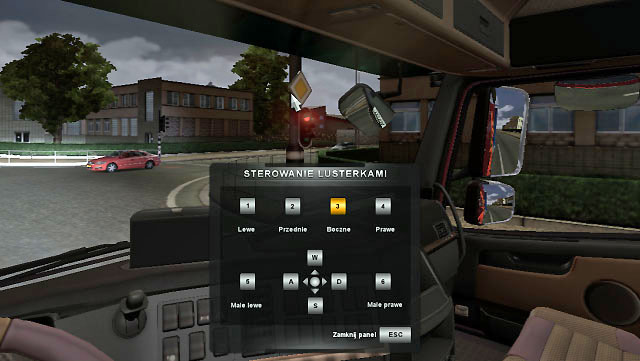
The main panel of "my truck" section has the "cabin modification" option. Use it to change the mirror settings. You can change the position (use [W], [S], [A], [D] buttons) of each mirror (buttons [1], [2], [3], [4], [5], [6]) to have a better field of view.


- Euro Truck Simulator 2 Game Guide
- ETS2: Game Guide
- ETS2: Driving your truck
- ETS2: Steering - Driving Guide
- ETS2: Dashboard - Driving Guide
- ETS2: Overtaking - Driving Guide
- ETS2: Turning - Driving Guide
- ETS2: Park the trailer - Driving Guide
- ETS2: Accident and calling emergency road service - Driving Guide
- ETS2: Setting mirrors - Driving Guide
- ETS2: Setting lights - Driving Guide
- ETS2: Taking fuel - Driving Guide
- ETS2: The fuel price in various countries - Driving Guide
- ETS2: Weather - Driving Guide
- ETS2: Driver's rest - Driving Guide
- ETS2: Radio and music player - Driving Guide
- ETS2: Driving your truck
- ETS2: Game Guide
You are not permitted to copy any image, text or info from this page. This site is not associated with and/or endorsed by the developers and the publishers. All logos and images are copyrighted by their respective owners.
Copyright © 2000 - 2026 Webedia Polska SA for gamepressure.com, unofficial game guides, walkthroughs, secrets, game tips, maps & strategies for top games.