F1 Manager 2022: Accessibility options
This page of the F1 Manager 2022 game guide describes accessibility, including settings for Daltonists and the inclusion of dialogue captions.
Last update:
Table of Contents
This page of our F1 Manager 2022 is dedicated to available Accessibility options.
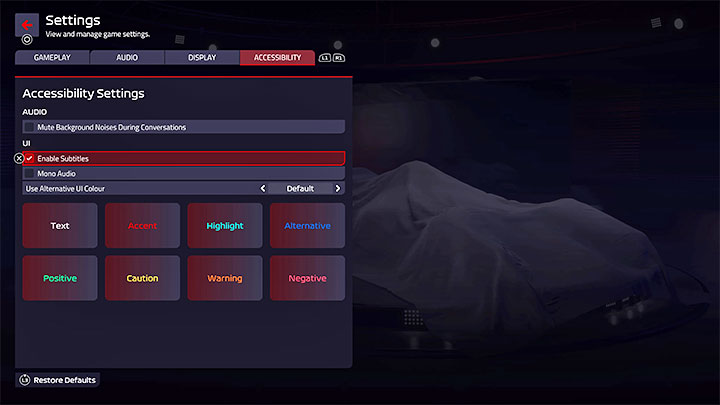
The Accessibility menu is the last tab in the option menu. Unfortunately, there isn't much to go on.
- You can turn on background noise reduction during conversations to better understand them.
- You can turn captions, for dialogue spoken by commentators or team members.
- You can turn on the audio sound .
- You can change the text colour - this is a setting for colorblind . There are different colors for different types of messages, e.g. positive, negative, warnings or highlighted information.


- F1 Manager 2022 Guide
- F1 Manager 2022: Game Guide
- F1 Manager 2022: Appendix
- F1 Manager 2022: Trophies / Achievements - list of all, trophy guide
- F1 Manager 2022: PC system requirements
- F1 Manager 2022: Language versions
- F1 Manager 2022: Accessibility options
- F1 Manager 2022: Overtaking bug - how to fix the problem?
- F1 Manager 2022: Multiplayer / co-op - is it available?
- F1 Manager 2022: Cockpit Camera (FPP) - Availability, Camera List
- F1 Manager 2022: Game Length - Career Duration
- F1 Manager 2022: Keybinds - PC, Consoles
- F1 Manager 2022: Appendix
- F1 Manager 2022: Game Guide
You are not permitted to copy any image, text or info from this page. This site is not associated with and/or endorsed by the developers and the publishers. All logos and images are copyrighted by their respective owners.
Copyright © 2000 - 2026 Webedia Polska SA for gamepressure.com, unofficial game guides, walkthroughs, secrets, game tips, maps & strategies for top games.