FUT 22: Pack contents - how to check?
On this page for the FIFA 22 guide we tell you how to check the contents of your package before you buy.
On this page of the FUT 22 mode guide in FIFA 22, you will learn how to preview the contents of the pack.
FIFA 21 added the option to preview the contents of a pack before purchasing it. This feature appealed to all fans of the series, so EA decided that it will also be implemented in the latest installment, FIFA 22.
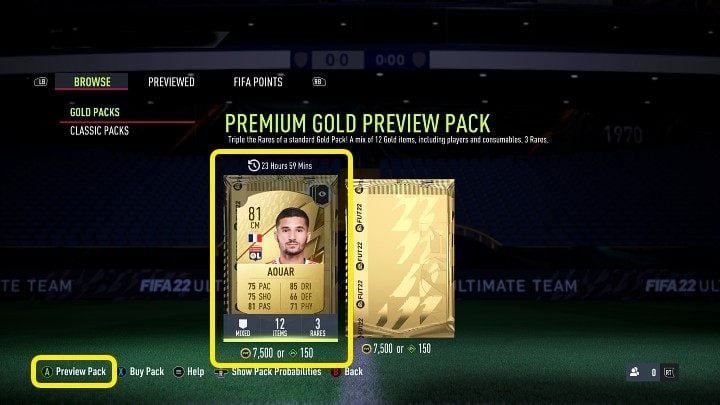
After logging into FIFA 22 Ultimate Team, go to the Store and select the package with the distinctive eye icon in the upper right corner - the pack is marked in the image above. Then, instead of buying the pack outright, select the Preview Pack option to check what's inside. If you like the pack's contents you can buy it - in return you'll be able to preview the next pack, etc.
The pack preview feature in FIFA 22 is available once every 24 hours and is definitely worth using.



- FIFA 22 Guide
- FUT 22: FUT 22
- FUT 22: FAQ
- FUT 22: Early Access - when?
- FUT 22: FUT Web App - when?
- FUT 22: FIFA 22 Companion - when?
- FUT 22: Money - how to make?
- FUT 22: Transfer market tax - how to calculate?
- FUT 22: FUT Champions rewards - when are awarded?
- FUT 22: Division Rivals rewards - when to obtain them?
- FUT 22: Squad Battles rewards - when to obtain them?
- FUT 22: Pack contents - how to check?
- FUT22: Player cards - what affects the price?
- FUT 22: Player cards - when to buy and sell?
- FUT 22: Marquee Matchups - what are they, how to do them?
- FUT 22: FUT Rulebreakers - what are they?
- FUT 22: Twitch Prime Pack (Amazon Prime Pack) - how to redeem?
- FUT 22: FAQ
- FUT 22: FUT 22
You are not permitted to copy any image, text or info from this page. This site is not associated with and/or endorsed by the developers and the publishers. All logos and images are copyrighted by their respective owners.
Copyright © 2000 - 2026 Webedia Polska SA for gamepressure.com, unofficial game guides, walkthroughs, secrets, game tips, maps & strategies for top games.