Forza Horizon 5: GPS voice - how to turn it off?
This guide page for Forza Horizon 5 answers the question - how to turn off the GPS voice that helps during cornering.
Last update:
On this page of the Forza Horizon 5 guide, you will learn how to turn off the GPS voice that tells you in real-time when and where to turn.
GPS helps players by using its voice prompts to know where and when to turn. While this may seem helpful, it can be irritating for some players in the long run. To fix this, go to the game settings.
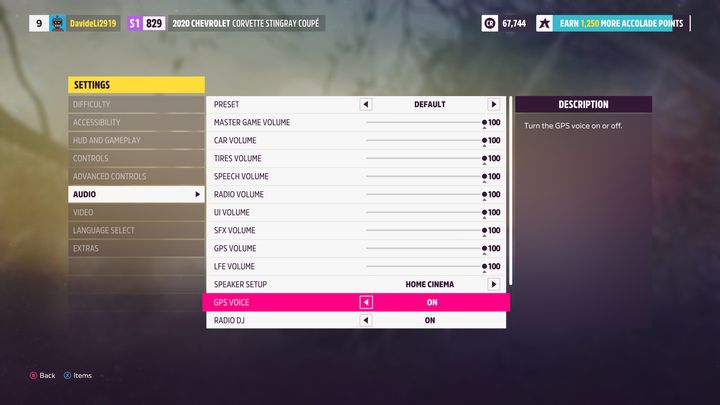
Next, go to the Sound tab, and then find the GPS Voice option. Set this option to off and then save the changes. The path you have to follow is still active.



- Forza Horizon 5 Guide
- Forza Horizon 5: Game guide
- Forza Horizon 5: FAQ
- Forza Horizon 5: Weekly Challenge rewards - when to get?
- Forza Horizon 5: Time of day - can you change it?
- Forza Horizon 5: Season - can it be changed?
- Forza Horizon 5: Barn Find - how to collect?
- Forza Horizon 5: GPS voice - how to turn it off?
- Forza Horizon 5: Horizon Life and Horizon Solo - what are the differences?
- Forza Horizon 5: Starting car - which one to choose?
- Forza Horizon 5: FAQ
- Forza Horizon 5: Game guide
You are not permitted to copy any image, text or info from this page. This site is not associated with and/or endorsed by the developers and the publishers. All logos and images are copyrighted by their respective owners.
Copyright © 2000 - 2026 Webedia Polska SA for gamepressure.com, unofficial game guides, walkthroughs, secrets, game tips, maps & strategies for top games.