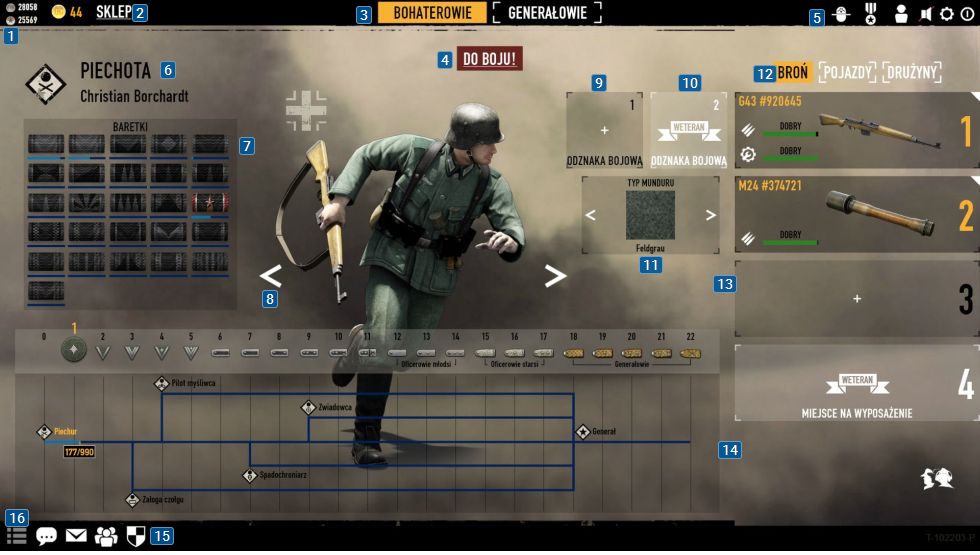
Heroes & Generals: Main Menu
The gameplay interface in the main menu, thanks to the fact that there's really no action here, is scattered around the whole screen. Along the upper edge of the screen you will find the information about your currencies [1], as well as a button used to enter the store [2]. A little bit to the right are buttons responsible for changing the type of the game [3], and just below it [4] an option to start the game. At the end of the upper edge of the screen [5] there's the option sections, where you can set up things associated with both the game and the account.
Now let us move to the leftmost edge of the screen, where you can find the information about currently selected soldier [6] and the Ribbon progress [7]. At the center of the screen there are buttons [8] used to change your currently selected soldier. The right edge of the screen allows you to select Combat Badge [9], and if you have a Veteran status a second one [10]. Just below [11] you can set up your soldier's uniform type, check his currently equipped gear [12] and change it [13]. The bottom section of the screen lets you see the progress of your soldier's development [14], play with community options [15], allowing you to interact with other players, and see the current events [16] associated with your account.


You are not permitted to copy any image, text or info from this page. This site is not associated with and/or endorsed by the developers and the publishers. All logos and images are copyrighted by their respective owners.
Copyright © 2000 - 2026 Webedia Polska SA for gamepressure.com, unofficial game guides, walkthroughs, secrets, game tips, maps & strategies for top games.