Prince of Persia The Two Thrones: Panoramic View
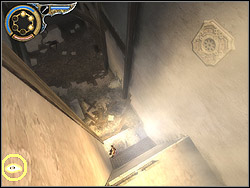 | It is worth in places which require the broader view than in basic TPP and FPP modes to switch on the panoramic view (landscape camera). It is possible to activate this mode (the "Q" button by default) when in left lower corner of the screen the icon of the eye will appear. With activated panoramic view it is possible to lead the hero normally. However it isn't advisable because of the very remote perspective - it makes the precise control of the prince impossible. It is better to use it exclusively for picking details out of the area and risks and pitfalls. |


- Prince of Persia: The Two Thrones Game Guide & Walkthrough
- Prince of Persia The Two Thrones: Game Guide
- Prince of Persia The Two Thrones: Characters
- Prince of Persia The Two Thrones: Tips and Tricks
- Prince of Persia The Two Thrones: Weapons
- Prince of Persia The Two Thrones: Enemies
- Prince of Persia The Two Thrones: Fight methods
- Prince of Persia The Two Thrones: Sand Gate
- Prince of Persia The Two Thrones: Fountains of Light
- Prince of Persia The Two Thrones: Sand of Time Powers
- Prince of Persia The Two Thrones: Panoramic View
- Prince of Persia The Two Thrones: Bonuses
- Prince of Persia The Two Thrones: Walkthrough
- Prince of Persia The Two Thrones: Game Guide
You are not permitted to copy any image, text or info from this page. This site is not associated with and/or endorsed by the developers and the publishers. All logos and images are copyrighted by their respective owners.
Copyright © 2000 - 2026 Webedia Polska SA for gamepressure.com, unofficial game guides, walkthroughs, secrets, game tips, maps & strategies for top games.