Ruined King: Quests Log - how to enable?
This page of the guide to Ruined King: A League of Legends Story tells you how to check out the Quests List.
Last update:
This page of the guide to Ruined King: A League of Legends Story explains how to enable the Quests Log.
Ruined King: A League of Legends Story contains both main and side quests, as well as ones that you can collect from Bounty Boards.
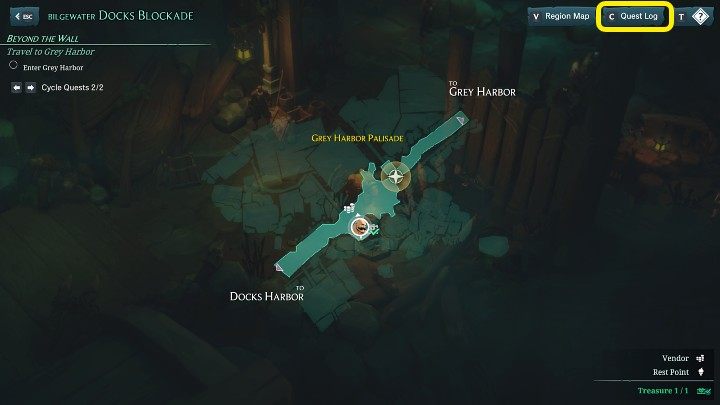
You can check the quests in Ruined King: A League of Legends Story in the Quest Log, which you can access via the region map menu. Just click the button marked in the picture above.
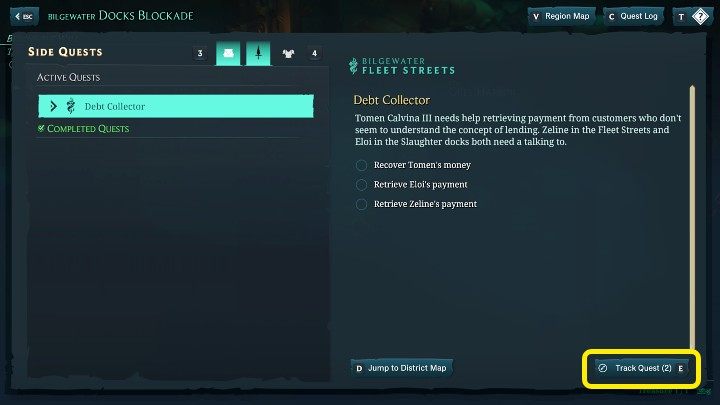
The quests in the Quests Log are divided into the previously mentioned categories, and each of them has a separate tab. All previously completed quests will also show up in their given category. From here you can also mark the quests you want to track (Track Quest) and also quickly jump to the region map related to the specific mission.



- Ruined King Guide
- Ruined King: Guide
- Ruined King: FAQ
- Ruined king: Fishing pole - how to get it?
- Ruined King: Quests Log - how to enable?
- Ruined King: Difficulty level - can you change it during the game?
- Ruined King: The Buhru Temple puzzle - how to open the door?
- Ruined King: Black Marks - how to get?
- Ruined King: Fast travel - is it possible?
- Ruined King: Team - how to change its composition?
- Ruined King: Difficulty levels - what are the differences?
- Ruined King: Ahri - when will she join the team?
- Ruined King: Miss Fortune - when will she join the team?
- Ruined King: Pyke - when will he join the team?
- Ruined King: FAQ
- Ruined King: Guide
You are not permitted to copy any image, text or info from this page. This site is not associated with and/or endorsed by the developers and the publishers. All logos and images are copyrighted by their respective owners.
Copyright © 2000 - 2026 Webedia Polska SA for gamepressure.com, unofficial game guides, walkthroughs, secrets, game tips, maps & strategies for top games.