The Crew 2: How to reset the vehicle / race?
In the Crew 2, it's easy to make a mistake that may prevent you from continuing or completing the competition and getting a good result. You won't find the "restart race" option as expected in the pauses menu, but it's fortunately easy to solve this problem.

If you only want to reset your vehicle then you have to press and hold:
- L1+R1 on PS4
- LB+RB on Xbox One
This is a useful option when, for example, you are off the road or hitting an obstacle while flying and the game hasn't automatically reset.
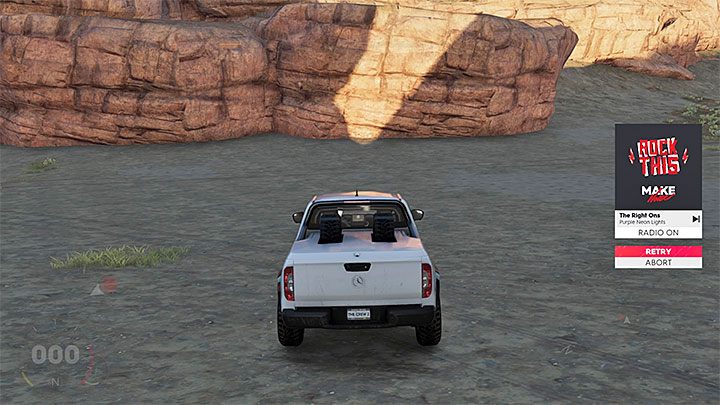
If you want to restart the competition, you have to press:
- Triangle on PS4
- Y on Xbox One
On the right side of the screen you will see a small menu similar to the one in the above picture. You have to highlight the restart option (Retry) and hold the interaction button to confirm this decision (one press of the button is not enough).


- The Crew 2 Game Guide
- The Crew 2: Game Guide
- The Crew 2: FAQ - Frequently Asked Questions
- The Crew 2: Why can't I win the race?
- The Crew 2: What vehicles can I get for free?
- The Crew 2: How to reset the vehicle / race?
- The Crew 2: How to easily get more fans (XP), parts and bucks? - the grind guide
- The Crew 2: How to get Crew Credits (CC - the alternate currency)?
- The Crew 2: How to unlock duels with champions?
- The Crew 2: Can I sell vehicles?
- The Crew 2: Can I change the difficulty level?
- The Crew 2: Where to find loot?
- The Crew 2: FAQ - Frequently Asked Questions
- The Crew 2: Game Guide
You are not permitted to copy any image, text or info from this page. This site is not associated with and/or endorsed by the developers and the publishers. All logos and images are copyrighted by their respective owners.
Copyright © 2000 - 2026 Webedia Polska SA for gamepressure.com, unofficial game guides, walkthroughs, secrets, game tips, maps & strategies for top games.