Unravel 2: How to change the looks of the characters?
Last update:
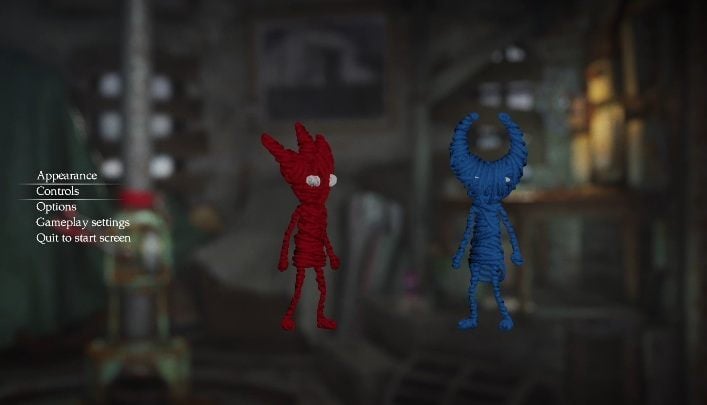
Unravel 2 lets you change the way the characters look. You can change that at any time. Just enter the menu and select Appearance.
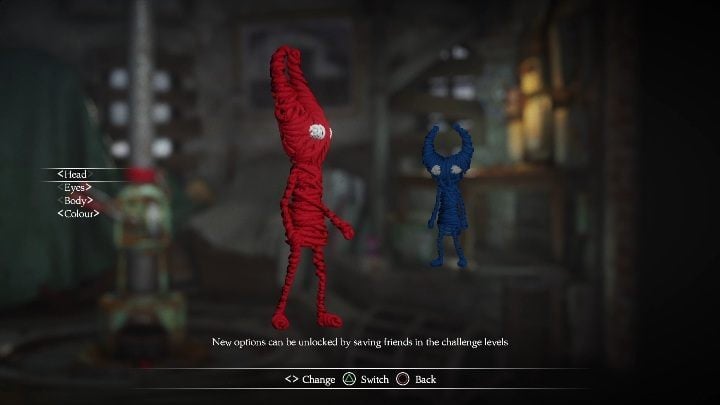
You can change the shape of their heads, eyes and bodies. Each of these has 5 variants. You can select a different color for the characters as well. You can't select the same color, of course.
You can select the other character using arrows - just press left or right to select the active character. Each change has to be confirmed - otherwise they won't be saved.


- Unravel 2 Game Guide
- Unravel 2: Game Guide
- Unravel 2: FAQ
- Unravel 2: How to get the 5th secret in the 'Is That All There Is' level?
- Unravel 2: How to escape the well in the Foreign Shore?
- Unravel 2: How to leave the Little Frogs cave?
- Unravel 2: How to go past the turbine in At the Rapids?
- Unravel 2: What's the setup for level 4?
- Unravel 2: How to control two characters?
- Unravel 2: How to change the looks of the characters?
- Unravel 2: FAQ
- Unravel 2: Game Guide
You are not permitted to copy any image, text or info from this page. This site is not associated with and/or endorsed by the developers and the publishers. All logos and images are copyrighted by their respective owners.
Copyright © 2000 - 2026 Webedia Polska SA for gamepressure.com, unofficial game guides, walkthroughs, secrets, game tips, maps & strategies for top games.