ATOM RPG: How do I change the time of day?
Last update:
In ATOM RPG you can change the time of day. This skill is mainly useful when you are waiting for a character or quest.
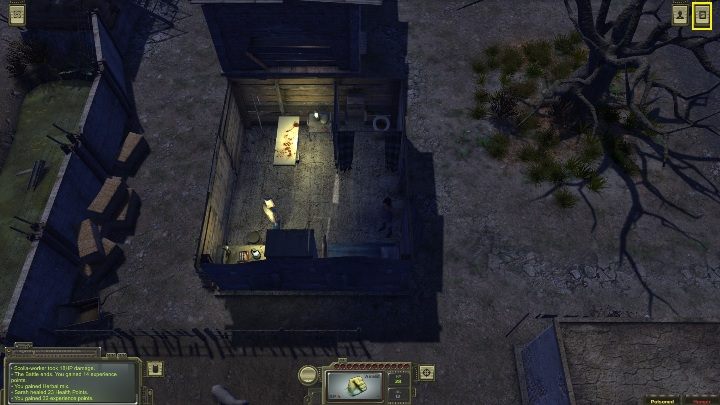
To change the time of day you must first enter the appropriate menu. On the screen above you can see a marked symbol, which you have to click. When you do this, another window will appear.
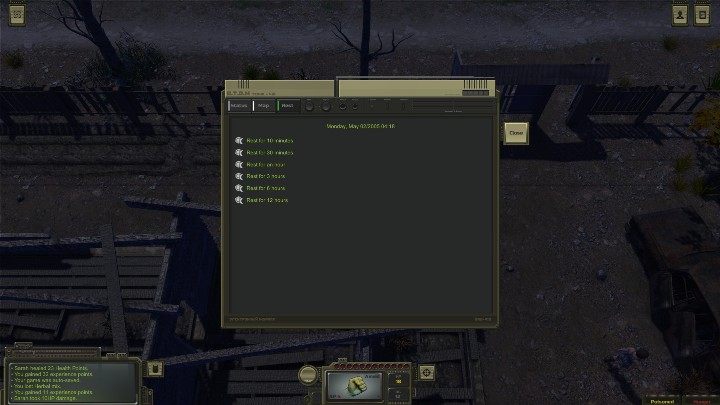
To change the game time, go to the REST option and select how much time you want to move. You can move the time by:
- 10 mins,
- 30 mins,
- An hour,
- 3 hours
- 6 hours
- 12 hours
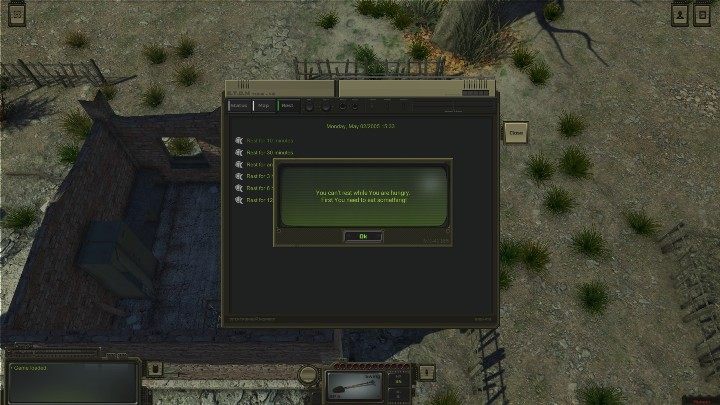
Remember that you can't skip time if you're in a fight or if you're hungry.



- ATOM RPG Guide
- ATOM RPG: Game Guide
- ATOM RPG: Starting tips
- ATOM RPG: What about food?
- ATOM RPG: What are companions available game?
- ATOM RPG: How to heal companions?
- ATOM RPG: How does crafting work?
- ATOM RPG: How to skin an animal?
- ATOM RPG: How to open locks?
- ATOM RPG: How do I change the time of day?
- ATOM RPG: How do I change the location?
- ATOM RPG: How to cure your hero?
- ATOM RPG: Starting tips
- ATOM RPG: Game Guide
You are not permitted to copy any image, text or info from this page. This site is not associated with and/or endorsed by the developers and the publishers. All logos and images are copyrighted by their respective owners.
Copyright © 2000 - 2026 Webedia Polska SA for gamepressure.com, unofficial game guides, walkthroughs, secrets, game tips, maps & strategies for top games.