Car Mechanic Simulator 2021: Own music - how to upload?
This Car Mechanic Simulator 2021 game guide page explains how to upload your own music files to the U-Zer Radio No. 1 station.
Last update:
On this page of the guide to Car Mechanic Simulator 2021, we explain how to make your own music available in the game. Here's the instruction showing you where to upload your music to be able to listen to it on the in-game U-Zer Radio No. 1.
The PC version of the game enables you to create your own play list and play it directly in the workshop by selecting the radio station U-Zer Radio no. 1. To do this, upload your music files in .MP3 or.Ogg format to the right folder.
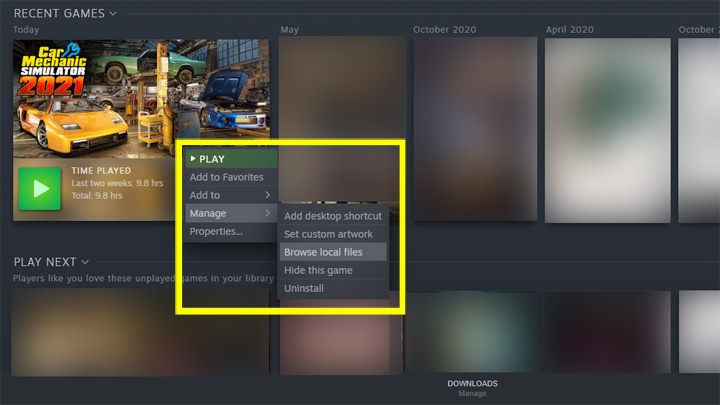
In the Steam app, go to the library and right-click on the game Car Mechanic Simulator 2021. Then select Browse Local Files.
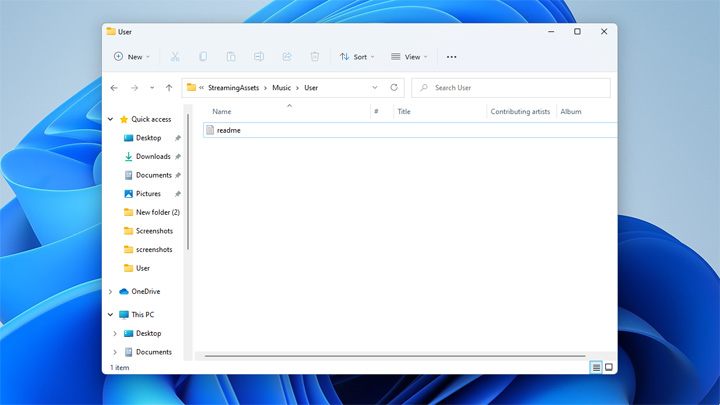
Windows Explorer will display the contents of the main folder, Car Mechanic Simulator 2021_data. From there, proceed to the following folders:
'StreamingAssets,' then 'Music,' and then 'User.'
Paste your files in .MP3 or .Ogg format into this last folder. After launching the game, you will already be able to enjoy your own playlist.


- Car Mechanic Simulator 2021 Guide
- Car Mechanic Simulator 2021: Game Guide
- Car Mechanic Simulator 2021: FAQ
- Car Mechanic Simulator 2021: Own music - how to upload?
- Car Mechanic Simulator 2021: Demo - where is it available?
- Car Mechanic Simulator 2021: Undetected parts - what to do, how to find?
- Car Mechanic Simulator 2021: Not enough credits to finish an order - what to do?
- Car Mechanic Simulator 2021: Money - how to earn quickly?
- Car Mechanic Simulator 2021: Service fluids - how to empty the tanks?
- Car Mechanic Simulator 2021: Shock absorbers - how to replace?
- Car Mechanic Simulator 2021: Rubber bushing - where to find?
- Car Mechanic Simulator 2021: FAQ
- Car Mechanic Simulator 2021: Game Guide
You are not permitted to copy any image, text or info from this page. This site is not associated with and/or endorsed by the developers and the publishers. All logos and images are copyrighted by their respective owners.
Copyright © 2000 - 2026 Webedia Polska SA for gamepressure.com, unofficial game guides, walkthroughs, secrets, game tips, maps & strategies for top games.