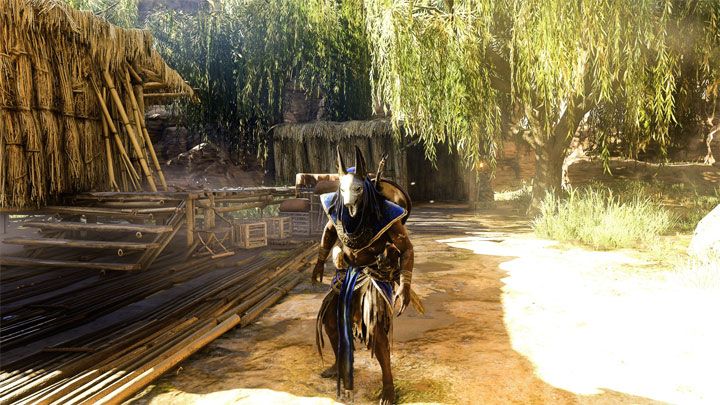
Anubis_ReShade is a mod for Assassin's Creed Origins, created by Jb0238177.
Description:
Removes the game's washed-out filter, adds color correction, improves its hdr (fake hdr), lighting, sharpness & shadows to give the game more of an all around cinematic & photogenic look....
Instructions:
You will need the latest version of ReShade to use this preset. You can get it here: https://reshade.me
How to install ReShade:
-Launch the ReShade Installer, then select the game's "ACOrigins.exe" file located in the game's "Assassin's Creed - Origins" folder.
-Select the game's API - it is Direct3D 10+.
-ReShade will now ask if you want to download & install any .fx files? Select all the .fx files, then click okay to download & install them.
-ReShade should now say Succeeded! You can close the installer now.
How to install my preset file:
-Extract my "Anubis_ReShade.7z" folder with 7zip & place the "Anubis_ReShade.ini" file into your "Assassin's Creed - Origins" folder where the game's "ACOrigins.exe" file is located.
What to do if the game fails to launch, crashes to desktop or your controller doesn't work after installing ReShade:
-Open your "Assassin's Creed - Origins" folder, where you installed ReShade & rename the "dxgi.dll" file to "d3d11.dll".
How to open the ReShade Overlay in-game & select my preset:
-Once you are in-game press the "Home" key on your keyboard to open the ReShade Overlay.
-To select my preset click the drop-down arrow to open the drop-down menu & select my file "Anubis_ReShade".
-If you do not see my file in the drop-down list, you will have to manually add it by clicking the "+" symbol next to the drop-down arrow. Then type in the full name of my file just like this: Anubis_ReShade.ini & press "Enter".
How to close the ReShade Overlay:
-Press the "Home" key on your keyboard.
- Last update: Friday, April 17, 2020
- Genre: Action
- File size: 4.1 KB