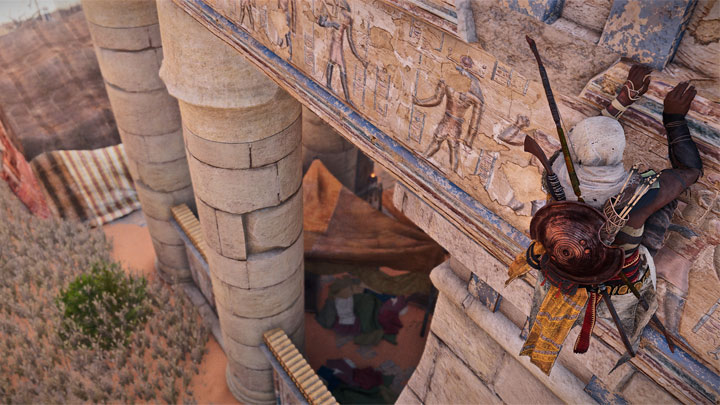
Cinematic Enhancer with DoF is a mod for Assassin's Creed Origins, created by TheMercsAssassin.
Description:
This is a Cinematic Enhancer to the already gorgeous Assassins Creed Origins. This ReShade includes a host of optional cinematic features, like Depth-of-Field, bloom, film grain, letterboxing, and more! It also setup so that you can toggle to a much more bleaker, grittier look with literally the click of a button, no need to hop through menus.
Instructions:
For me the game crashes if I use any form of ReShade or SweetFx in fullscreen mode. So you must enable borderless window mode to use ReShade if yours also crashes when trying to load the game with Reshade enabled.
Tested at default in-game brightness. Use the in-game screen calibration setting to adjust your UI to fit into the letterbox (black bars).
Tested on Ultra settings except shadows set at high.
IMPORTANT END!!!
SUPER FAST INSTALL (If downloaded game through Steam and your game path is setup like this, minus the quotes: "C:\Program Files (x86)\Steam\SteamApps\common\Assassins Creed Origins")
1) Just put the files from this ReShade in you AC origins main folder. So there's the reshade-shaders folder, dxgi.ini, dxgi.dll, and CinematicEnhancer.ini.
2) Run the game, press F4 to bring up the in-game menu and make sure sure in the drop down menu at the top, CinemaitcEnhancer is the file selected. Use the toggle keys outlined above to tweak the reshade. END turns the entire reshade on and off.
3) Profit
Abridged Version of instructions
Download latest version of ReShade from here: https://reshade.me/
Run the .exe in admin mode and select ACOrigins.exe in your Assassins Creed Origins main folder.
Choose the DirectX 10+ version
Say yes when it ask if you want to download a collection of shaders. Have these following shaders selected and deselect any of the effects not listed here:
AdaptiveSharpen
Border
Clarity
FakeHDR
Tonemap
Deband
Technicolor2
FilmGrain
DOF (depth of field)
Bloom
Vignette
Now download my preset here. Put the CinematicEnhancer.ini file in your game's main folder where you found ACOrigins.exe and where your reshade-shaders folder should now also be installed.
Run your game and after you get a message in a grey box saying reshade effects have loaded, press Shift+F2 simultaneously to open the in-game ReShade GUI. Select the .ini file from that drop down menu. Toggle the effect with scroll-lock key. You can change these keys in the ReShade's settings menu.
Click continue until the boxes go from red to gray/clear.
Done. Your new ReShade should be making your game look fapping sexy by this point.
Step-by-Step of Instructions or if you downloaded the game from Uplay:
1. Download the Reshade 3.0.8 (or latest version if different) from here https://reshade.me/
2. Scroll to bottom of page and download whatever the latest version advertised is.
Run the .exe that you just downloaded. Probably best to copy it to your desktop or someone first outside your downloads folder.
Follow the steps it tells you selecting yes everything it asks.
2. Select your "ACOrigins.exe" which is in the main folder of the game.
3. Select the DirectX 10+ version after you select the "ACOrigins.exe"
4. Run your game
As your game loads up, you should see a grey box popup in the top of the screen saying it's loading all the reshade effects.
Once it's done, hit "shift+F2" and follow the promps. The most important thing is to hit the plus symbol next near the top of the Reshade GUI and type any name you want.
Follow the other prompts until the boxes turn from red to black or grey or whatever indicates you're done with the very short tutorial.
You can leave your game open or close it for this next step.
5. Go back to your game's main folder, where the "ACOrigins.exe" is and look for that file you just created with whatever name you gave. It should be a .ini file.
6. Open the .ini file and replace all the text with the text from my preset on this page.
Save the file. Run your game or alt tab back to it. And then do step 7 if you your game is still running.
7. Reopen the Reshade GUI with Shift+f2 and click the click "reload". The new effects should start loading with my custom settings.
PROFIT!
UNINSTALLING
1. Delete the Reshade folder, dxgi.ini, dxgi.dll, and dxgi.log from your game folder. That's it.
Enjoy, leave comments below if you're having trouble installing or better yet youtube a Resahde 3.0+ install guide. It's extremely easy.
You may notice a slight decrease in performance, but it should still be pretty similar FPS to what you usually get. The visual difference is night and day to me and I can't ever go back to vanilla.
- Last update: Sunday, September 23, 2018
- Genre: Action
- File size: 8.2 MB