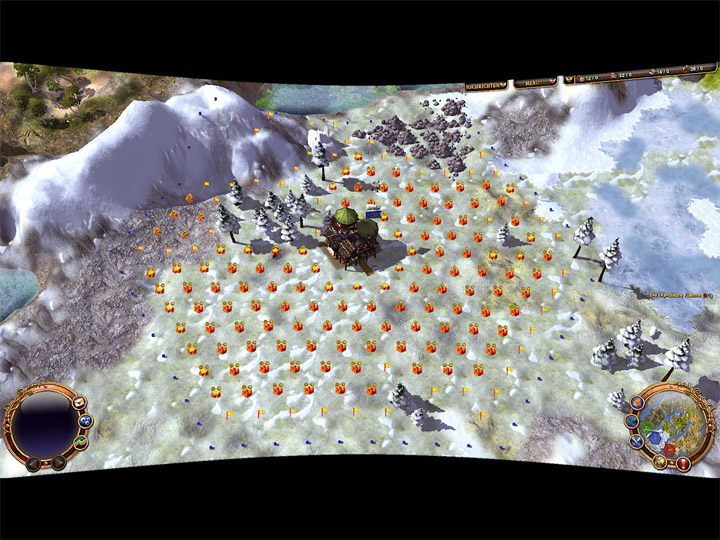
Widescreen Fix is a mod for The Settlers: Rise of Cultures (also known as Die Siedler - Aufbruch der Kulturen) created by KonradAr and Zocker-160.
Description:
A widescreen patch that increases the FOV for The Settlers - Rise of Cultures, by unlocking more zoom levels. Supports 5:4, 4:3, 3:2, 16:10, 16:9, 21:9, up to 32:9.
In order to run this game on Windows 7-11, you will need the 2014 Patch, that contains missing files from the German gaming magazines version from 2014.
Also check out the Widescreen Fix for The Settlers II -10th Anniversary (+ Vikings AddOn)
Instructions:
How to install the game from the 2008 CD:
1) Insert CD into drive
2) Select "Select what happens with this disc" from the bottom right corner.
3) Select "Open folder to view files" from the top right corner.
4) Double click on DieSiedlerAufbruchDerKulturen.exe
5) Wait about 20 seconds.
6) Open CD drive
7) The User Account Control window appears with darker background, don't click anything.
8) Close the CD drive again and wait about 10 seconds
9) Accept the User Account Control Message
10) Wait for the verifier to load
11) Now you can install the game
12) After the installation is finished, run SAdK 2014 Patch
13) Install the Widescreen Fix
14) Install the English fan translation
Wie installiere ich das Spiel von der CD aus 2008:
1) CD einlegen
2) Wähle "Wählen sie eine Aktion für diesen Datenträger aus" von der rechten unteren Ecke aus.
3) Wähle "Ordner öffnen, um Dateien anzuzeigen" von der rechten oberen Ecke aus.
4) Doppelklick auf DieSiedlerAufbruchDerKulturen.exe
5) Warte ca. 20 Sekunden.
6) Öffne das CD Laufwerk.
7) Das "Benutzerkontensteuerung" Fenster mit verdunkeltem Hintergrund erscheint, klick nichts an.
8) CD Laufwerk wieder schließen, und ca. 10 Sekunden warten.
9) Erst jetzt auf "JA" im Benutzerkontensteuerungsfenster klicken.
10) Warte auf den CD Überprüfer bis der 100% lädt.
11) Jetzt kannst du das Spiel installieren.
12) Nachdem die Installation fertig ist, starte den SAdK 2014 Patch.
13) Installiere eventuell den Widescreen Fix.
- Last update: Monday, February 2, 2026
- Genre: Strategy
- File size: 1.7 MB