Dark Alliance: Field of View/FOV - how to increase?
From this guide page to Dungeons & Dragons Dark Alliance you will learn how to expand the field of view (FOV).
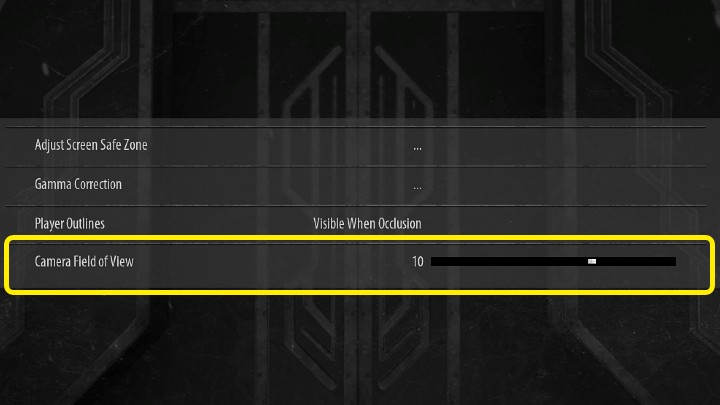
The option responsible for changing the field of view in D&D Dark Alliance is in the Settings in the Graphics tab. The default value of this setting is 0, but you can reduce it to -30 or increase it to 30.
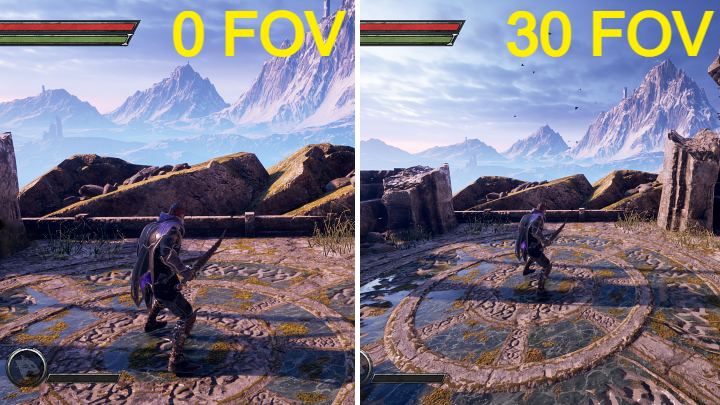
In the image above you can see the comparison of 0 FOV with 30 FOV - the difference in field of view is huge.



- Dark Alliance Guide
- Dark Alliance: Game Guide
- Dark Alliance: FAQ
- Dark Alliance: Silence - how to cure?
- Dark Alliance: Environmental threats - how to eliminate?
- Dark Alliance: Field of View/FOV - how to increase?
- Dark Alliance: Crossplay/cross-platform - is it available?
- Dark Alliance: Lich Weapon Set - how to unlock?
- Dark Alliance: Legendary items - how to farm?
- Dark Alliance: Character level - what is the maximum level?
- Dark Alliance: Tablets, Tomes, Reliefs, Paintings - what are they for?
- Dark Alliance: Items - how to upgrade?
- Dark Alliance: FAQ
- Dark Alliance: Game Guide
You are not permitted to copy any image, text or info from this page. This site is not associated with and/or endorsed by the developers and the publishers. All logos and images are copyrighted by their respective owners.
Copyright © 2000 - 2026 Webedia Polska SA for gamepressure.com, unofficial game guides, walkthroughs, secrets, game tips, maps & strategies for top games.