Guild Wars 2: Managing of the materials
Collecting dozens of components and items you'll fulfill your inventory very quickly what will force you to return to the bank to put there the surplus resources. But you have two options to omit this travel. Clicking the RMB on the material in the inventory choose Deposit Collectible, and the item will be transferred automatically to your vault. The other possibility is to click on the rack in the corner of inventory and choose Deposit All Collectibles, what transfers all items which may be found in your collection.
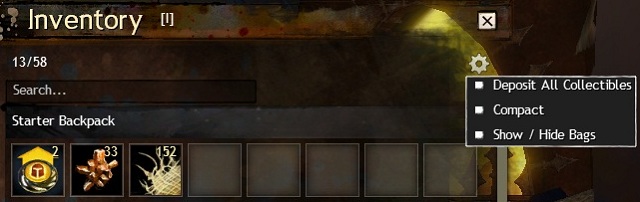
To organize the mess, I recommend to dismantle all useless items immediately. This will free the space in the inventory.
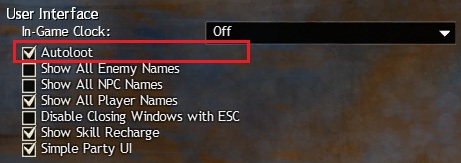
And if you haven't already done this, I recommend to turn on the autoloot, what will speed up collecting the items from defeated enemies.


- Guild Wars 2 Game Guide
- Guild Wars 2: Game Guide
- Guild Wars 2: Crafting
- Guild Wars 2: An introduction to crafting
- Guild Wars 2: Materials - resources
- Guild Wars 2: Materials - plants
- Guild Wars 2: Materials - salvaging the materials
- Guild Wars 2: Battle loot
- Guild Wars 2: Managing of the materials
- Guild Wars 2: Production, experience
- Guild Wars 2: Professions
- Guild Wars 2: Mystic Forge
- Guild Wars 2: Legendary weapon
- Guild Wars 2: Exotic precursor weapon
- Guild Wars 2: Crafting
- Guild Wars 2: Game Guide
You are not permitted to copy any image, text or info from this page. This site is not associated with and/or endorsed by the developers and the publishers. All logos and images are copyrighted by their respective owners.
Copyright © 2000 - 2026 Webedia Polska SA for gamepressure.com, unofficial game guides, walkthroughs, secrets, game tips, maps & strategies for top games.