Marvel's Spider-Man: Taking photos - how to?
Peter Parker always was involved in photography; he worked as a reporter for Daily Bugle, for example. In Marvel's Spider-Man, the man no longer is a journalist, but he still carries his camera. Just press the up arrow and you will enter the photo mode.
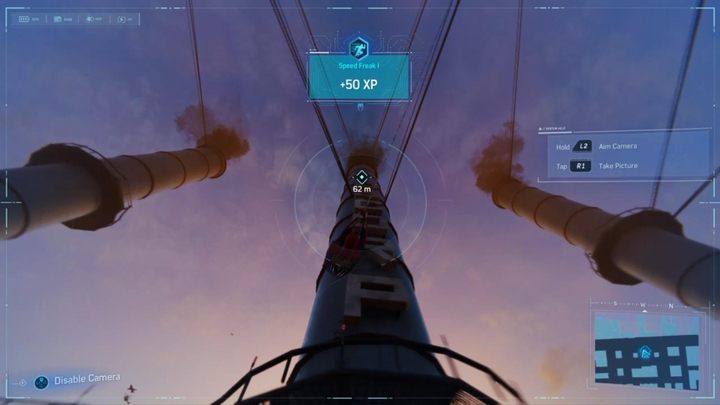
Use the right analog stick to move the camera around. Hold L2 to zoom in and R1 to snap the photo. They're quite a few moments in the game when you have to photograph an object. This is especially common in the missions played as MJ.
Additionally, the game also contains the so-called Landmarks - photographing them yields Landmark Tokens, which can be used to craft new suits and gadgets.

- Spider-Man Game Guide
- Marvel's Spider-Man: Game Guide
- Marvel's Spider-Man: FAQ
- Marvel's Spider-Man: Map - how to explore?
- Marvel's Spider-Man: Gadgets - how to upgrade?
- Marvel's Spider-Man: Taking photos - how to?
- Marvel's Spider-Man: Crime Tokens - how to get?
- Marvel's Spider-Man: Completing the game in 100% - how to?
- Marvel's Spider-Man: Fast travel - is there?
- Marvel's Spider-Man: Playing after finishing the main story - can you?
- Marvel's Spider-Man: Gadgets - how to renew?
- Marvel's Spider-Man: Parker's apartment - how to return?
- Marvel's Spider-Man: Speeding up the time - is it possible?
- Marvel's Spider-Man: Uncle Ben's grave - how to find?
- Marvel's Spider-Man: Best skills to learn - what are?
- Marvel's Spider-Man: Avengers tower - how to find it?
- Marvel's Spider-Man: FAQ
- Marvel's Spider-Man: Game Guide
You are not permitted to copy any image, text or info from this page. This site is not associated with and/or endorsed by the developers and the publishers. All logos and images are copyrighted by their respective owners.
Copyright © 2000 - 2026 Webedia Polska SA for gamepressure.com, unofficial game guides, walkthroughs, secrets, game tips, maps & strategies for top games.