NieR Automata: Controls
This page of the guide provides information on the available controls and control settings in Nier Automata. Learning the controls will help you understand how to perform certain actions, including those that aren't included in the built-in tutorials.
PS4 and PS5
 | Moving. |
 | Toggling Pod's flashlight - it's useful when exploring dark locations, such as sewers. |
 | Looking around. In the sections that show the action from above, the analog stick can be used to choose the firing direction. |
 | Reset camera position. |
 | Activating the Pod Program - this is an active skill set to a specific Pod (a robot that follows the main character). At the beginning of the game this will be a strong laser attack, but later you will unlock additional pods, which can be set as active in the inventory menu. |
 | Lock-on - this option allows you to lock the camera on the enemy you were facing when you pressed the button. This function works only at a easy and normal level of difficulty and it helps a lot in delivering more effective attacks (especially long-range) and avoiding enemy attacks. |
 | Light attack - you can also perform combos. |
 | Heavy attack - you can perform combos, too, and hold the triangle to charge a very strong attack. |
 | Jump - you can press the button again in mid-air to perform a double jump. Holding down the button during flight activates slow descent. |
 | Interact -this button is used e.g. for lifting the loot, initiating conversations, scrolling through dialogues, confirming choices and interacting with objects in the environment. |
 | Evade - This is a very important function. The evade can be used during fights (preferably just before the enemy finishes the attack), as well as in flight and to start sprinting. If you did a perfect evade, then you can quickly press Square, Triangle or R1 to counter. |
 | Long-range attack - the Pod will start firing from its installed gun. This type of attack is unlimited, but also quite weak by default. Regardless, it's a highly recommended technique for weakening many enemies safely. |
 | Weapon selection menu - this is a shortcut that allows you to quickly select a new weapon or Weapon Set, without having to open a separate inventory menu. |
 | Previous Pod - this action only works when a new Pod is found (only one is available when the game starts). |
 | Next Pod - this action only works when a new Pod is found (only one is available when the game starts). |
 | Disposable item menu - this is a shortcut, thanks to which you can quickly select e.g. a medicine without having to open a separate inventory menu. |
 | Pressing the left part of the touchpad activates the shortcut menu. Pressing the right side of the touchpad activates the System Menu, which contains e.g. the map, inventory, skills tab or game options. |
 | Activate the System Menu (same as pressing the right side of the touchpad). |
Additional control settings
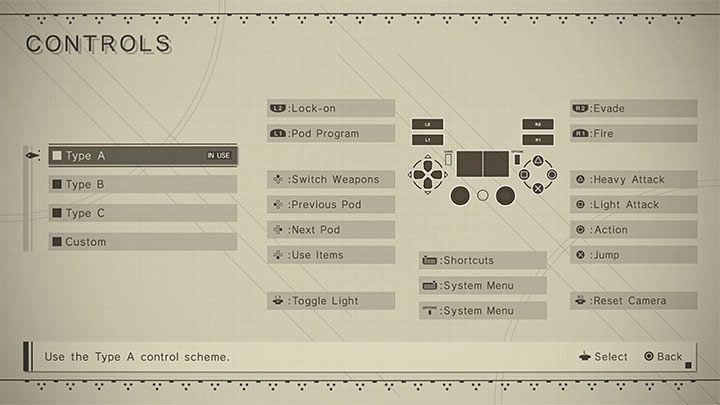
The table above presents the default controls in console versions, i.e. for Type A. You can also select alternative control options (Type B and Type C) and customize them to your own preferences.
Due to the dynamic nature of the game and its console origin, we strongly recommend using the controller to play on PC as well.

In the Game tab, you can enable or disable the controller vibrations.
In the Camera tab are all camera settings. You can e.g. invert the X-axis and Y-axis, adjust the camera sensitivity, change its position and zoom level.


- NieR Automata Guide
- NieR Automata: Game Guide
- NieR Automata: Appendix
- NieR Automata: System requirements
- NieR Automata: Controls
- NieR Automata: Language versions
- NieR Automata: Performance on PC - how to improve?
- NieR Automata: Social elements
- NieR Automata: Camera - how to change?
- NieR Automata: Cut-scenes - can you skip?
- NieR Automata: Game length
- NieR Automata: Saves backup - how to create?
- NieR Automata: PS5 - is the game compatible?
- NieR Automata: Trophy shop - how to unlock?
- NieR Automata: Trophies/Achievements
- NieR Automata: Game of the Yorha Edition
- NieR Automata: Appendix
- NieR Automata: Game Guide
You are not permitted to copy any image, text or info from this page. This site is not associated with and/or endorsed by the developers and the publishers. All logos and images are copyrighted by their respective owners.
Copyright © 2000 - 2026 Webedia Polska SA for gamepressure.com, unofficial game guides, walkthroughs, secrets, game tips, maps & strategies for top games.